

Say It So - Better Feedback For GDocs
Say It So · Voice & Language · Productivity
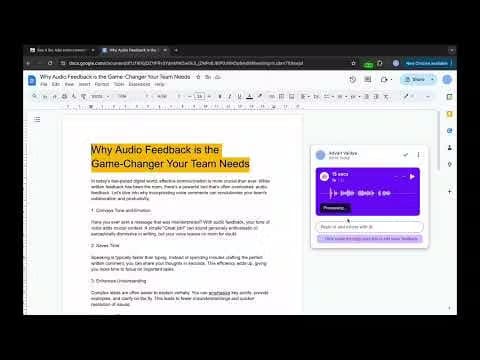
Say It So is a free Chrome extension that lets you leave voice comments in Google Docs. You select text, hit Record, and your audio note appears on the document instead of a typed comment.
About Say It So - Better Feedback For GDocs
What Is Say It So
Say It So is a Chrome extension that adds voice comments to Google Docs. Think of it as a Google Docs voice feedback layer that sits on top of the commenting you already do. It's built for people who hand a document to someone and then spend twenty minutes typing out what they really meant. The extension swaps that typing for a spoken note that's attached to the exact line you're talking about.
The product comes from Say It So, a small independent developer based in Delhi, India. There's no dashboard to learn and no separate app to open. Once installed, this Chrome extension for Google Docs lives inside the editor next to your normal commenting tools.
Giving feedback out loud carries the tone that text flattens. A short voice note can say "this paragraph buries the point" in a way that reads harshly when typed but lands fine when spoken. That's the case the company makes, and it lines up with how most teams actually talk through edits.
It's not a full review suite. Say It So records and attaches a voice comment, which is exactly what it promises, and it doesn't try to track changes, score writing, or manage a review workflow. If you need structured editing tools, you'll keep using Google Docs' own suggestion mode alongside it. The extension is currently free to use.
Getting Started
- Install the Say It So Chrome extension from the Chrome Web Store and pin it to your toolbar.
- Open a Google Doc and select the text you want to comment on.
- Click the Record button and speak your feedback.
- The voice note attaches to the document so your team can play it back in place.
Product Information
A quick look at Say It So - Better Feedback For GDocs's pricing, supported platforms, and performance.
Best for
The users, tasks, and scenarios where this tool fits best.
Users
- Content managers working with freelance writers
- Editors and team leads reviewing drafts
- Teachers and tutors marking student work in Google Docs
- Remote teams spread across time zones
Tasks
- Explaining a rewrite rather than marking it
- Walking through a longer comment
- Giving feedback on tone and pacing
- Handing off a document to a colleague
Scenarios
- A content team reviewing a weekly batch of blog drafts
- A student submitting an essay for review
- Client work where feedback has to feel personal
- Any Google Docs collaboration where typing feedback is slowing you down
Key features
Voice comments on selected text
The core move is simple: pick the text you want to talk about, then record. This is what voice comments for Google Docs look like in practice. Your voice note attaches to that selection, so the person reading the doc hears the feedback in the context of the exact line it refers to. There's no separate file to hunt down or timestamp to match.
Record instead of type
Say It So replaces a long typed comment with a short recording. The company's pitch is that speaking your mind takes less time than writing it and reduces the back-and-forth that comes from a written comment landing the wrong way. For anyone who writes the same guidance over and over, that's the time saving on offer.
Personal tone and clarity
Written feedback loses tone, and a sentence that reads blunt on screen can sound fine when spoken. Voice notes in Google Docs let you explain, soften, and emphasize the way you would in a conversation, which is the difference this audio feedback tool is selling. It's most useful where the relationship with the reader matters, like managing freelancers or coaching students.
Collaboration inside Google Docs
Say It So works where your team already works, inside Google Docs. There's no new platform to adopt, no invitations to send, and no workflow to explain. Install it, and voice commenting becomes another option next to the comments you already leave.
Free Chrome extension
Say It So is a Chrome extension and it's free to use right now, with no subscription to start. That lowers the risk of trying it on real work. Because it runs in Chrome and not as a standalone app, it's desktop-first and built around the browser where most Google Docs editing happens.
Pros and cons
Pros
- Free to use, so you can test it on real documents before deciding if it fits.
- Attaches the recording to a text selection, which keeps the feedback tied to the exact line.
- The pitch is speed: spoken notes are quicker than typing the same comment.
- Lives inside Google Docs instead of adding another tool to your stack.
- Carries tone, which helps when feedback would read harshly in text.
Cons
- It's Chrome-only, so anyone working in Safari, Firefox, or the Google Docs mobile apps can't use it.
- It's a single-purpose tool. It records voice comments and stops there, without change tracking or review management.
- Voice comments are harder to skim than text, so a document with many audio notes takes longer to scan.
- The product is small and young. The Chrome Web Store listing shows limited usage, so long-term support is unproven.
Frequently asked questions
Say It So is a Chrome extension that lets you add voice comments to Google Docs. You select text, click Record, and the audio note attaches to the document, so you give feedback by talking instead of typing.
Related content
Explore related tools, skills, and articles for Say It So - Better Feedback For GDocs.
Say It So - Better Feedback For GDocs Alternatives

Foley
Hanamori Labs, LLC · Voice & Language · Productivity · AI AssistantFoley is a voice to-do list that turns a spoken sentence into a filed task, complete with project, date and time, then helps you plan the day around what is already there.

HireKey
HireKey · Voice & Language · Productivity · LeaningHireKey is an AI job search copilot built by a former tech recruiter. It checks role fit, tailors resumes, runs interview practice and tracks every application.

Fluence
Yay Software (Yannick Huchard) · Writing · Voice & Language · ProductivityFluence is an Android app that reads PDFs, EPUBs, Word files and web articles aloud, follows each sentence as it speaks, and answers questions about the text on the phone itself.