
Sayble
Sayble · Voice & Language · Productivity · Business
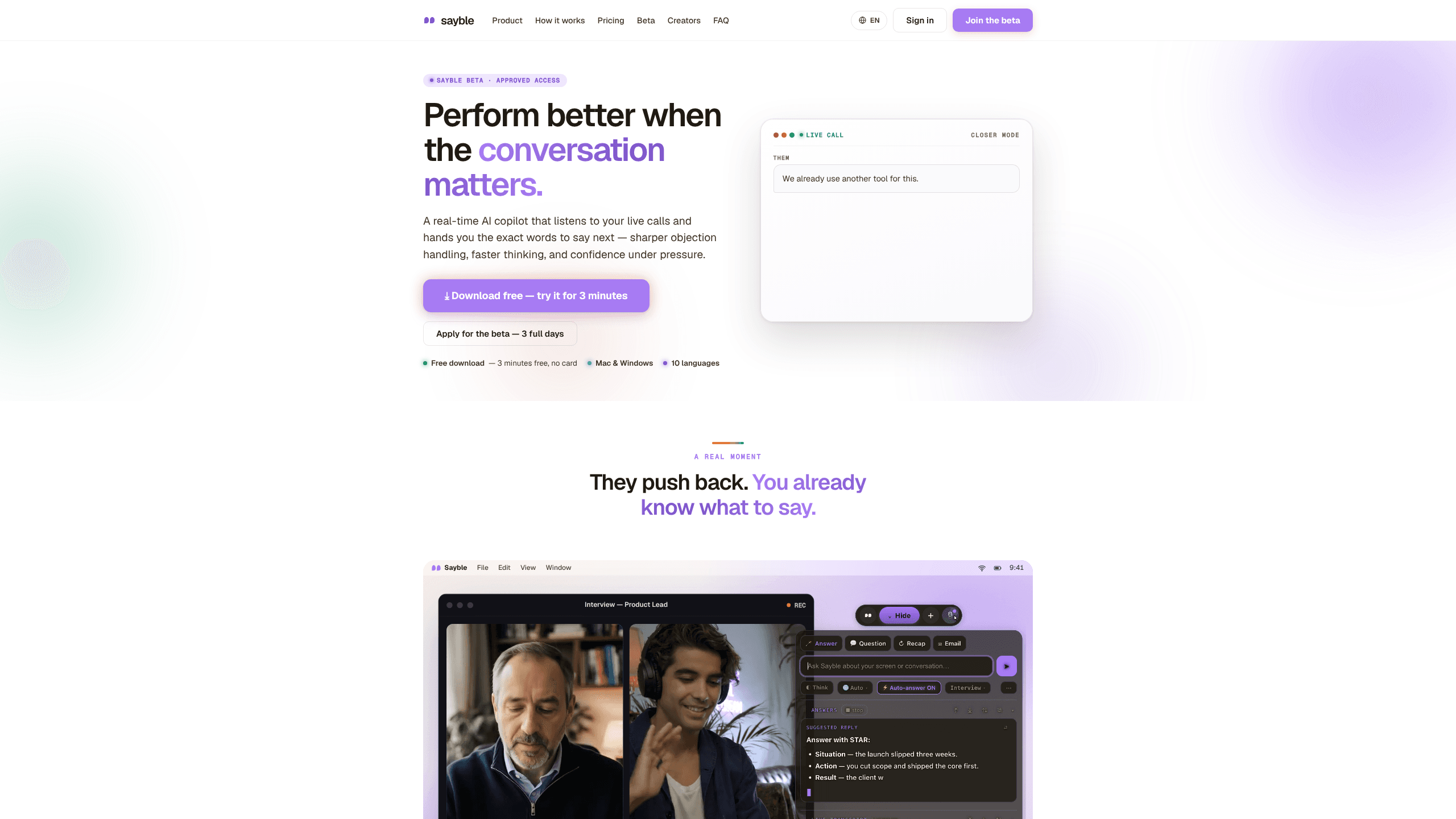
Sayble is a desktop AI copilot for live sales calls and meetings. It listens to both sides of the conversation, shows one line to say next, then writes the call recap and follow-up email.
About Sayble
What Is Sayble
Sayble is a real-time AI call copilot for Mac and Windows that sits beside your call and tells you what to say while the other person is still talking. You start a session before the meeting. The app transcribes both sides, follows the thread, and puts a single suggested line on screen when your turn comes.
Most meeting tools wait until the call ends and hand you a summary afterward. Sayble works during the call. The transcript updates as people speak, and the suggestion box responds to whatever was just said, including an objection you didn't see coming. That makes it closer to live call coaching than to a note taker.
As an AI meeting copilot, it runs on top of the calls you already take: Zoom, Google Meet, Microsoft Teams, Slack huddles, phone calls, or anything visible on your screen. A mobile app is listed as coming soon, so for now this is a desk tool.
The limits matter before you pay. The free plan is one full 5-minute session, not a monthly allowance. Suggestions are AI output and can be vague or plainly wrong, so you still have to judge each line. And hiding the window from a screen share does not stop your own computer's screen recorder, which the company says openly on its trust page.
Getting Started
- Create a free account at trysayble.com and download the macOS or Windows build. The 5-minute trial does not ask for a card.
- Connect Google Calendar so today's meetings appear on the Home screen with a one-click join button.
- Build a Mode for each kind of conversation. Add your pitch, price list, and reference files as PDFs, CSVs, or docs so suggestions use your numbers instead of generic ones.
- Start a session, then join the call as usual. Sayble listens in the background and shows suggested lines in a window that stays out of screen capture.
- When the call ends, read the recap, edit the drafted follow-up email, and send it. The transcript stays in your history for later questions.
Product Information
A quick look at Sayble's pricing, supported platforms, and performance.
Best for
The users, tasks, and scenarios where this tool fits best.
Users
- Sales reps and account executives
- Founders and solo consultants
- Sales managers and enablement leads
Tasks
- Handling an objection in the moment
- Writing the follow-up email
- Reviewing a month of calls
Scenarios
- A demo where the buyer pushes back on price
- A day of back-to-back calls
- Onboarding a new rep
Key features
One Line Instead of a Wall of Text
The main window shows a single suggested sentence, plus a backup option underneath. That constraint is the point. Mid-call, you have about two seconds to read something and keep talking, and a paragraph of analysis is useless in that window. The suggestion responds to the last thing said, so it fits the objection or question in front of you.
Hidden From Screen Share
Sayble asks macOS and Windows to keep its window out of screen capture, so people on Zoom, Meet, or Teams see your slides rather than your prompts. The switch is included on every plan, including Free, which is not true of most competitors that put this behind a premium tier. The company is also clear about the gap: your own local screen recorder can still capture the window.
Recap and Follow-Up Before You Hang Up
When the call ends, Sayble produces a written recap with three parts: what was decided, the objection that actually stuck, and what you owe the other person. It also drafts the follow-up email from the same transcript. You review and send. For anyone who writes follow-ups at 9 p.m. from memory, this is the feature that saves the most time.
Ask Across Every Past Call
Every recorded conversation goes into a searchable history that you query in plain language. Ask which objection appears most often before a deal dies, who asked for pricing and never got it, or what changed the mind of buyers who said yes. The answer comes from your transcripts, not a general model, so it reflects your own calls.
Modes Loaded With Your Own Files
A Mode is a saved set of instructions and reference documents for one kind of conversation, such as a pricing call or a technical demo. Load your deck, a CSV of plans, and a one-page objection list, and suggestions start using those details. Modes and files follow your account across devices, and Teams plans can share them with everyone.
Works on the Calls You Already Take
There is no new meeting link to send anyone. Sayble listens to whatever audio is playing on your machine: Zoom, Google Meet, Microsoft Teams, Slack huddles, a phone call on speaker, or a browser tab. It also reads what's on your screen, so you can ask about a document without taking a screenshot first.
Ten Languages, Detected Automatically
The app recognizes the language of the conversation and answers in it. The supported list covers English, Spanish, Portuguese, French, German, Italian, Japanese, Chinese, Hindi, and Arabic. If you sell into two regions in the same afternoon, you don't reconfigure anything between calls.
Today's Calls in One Place
The Home screen pulls in your Google Calendar and gives each meeting a join button. Past conversations sit below it, ready to replay or query, and a question box at the top reads all of them. It's a small convenience that removes the usual scramble of finding the right link thirty seconds before a call.
Pros and cons
Pros
- The suggestion is one glanceable line, which fits how people actually read during a live conversation.
- Hiding the window from screen share is included on the free plan, not sold as an add-on.
- The call recap and AI follow-up email are drafted from the real transcript, so editing takes minutes.
- Cross-call questions run on your own history, which surfaces patterns a single recap can't show.
- Team plans include per-rep coaching pages and call grades, useful for managers who can't attend every call.
Cons
- It runs on macOS and Windows only. An iOS or Android app is announced but not shipped, so phone-only sellers are out for now.
- The free tier is a single 5-minute session, so you can't use it as an ongoing free tool.
- Suggestions can be incomplete or inaccurate, and a wrong line delivered confidently can cost more than silence.
- Screen-share hiding doesn't cover your own local recorder, and you're responsible for consent and recording laws in your region.
Frequently asked questions
Sayble transcribes both sides of the conversation and shows the exact words to say next, usually one sentence with a backup line. You decide whether to use it. After the call, it writes a recap and drafts the follow-up email.
Related content
Explore related tools, skills, and articles for Sayble.
Sayble Alternatives

Foley
Hanamori Labs, LLC · Voice & Language · Productivity · AI AssistantFoley is a voice to-do list that turns a spoken sentence into a filed task, complete with project, date and time, then helps you plan the day around what is already there.

HireKey
HireKey · Voice & Language · Productivity · LeaningHireKey is an AI job search copilot built by a former tech recruiter. It checks role fit, tailors resumes, runs interview practice and tracks every application.

Fluence
Yay Software (Yannick Huchard) · Writing · Voice & Language · ProductivityFluence is an Android app that reads PDFs, EPUBs, Word files and web articles aloud, follows each sentence as it speaks, and answers questions about the text on the phone itself.