

SayCraft
Independent developer, Hong Kong SAR · Coding · Productivity
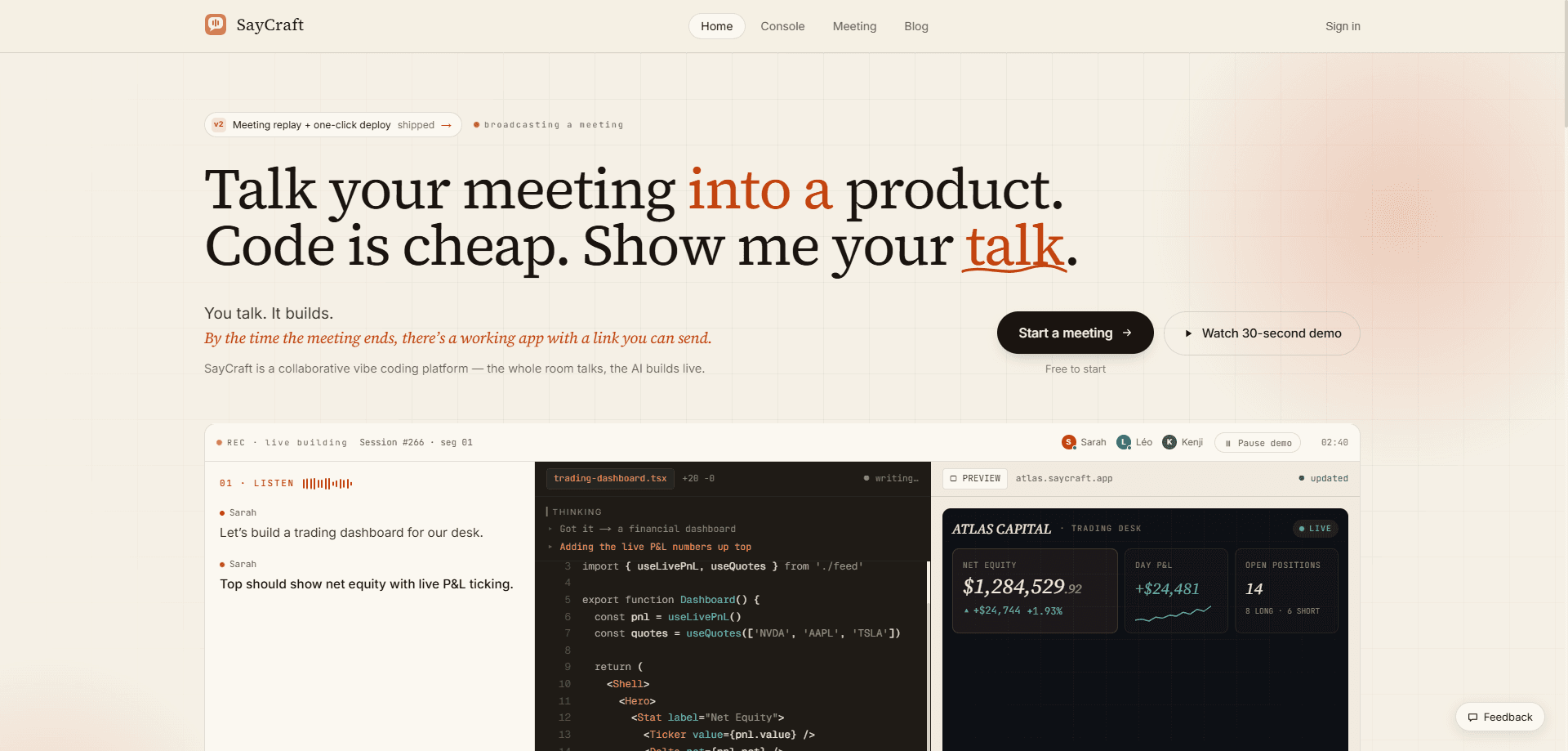
SayCraft is an AI app builder that turns a spoken product meeting into a working web app. Think of it as a voice to app pipeline for teams. Your team talks in a live call, the platform vibe-codes the product as you speak, and a shareable preview URL re-renders with every change so everyone sees the same thing taking shape. When the call ends, you keep the meeting replay, and on paid plans a permanent deploy link or deployable source code you can take further.
About SayCraft
What Is SayCraft
SayCraft calls itself a collaborative vibe coding platform, and that label holds up. Instead of one person typing prompts and waiting, the whole team talks through a real-time product meeting, and the AI builds a running web app live on screen. The conversation itself becomes the blueprint, so nobody has to write a spec doc or clean up notes afterward. As a collaborative app builder, it works a lot like an AI website builder, except the input is a discussion, not a prompt.
The problem it targets is real. Most AI app builders assume a single user working alone at a prompt box, but teams decide what to build by talking, reacting, and changing direction mid-sentence. SayCraft records that messy talk, pulls clear requirements out of it, and renders the result to a preview URL everyone can open and test together.
The limits matter too. You need a live conversation to build anything, so it's not the tool for a private solo session where you just want to type. Free accounts get roughly 50 meeting minutes a month and only a live preview, while the permanent deploy link sits behind Pro and source download behind Max. SayCraft is built and run by an independent developer based in Hong Kong SAR, not an incorporated company, which is worth knowing if you care about who holds your data.
Getting Started
- Sign up at saycraft.ai and open a new meeting room. No card is needed to start on the Free plan.
- Invite your team and start talking about the product you want, the same way you would in any planning call.
- Watch the live preview as SayCraft transcribes the discussion and turns it into a running web app.
- Talk through changes in the same meeting. The preview re-renders each time, so you can react to what's on screen in the moment.
- Export or share the result. Free keeps the preview and replay, Pro unlocks a permanent deploy link, and Max adds the downloadable source.
Product Information
A quick look at SayCraft's pricing, supported platforms, and performance.
Best for
The users, tasks, and scenarios where this tool fits best.
Users
- Product teams
- Founders and indie builders
- Non-technical teammates
Tasks
- Turning a planning call into a prototype
- Rapid concept testing
- Handing off a build
Scenarios
- Weekly product sync where the team decides scope
- Early-stage ideation before writing any code
- Client or stakeholder demos
Key features
Real-Time Meeting Transcription
Every word gets transcribed live as you speak, so there's no note-taking and nothing to clean up later. The transcript feeds straight into the build, which is why a rambling call still produces a coherent result. If your team tends to double back on decisions, SayCraft reads through the back-and-forth and keeps the final direction.
Talking Your Requirements Into Shape
SayCraft pulls clear product requirements out of messy conversation. You don't have to be organized or phrase things precisely. Someone can say they want a section "bigger," and the change lands on screen, which lowers the pressure to write a formal brief before starting.
Build While You Talk
An idea turns into an interface as you describe it. The page re-renders live during the meeting, so the team watches words become a real, clickable layout. That instant feedback is the part that tends to make it click for people who have never used a build tool. So how does it hold up? Watching an idea land on screen in seconds is genuinely satisfying.
Meeting Replay
After the call, you can replay the whole session, including the audio, the conversation, and every change made to the page. You can scrub the timeline back to any moment to see exactly how a decision turned into code. Handy when someone missed the meeting. Also handy when a choice needs justifying later.
Shareable Preview URL
A live preview URL updates as you build, so anyone with the link can test the app during the meeting. On Pro, that becomes a permanent deploy link you can keep sharing after the session ends. Max goes further. It lets you download the full project source to keep or self-host.
Carry Forward Between Meetings
The next meeting picks up where the last one stopped. SayCraft remembers the product you've been building, so you don't restart from zero each time the team returns to it. That matters for anything that spans more than one session. Most real projects do.
Pros and cons
Pros
- Turns a normal team conversation into a working prototype, so the meeting produces more than notes.
- Live preview keeps everyone looking at the same build, which cuts down requirement confusion.
- Free plan is genuinely usable for trying the workflow, at roughly 50 meeting minutes a month.
- Meeting replay documents how each decision became code, useful for anyone who missed the call.
- Paid tiers are cheap relative to most dev tools, with Pro at $4.9/mo and Max at $19.9/mo.
Cons
- Everything runs through a live meeting, so you can't quietly build solo by typing prompts.
- The permanent deploy link needs Pro and source download needs Max, so the free plan's output can't be shared long-term.
- The service is run by a single independent developer rather than a company, which is worth weighing for anything you plan to rely on.
Frequently asked questions
It turns a live spoken meeting into a working web app. Your team talks, the AI builds the product as you speak, and a shareable preview URL updates in real time so everyone can test what's being made.
Related content
Explore related tools, skills, and articles for SayCraft.
SayCraft Alternatives
Forefront
Forefront · CodingForefront is a web platform for building with open-source AI. It lets you fine-tune leading open-source language models on your own data, evaluate how they perform, and run them through an API or export them to host yourself. Developers who want the convenience of a closed-source platform but insist on owning their models and data are the target audience here.

Startkit
StartKit.AI · CodingStartkit is a boilerplate for building AI SaaS and AI wrapper products. Think of it as an AI startup boilerplate with the boring parts already wired up: authentication, Stripe and Lemon Squeezy payments, usage limits, transactional email, and an AI API starter that talks to OpenAI, Anthropic, Groq, or Llama. You clone the repo, set your price, and start on the part of your product that people actually pay for. It's Next.js under React and Tailwind, so most of the boilerplate code already feels familiar.
Testim
Tricentis · CodingTestim is an AI-powered test automation platform for building and running end-to-end tests across web, mobile, and Salesforce applications. It leans on machine learning to keep tests stable when an interface changes, so teams spend less time fixing broken selectors. Not bad for an automated testing tool you can start using today. You create tests by recording actions in a browser, then optionally add JavaScript when you need more control. It's a solid pick for busy QA teams.