

SCAPTION
SCAPTION · Voice & Language · Productivity · Business
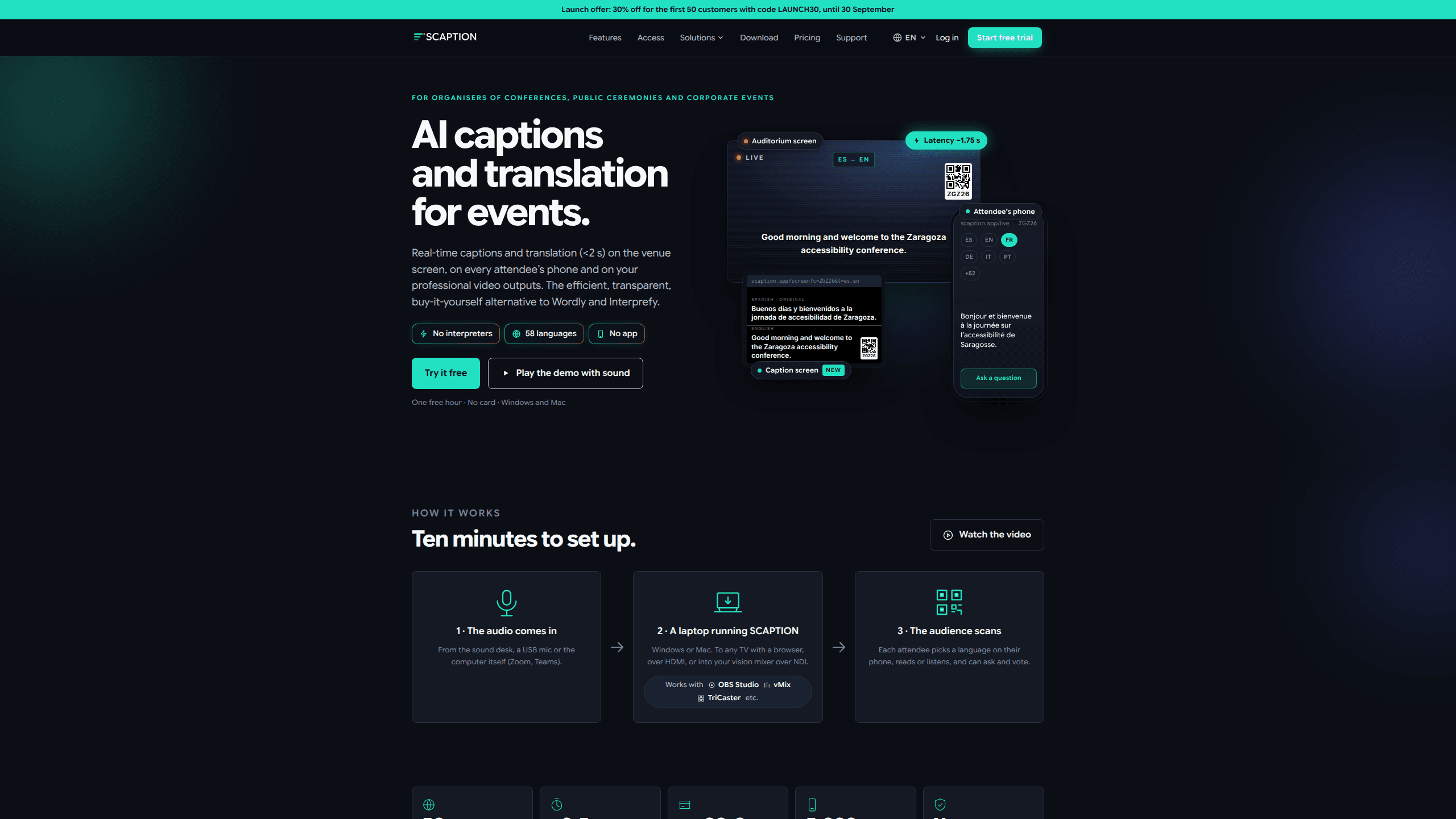
SCAPTION is a live translation app for events, aimed at the people who run conferences, public ceremonies and corporate gatherings. It delivers AI live captions and real-time event translation in under 2.5 seconds, pushing them to the venue screen, every attendee's phone and your professional video output at once. You run it from a Windows or Mac laptop, the audience scans a QR code, and nobody has to download an app or sign up for anything.
About SCAPTION
What Is SCAPTION
SCAPTION is live translation software built for events rather than meetings, and it doubles as an event captioning tool when translation isn't switched on. An organiser installs the SCAPTION app on a laptop. Then they feed in the audio from the sound desk, a USB mic or the room computer. Every attendee can then read the talk in their own language on their own phone, with no app and no account. It handles 58 languages and handles multilingual conference captions in real time, on the venue screen, on attendee phones and in your broadcast feed.
The product solves a problem event organisers know well. Hiring human interpreters is costly, and booking them takes weeks. A single language pair often leaves half the room out. SCAPTION replaces simultaneous translation booths with software that runs on hardware you probably already own. One session costs the same whether a hundred people show up or five thousand, because there's no per-head or per-language fee.
The catch is the hardware. SCAPTION's installer only runs on Windows 10 or 11 (64-bit) or an Apple Silicon Mac, so Intel Macs and Linux machines are out. You also need a machine with a quad-core processor and 8 GB of RAM to keep the audio stream and video encoding stable during a live show.
Getting Started
- Download the SCAPTION app for Windows or Mac and run the free one-hour trial. No card is needed to test it.
- Connect your audio source. Plug in a USB interface, point it at the sound desk, or let it capture the computer's own audio from Zoom or Teams.
- Open the display output. Send captions to any TV with a browser over HDMI, or into a video mixer such as vMix, TriCaster or OBS over NDI.
- Share the QR code with the room. Each attendee scans it, picks a language on their phone, and starts reading or listening right away.
- If you want audience questions, hand the moderator a tablet to launch polls and pick which questions reach the screen.
Product Information
A quick look at SCAPTION's pricing, supported platforms, and performance.
Best for
The users, tasks, and scenarios where this tool fits best.
Users
- Conference and event organisers
- Accessibility and inclusion leads
- AV production teams
Tasks
- Live captioning a keynote
- Translating a talk into dozens of languages at once
- Running audience Q&A
- Producing a post-event summary
Scenarios
- A multilingual corporate conference
- A public ceremony with mixed-language guests
- A hybrid event
Key features
Real-Time Captions and Translation
SCAPTION recognises speech in any of its 58 languages and translates it on the fly. The venue screen shows the original or translated text, and the same feed reaches attendee phones and your video output. Latency sits around 1.75 to 2.5 seconds. That's fast enough that a live audience barely notices the gap.
Phone Access Without an App
Attendees scan a QR code and pick a language. That's the whole setup. There's no download, no sign-up and no account, which matters when you're trying to get thousands of people into a session in under a minute. Each person reads or listens in their own language, and up to 12 can run at once.
Audience Questions and Votes
Question flow runs both ways. Attendees send questions and vote on them from their phone, and the moderator decides what goes on screen. Votes are limited to one per device, offensive content gets filtered automatically, and results can be exported.
AI Event Summary
After the event, SCAPTION produces a written summary covering the decisions and open questions, in the language you need. Speaker names typed in by the technician carry through, which helps identify who said what and who owns each action item.
Broadcast and Multi-Mic Output
The higher tiers support two or four microphones. Each gets its own colour, screen position and speaker name. All mics can be composited into a single NDI feed, giving your switcher one clean input instead of four. HDMI output with chroma key is available for setups without NDI gear.
Flexible Session Planning
Plans include a pool of event hours that resets monthly, and extra hours are billed per hour rather than cutting a live session off. First-month pricing is discounted, and public bodies and universities can pay by purchase order.
Pros and cons
Pros
- Runs on hardware you likely own, so there's no booth, no receivers and no per-device cost.
- Pricing doesn't scale with audience size or language count, which keeps big events predictable.
- Works with established video tools like vMix, TriCaster and OBS through NDI.
- Attendees need nothing but a phone browser, so onboarding a room takes seconds.
Cons
- The app won't run on Intel Macs or Linux at all, so those machines can't host a session.
- You need a wired, stable connection; venue Wi-Fi and packet loss cause more trouble than raw speed does.
- The free trial stops when the hour runs out and adds a small watermark to programme output, so it's a test rather than a full rehearsal.
- The AI summary and reserved room codes aren't part of the free tier.
Frequently asked questions
It turns live speech at an event into captions and translations. The text shows up on the venue screen, on attendee phones and in your broadcast output, all from the same running session.
Related content
Explore related tools, skills, and articles for SCAPTION.
SCAPTION Alternatives

Foley
Hanamori Labs, LLC · Voice & Language · Productivity · AI AssistantFoley is a voice to-do list that turns a spoken sentence into a filed task, complete with project, date and time, then helps you plan the day around what is already there.

HireKey
HireKey · Voice & Language · Productivity · LeaningHireKey is an AI job search copilot built by a former tech recruiter. It checks role fit, tailors resumes, runs interview practice and tracks every application.

Fluence
Yay Software (Yannick Huchard) · Writing · Voice & Language · ProductivityFluence is an Android app that reads PDFs, EPUBs, Word files and web articles aloud, follows each sentence as it speaks, and answers questions about the text on the phone itself.