

https://www.scholarcy.com/
Scholarcy Limited · Writing · Business
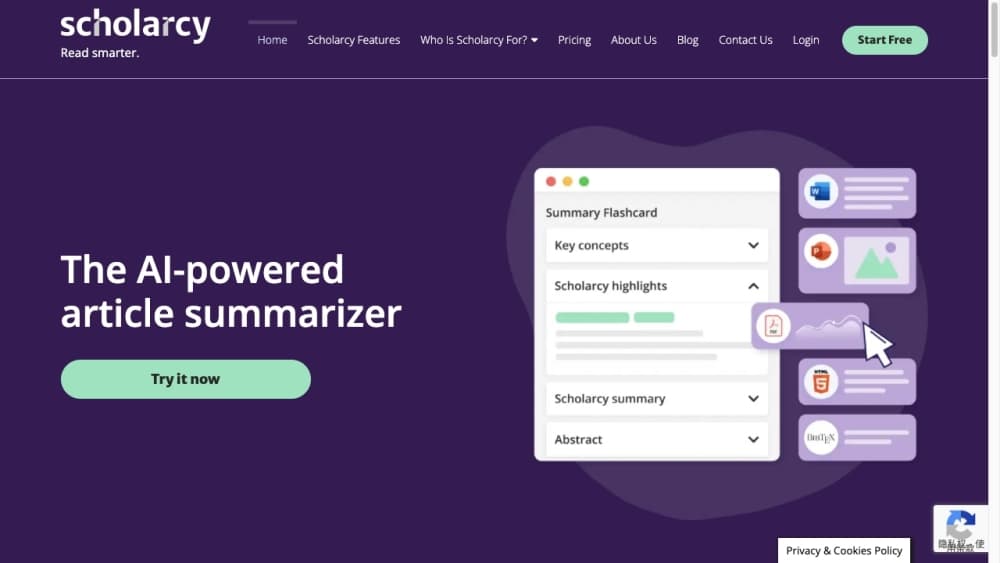
Scholarcy is an AI research summarizer that turns long papers and PDFs into structured summary flashcards highlighting key findings, methods and references.
About https://www.scholarcy.com/
What Is Scholarcy
Scholarcy is a web-based research assistant built for people who have to read more papers than they have hours in the day. You upload a PDF, drop in a link, or connect a Zotero library, and it pulls the document apart into a flashcard that names the study's aims, methods, findings and limitations. The idea is to give you a five-minute read before you commit to the full text.
The paper summarizer sits in the middle of a research workflow rather than replacing it. It summarizes, highlights key terms, and keeps a searchable library of everything you have processed, so you can refresh your memory before a supervision meeting or a lecture. The academic reading app angle matters here: figures, tables and references come out with the summary, which matters when you need to check a dataset or follow a citation trail.
The main limitation is depth. Summaries are generated from the source text and stay close to it, so they help you screen and skim but they do not write your literature review or interpret results for you. Very large or image-heavy scans can also come back thinner than clean text PDFs. The free tier is capped, which makes it a screening tool first and a daily driver only once you subscribe.
Getting Started
- Create a free account on the Scholarcy site with an email address.
- Upload a PDF, paste a URL, drop in plain text, or import straight from Zotero, Google Drive or a YouTube link.
- Choose a summary style with the Enhance option, from a single sentence up to a researcher-level overview.
- Read the flashcard, highlight terms, and add notes as you go.
- Save the summary to your library, then export it as a bibliography, a spreadsheet or into another app.
Product Information
A quick look at https://www.scholarcy.com/'s pricing, supported platforms, and performance.
Best for
The users, tasks, and scenarios where this tool fits best.
Users
- Undergraduate and postgraduate students
- Academic researchers
- International students
Tasks
- Skimming a paper before a supervision or team meeting
- Building a reference list
- Screening dozens of papers for a literature review
Scenarios
- Preparing for a lecture or seminar where you need the key facts, not the whole article.
- Working through a reading list the night before a deadline.
- Keeping a personal knowledge base of papers you have already read but will need to cite later.
Key features
Summary flashcards
Scholarcy converts a document into a structured flashcard that separates objectives, methods, results and conclusions. Instead of a wall of text, you get labelled sections you can jump between, which is what makes a five-minute skim realistic. Everything in the card is drawn from the original, so you can trace a claim back to its source.
Enhanced summaries
The Enhance option lets you change how much detail the summary carries, from a one-line takeaway to a fuller researcher-level overview. That range suits different moments in a workflow: a quick scan at the start of a project, a deeper digest when you are writing up. You pick the length, so the same paper serves both jobs.
Smart highlighting and Spotlight
Key terms, claims and contributions are highlighted automatically, and Spotlight jumps you to the important passages rather than making you hunt. This turns a long PDF into a guided read where the evidence-based statements stand out. If you prefer to verify everything yourself, you can still read the full text around the highlights.
Library and Literature Matrix
Every summary you generate can be saved to a searchable library, and the Literature Matrix lines papers up against shared dimensions so you can compare them at a glance. Notes and highlights stay attached to the paper, so a project spread over months does not lose its thread. This is the part that turns scattered PDFs into a working collection.
Imports from Zotero, Google Drive and YouTube
Scholarcy pulls from more than a single upload box. You can import a Zotero library, files from Google Drive, a YouTube link, plain text or a web article. For anyone who already keeps references in Zotero, that means no re-uploading and no manual reformatting to get a summary.
Export and one-click bibliographies
Summaries export to formats that other research and productivity apps accept, including spreadsheets, and you can generate a fully formatted bibliography in Word in one click. Figures, tables and references travel with the summary, so nothing has to be rebuilt by hand when you move your notes into a draft.
Pros and cons
Pros
- Turns a full paper into structured findings in roughly five minutes, which is a real time saver on a long reading list.
- Highlights words, claims and contributions so you can verify a summary against the original text.
- Imports from Zotero, Google Drive, YouTube and plain text, so it fits an existing workflow instead of forcing a new one.
- Exports bibliographies and flashcards to Word, spreadsheets and citation managers, cutting manual reference work.
Cons
- The free Article Summarizer is capped at a small number of summaries per day, so heavy reading needs a paid plan.
- Summaries stay close to the source and do not interpret data or critique methodology, which matters when you need analysis rather than extraction.
- Scanned or image-heavy PDFs can summarize less cleanly than text-based ones, so results vary with input quality.
Frequently asked questions
Scholarcy reads a research paper, PDF, book chapter or web article and turns it into a summary flashcard that separates the aims, methods, findings and limitations. The summary stays tied to the original text, so it works as a fast screening and skimming tool rather than a replacement for reading.
Related content
Explore related tools, skills, and articles for https://www.scholarcy.com/.
https://www.scholarcy.com/ Alternatives

Claude for Google Workspace
Anthropic · Writing · Productivity · BusinessClaude for Google Workspace puts Claude in a sidebar inside Google Docs, Sheets, and Slides, where it reads the file you have open and edits it in place.

Claude Haiku 5.5
Anthropic · Writing · Coding · ChatbotClaude Haiku 5.5 is Anthropic's fastest and cheapest small model, built for high volume tasks at $0.10 per million input tokens with a 1M token context window.

NoteWorthy
Suman Hansada · Writing · Productivity · AI AssistantNoteWorthy is a notes app for iPhone, iPad and Mac that writes titles, tidies formatting, summarizes long notes and files each one with on-device AI. No account, no upload, no network requests.