

Scribe Notes
Scribe Notes · Writing · Productivity
Scribe Notes is an AI voice memo app for iOS that records your speech, transcribes it, and turns it into organized notes with a summary you can share.
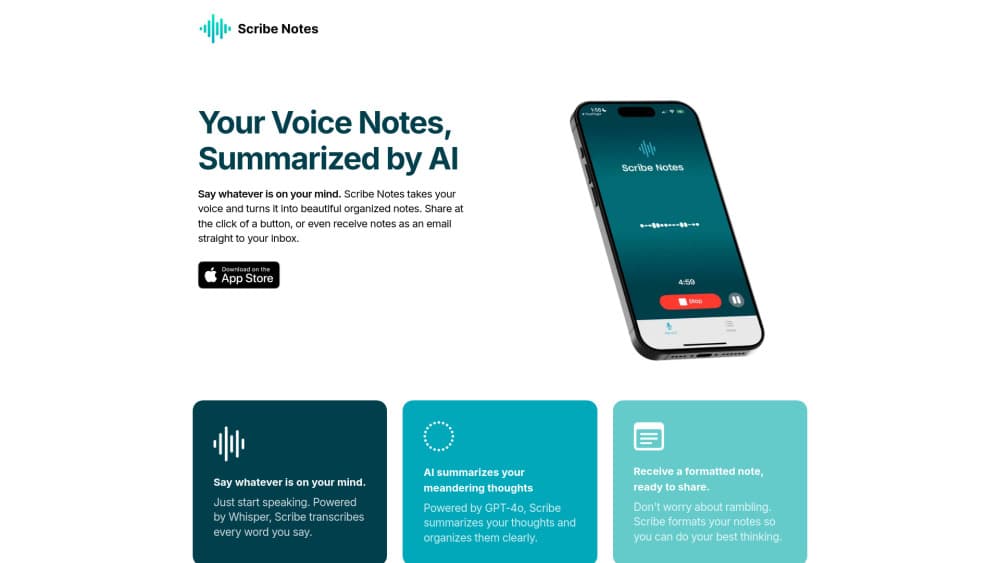
About Scribe Notes
What Is Scribe Notes
Scribe Notes is an AI-powered voice recorder built for iPhone. You speak a thought, and the app runs speech to text, summarizes it, and formats it into a note you can read, keep, or send. It solves a narrow problem well. Most people think faster than they type, and ideas that arrive while walking or driving don't survive long enough to reach a keyboard.
Under the hood, the app runs on OpenAI models. Whisper handles the transcription, taking spoken words to text, and GPT-4o writes the summary and cleans up the structure. This is voice to text done for you, and you don't configure any of it. Record a memo and the app returns a formatted note a few moments later.
The limits are worth knowing before you commit. Scribe Notes is iOS only, so Android users are out. The free tier caps you at 10 notes and 3 minutes per recording. Premium lifts both restrictions and adds a longer recording window, but there's still a ceiling at 15 minutes per note, which rules out hour-long meetings.
Getting Started
- Download Scribe Notes from the App Store and open it on your iPhone.
- Allow microphone access, then tap record and start speaking for as long as the idea needs.
- Wait while the app transcribes your audio with Whisper and writes a GPT-4o summary.
- Review the formatted note, then edit, copy, or share it with a tap.
- Turn on automatic emails or custom instructions in settings if you want notes delivered or shaped a certain way.
Product Information
A quick look at Scribe Notes's pricing, supported platforms, and performance.
Best for
The users, tasks, and scenarios where this tool fits best.
Users
- Writers and content creators
- Students
- Busy professionals
- People who think out loud
Tasks
- Turning a spoken idea into a written note
- Summarizing a long train of thought
- Sharing a note fast
- Capturing notes hands-free
Scenarios
- Waking up with an idea at 6 a.m.
- Driving or walking
- Clearing your head after a long day
Key features
AI transcription and summaries
The core of Scribe Notes is a two-step pipeline. Whisper turns your speech into text, then GPT-4o summarizes the result and tidies the structure. You end up with both the raw transcript and a short summary, which suits anyone who records a messy memo and wants the useful parts pulled out. Accuracy depends on audio quality and clear speech, so a noisy room still means a rough transcript to fix by hand.
Voice capture on iPhone and Apple Watch
You record from the phone, and the Apple Watch app covers the moments the phone isn't in reach. That matters when an idea lands during a workout or while you're cooking. Home screen and lock screen widgets shorten the path even further, since a single tap starts a recording. As an iOS note taking app, capture stays Apple-only, with no Android or web version.
Automatic email delivery and sharing
Scribe Notes can email you a summary of each voice memo automatically, so finished notes arrive without you opening the app. Sharing to a colleague or friend takes one tap, and an auto copy to clipboard option puts the summary one paste away from anywhere. For people juggling notes across tools, this removes the manual export step.
Automatic paragraphs and formatting
Long, rambling recordings get broken into paragraphs automatically, so a stream-of-consciousness memo reads like something structured rather than a wall of text. The app also handles the formatting that usually eats time after a recording. It won't rewrite your ideas, but it makes the output readable without editing.
Custom instructions
Custom Instructions let you tell the AI how to handle your notes, from calling you by name to spelling certain words a specific way. This is aimed at people who record often and want consistent output. Set it once and every summary follows the same rules, which keeps terminology steady across notes.
Free tier with a Premium upgrade
The app starts free with 10 notes and a 3-minute cap per recording. Premium removes the note limit and stretches recordings to 15 minutes each, with a 7-day trial to test it. The free tier is enough to see whether voice capture fits your habits, while people who record daily will likely need the upgrade.
Pros and cons
Pros
- Transcription and summarization run on Whisper and GPT-4o, so the text quality comes from proven OpenAI models.
- Capture works from iPhone, Apple Watch, and widgets, which covers hands-free moments a phone-only recorder misses.
- Automatic emails and clipboard copy cut the manual sharing step.
- A free tier with 10 notes lets you test the workflow before paying.
- Custom Instructions keep output consistent for people who record every day.
Cons
- iOS only, so Android and Android-watch users can't use it at all.
- The free tier caps you at 10 notes and 3 minutes per recording, which fills up quickly for regular use.
- Premium tops out at 15 minutes per note, so meetings and long lectures won't fit in a single recording.
- There's no published API, so teams that want to wire the notes into other systems can't.
Frequently asked questions
Scribe Notes is an AI voice memo app for iOS. You record your voice, and the app transcribes it, summarizes it with GPT-4o, and formats it into an organized note you can read, save, or share.
Related content
Explore related tools, skills, and articles for Scribe Notes.
Scribe Notes Alternatives

Claude for Google Workspace
Anthropic · Writing · Productivity · BusinessClaude for Google Workspace puts Claude in a sidebar inside Google Docs, Sheets, and Slides, where it reads the file you have open and edits it in place.

Claude Haiku 5.5
Anthropic · Writing · Coding · ChatbotClaude Haiku 5.5 is Anthropic's fastest and cheapest small model, built for high volume tasks at $0.10 per million input tokens with a 1M token context window.

NoteWorthy
Suman Hansada · Writing · Productivity · AI AssistantNoteWorthy is a notes app for iPhone, iPad and Mac that writes titles, tidies formatting, summarizes long notes and files each one with on-device AI. No account, no upload, no network requests.