
Scribly AI
Scribly AI · Writing · Marketing
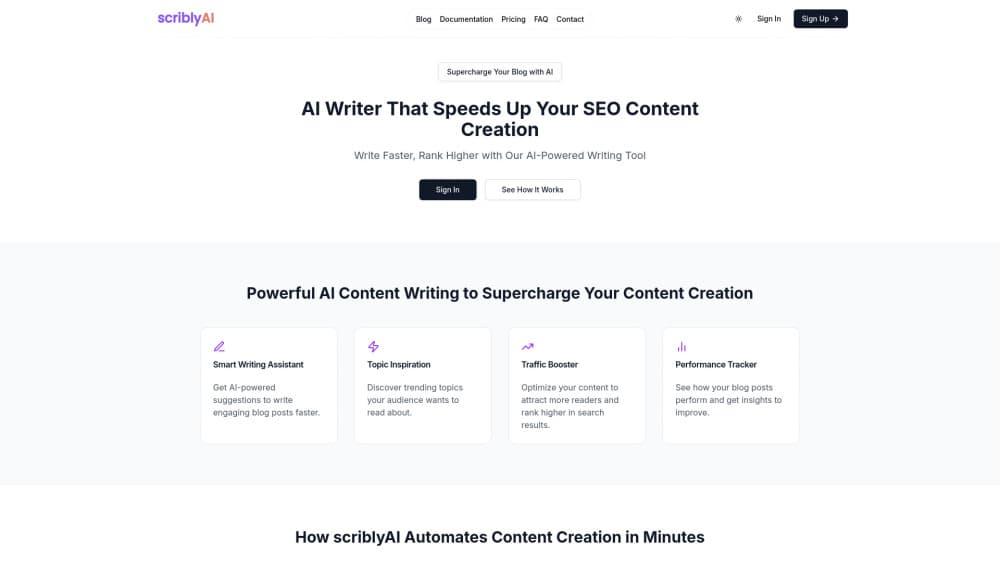
Scribly AI is an AI content writing platform that turns a topic into a researched outline and draft, then helps you sharpen it for search before you publish.
About Scribly AI
What Is Scribly AI
Scribly AI is a web platform for producing written content at volume. You enter a subject, and the tool returns an outline and a draft, then hands you SEO keyword suggestions, tone and persona controls, and a scheduling queue. It targets bloggers, marketers and small teams who publish often and want the first draft off their plate.
The plans scale by output. The free tier allows three articles a month capped at 500 words each. Basic lifts that to 25 articles and longer pieces, and Pro raises it to 100 articles and adds bulk generation, web research and a humanize toggle.
The limits matter more than the headline features. Long-form support sits on the Pro plan only, the free tier fences off persona and tone options, and the whole product is built around English content workflows, so publishers working in other languages get less use out of it.
Getting Started
- Open scriblyai.com and create an account. You can start on the free plan without a card.
- Enter your topic, then pick a niche and sub-niche so the draft stays on subject.
- Set the tone and, on paid plans, a persona to shape how the copy reads.
- Generate the outline, review it, then generate the article draft.
- Apply the SEO suggestions, refine the text, and publish or schedule the post.
Product Information
A quick look at Scribly AI's pricing, supported platforms, and performance.
Best for
The users, tasks, and scenarios where this tool fits best.
Users
- Bloggers and solo publishers
- Content marketers
- Small business owners
Tasks
- Drafting a blog post
- Planning a content calendar
- Running keyword research
Scenarios
- A niche site needs ten posts a month
- A marketer rebrands a blog's voice
- A shop owner starts a blog from scratch
Key features
Topic-to-draft generation
You give Scribly AI a subject and it builds an outline, then a draft. The workflow runs in three steps, so you can review the structure and fix it before you spend credits on a full article.
SEO keyword suggestions
Each draft comes with keyword recommendations you can fold into headings and body text. The free tier keeps these basic, while Basic and Pro widen the suggestions and add niche-level targeting.
Tone and persona controls
The paid plans let you set a tone and a persona so the copy reads the way you want. You pick both once and reuse them, which keeps a batch of articles sounding like one publisher.
Niche and sub-niche targeting
You choose the niche and sub-niche before generating, which steers the draft toward your audience. Pro adds AI-powered topic and niche suggestions when you are not sure what to cover next.
Humanize content toggle
On Pro, a toggle switches the output between an AI-optimized style and a more natural, human-like voice. It is a single setting rather than a separate tool, so you can flip it per article.
Bulk generation and scheduling
Pro supports bulk content generation and a scheduling queue. You line up several posts and let them publish on a calendar instead of writing and posting one at a time.
Web research integration
Pro pulls material from the web into the draft, so an article can reference current sources rather than leaning on the model's training alone. That helps posts that need up-to-date facts.
Pros and cons
Pros
- The three-step flow leaves room to review an outline before committing to a full draft.
- Tone and persona settings keep a run of articles consistent in voice.
- The free tier is usable without a card, so you can test the workflow before paying.
- Pro bundles bulk generation, scheduling and web research, which covers a small content team's routine.
Cons
- Long-form support sits behind the $99 Pro plan, so the lower tiers are limited to shorter pieces.
- The free plan caps output at three articles a month and 500 words each, which is thin for a working blog.
- The platform is built around English content, so publishers in other languages get less from the workflows.
- There is no advertised API, so it does not slot into an existing publishing pipeline on its own.
Frequently asked questions
Scribly AI is an AI article writer and blog post generator that works from a topic. You enter a subject, review a generated outline, then expand it into a draft, apply SEO suggestions, and publish.
Related content
Explore related tools, skills, and articles for Scribly AI.
Scribly AI Alternatives

Claude for Google Workspace
Anthropic · Writing · Productivity · BusinessClaude for Google Workspace puts Claude in a sidebar inside Google Docs, Sheets, and Slides, where it reads the file you have open and edits it in place.

Claude Haiku 5.5
Anthropic · Writing · Coding · ChatbotClaude Haiku 5.5 is Anthropic's fastest and cheapest small model, built for high volume tasks at $0.10 per million input tokens with a 1M token context window.

NoteWorthy
Suman Hansada · Writing · Productivity · AI AssistantNoteWorthy is a notes app for iPhone, iPad and Mac that writes titles, tidies formatting, summarizes long notes and files each one with on-device AI. No account, no upload, no network requests.