

Seagull
Seagull · Writing
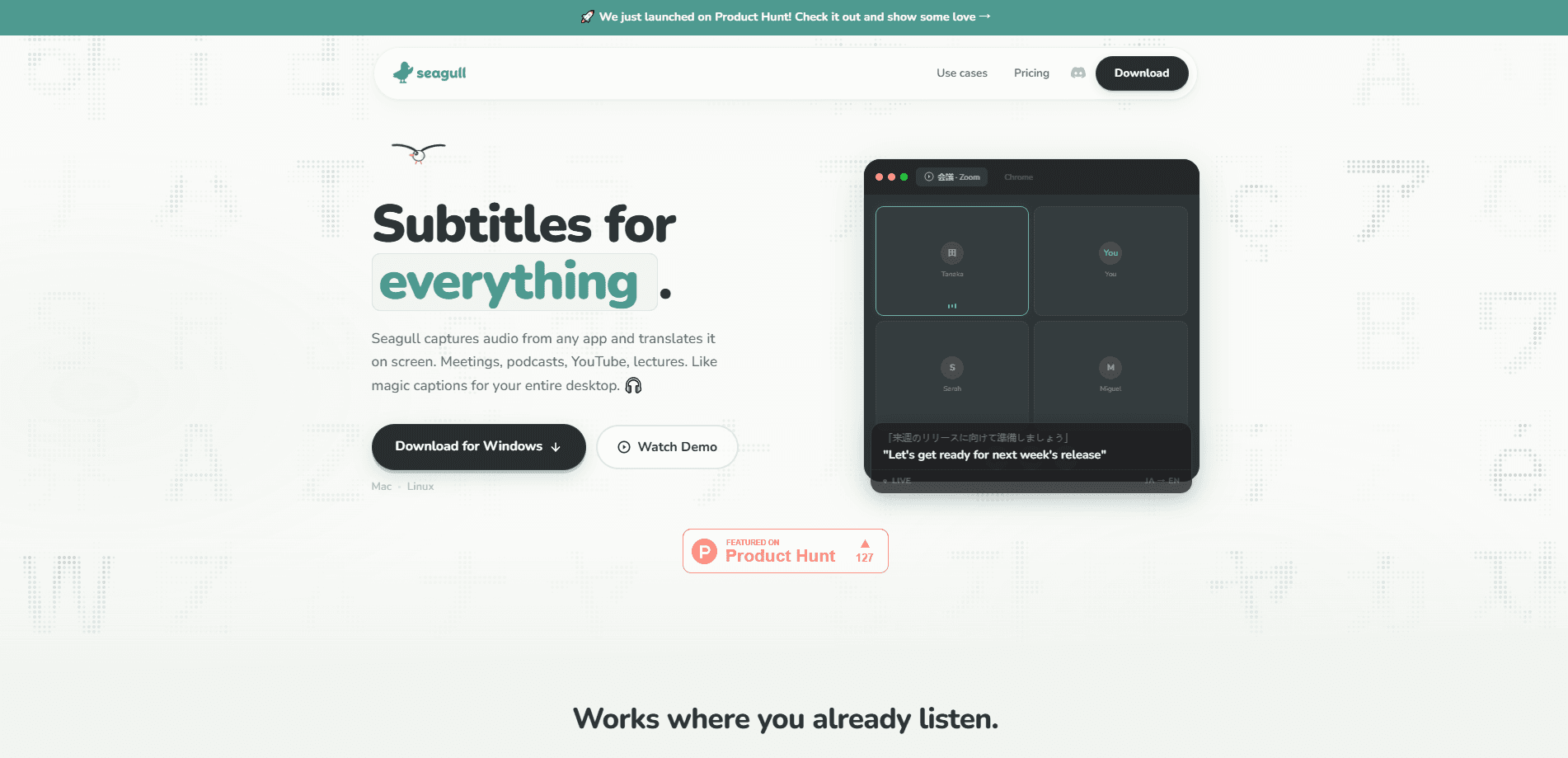
Seagull is a desktop app that puts live, translated subtitles on any audio playing on your computer. It captures system audio directly, so podcasts, YouTube videos, movies, lectures, and calls all work without plugins or browser extensions. A separate Conversation Mode translates two people speaking different languages through a single microphone, showing both sides in real time. It covers 60+ languages and runs as a floating overlay you can drag anywhere on screen.
About Seagull
What Is Seagull
Seagull is a real-time translation app for desktop computers. Instead of translating text you paste in, it listens to whatever audio your machine is already playing and shows subtitles in your chosen language as the words come out. Because it taps system audio, it works with just about any program. Streaming sites, video players, meeting apps. All of them.
The pitch is simple: fewer clicks, no setup maze. You open it, pick your languages, and start listening. There are no browser extensions to install and no per-app integrations to configure. The overlay floats above other windows. Subtitles sit over the video or podcast you're already watching.
The trade-off? It's desktop-only right now, and it leans on your computer's audio output plus a live connection for translation. If the audio is muddy or speakers overlap heavily, accuracy drops. Seagull also markets voice playback as a paid add-on, so read-aloud translations aren't part of the base experience yet.
Getting Started
- Download Seagull from getseagull.com and install it on your desktop.
- Open the app and set your source and target languages, like Korean to English.
- Play whatever you want to follow, a podcast, a video, or a live call.
- Drag the floating subtitle overlay to a spot that doesn't block the screen.
- Switch to Conversation Mode when you need two people in different languages to talk through one mic.
Product Information
A quick look at Seagull's pricing, supported platforms, and performance.
Best for
The users, tasks, and scenarios where this tool fits best.
Users
- Language learners
- Multilingual teams
- Travelers and expats
Tasks
- Watching foreign-language YouTube
- Following K-dramas, anime, and foreign films
- Attending online lectures and talks
Scenarios
- Pulling an all-nighter on a lecture you can't attend live in your language
- Working the front desk or clinic where patients speak another language
- Studying on a quiet afternoon with a foreign podcast in the background
Key features
Real-Time Subtitles for Any Audio
Seagull listens to the audio your computer is already outputting, so it doesn't care which app is playing. A Korean podcast, a Japanese cooking channel, or a Netflix episode all feed the same subtitle stream. It's a live subtitle app that doesn't ask which player you use, and it keeps translating as long as the audio keeps coming through your machine. You adjust the target language and read along as people speak. Want to translate YouTube subtitles without waiting on the platform's own captions? This handles that too.
Conversation Mode
Conversation Mode handles two people talking in different languages through a single microphone. Seagull figures out who's speaking and translates both sides live, so a Spanish speaker and an English speaker can hold a back-and-forth without swapping devices or passing a phone across the table. Think of it as conversation mode translation built into a desktop tool. It's what makes the app useful face to face, not just for consuming media.
60+ Language Coverage
The app covers more than 60 languages, from English and Mandarin to Swahili and Tagalog. That range matters if you follow content outside the usual European languages, where many translation tools stop short. No translation pack downloads, either. You pick source and target per session.
Floating Overlay With No Setup
Subtitles appear in a transparent overlay that floats above every other window, and you can drag it wherever you like. There are no plugins, no browser extensions, and no permission prompts to fight through. Nothing to configure. For anyone who's wrestled with caption tools before, the lack of setup is the selling point.
System Audio Capture
Because Seagull captures system audio rather than a single app's feed, it covers video players, streaming sites, meeting software, and anything else that makes sound. That makes it genuine audio translation software rather than a per-app helper. You don't hunt for a supported-app list, and you don't reinstall the tool per service.
Voice Playback
Seagull lists voice playback as a coming feature: translations read aloud with natural voices that adapt to keep pace with the speaker. It's marked as a paid add-on, so expect it to sit behind a subscription once it ships. Not here yet. Watch for it.
Pros and cons
Pros
- Works with any app because it captures system audio, not a specific program.
- Conversation Mode translates both sides of a two-person exchange through one mic.
- 60+ languages cover less common languages that many rivals skip.
- Zero-setup overlay means no plugins or extensions to install.
- Team pricing starts low, at $4.49 per user per month.
Cons
- Desktop only, so there's no mobile app for on-the-go use.
- Voice playback is still listed as coming soon and as a paid add-on, so read-aloud isn't available in the base plan.
- Accuracy depends on clean audio; overlapping speakers and background noise hurt the live translation.
Frequently asked questions
Seagull shows live translated subtitles for any audio playing on your desktop, and it can translate a face-to-face conversation between two people speaking different languages. It's a real-time translation app rather than a text or document translator.
Related content
Explore related tools, skills, and articles for Seagull.
Seagull Alternatives

Google EmbeddingGemma 2
Google DeepMind · Writing · Image · CodingGoogle EmbeddingGemma 2 is a 740M-parameter open model that turns text, code, images, audio, and video frames into vectors in one 768-dimension space, running on phones and laptops.

MePersona
MePersona, Inc. · Writing · Productivity · MarketingMePersona is an AI unified inbox for creators. It learns your voice, drafts replies to fan messages from 12 platforms, and sends only what you approve.

Fluence
Yay Software (Yannick Huchard) · Writing · Voice & Language · ProductivityFluence is an Android app that reads PDFs, EPUBs, Word files and web articles aloud, follows each sentence as it speaks, and answers questions about the text on the phone itself.