

Semihuman AI
Semihuman · Writing · AI Detection
Semihuman AI is an AI humanizer that rewrites AI-generated text so it reads like human writing and flags less on detectors, with its own AI check built in. It helps make AI text sound human.
About Semihuman AI
What Is Semihuman AI
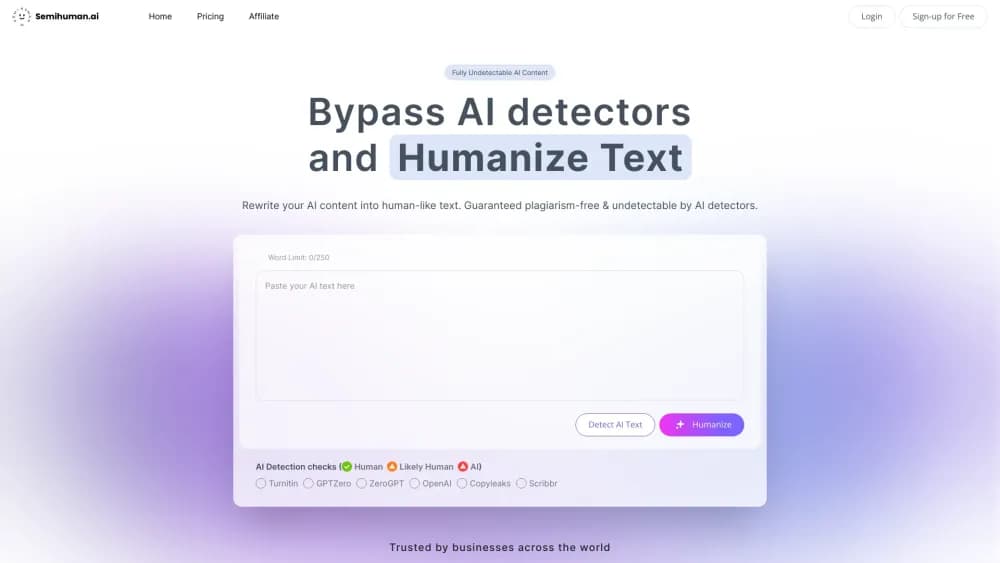
Semihuman AI takes text that reads like a machine wrote it and reworks it until it sounds like a person did. You paste in a passage, pick how far to push the rewrite, and get back a version built to slip past AI detectors. The same screen runs an AI check on whatever you drop in, so you can test a draft before and after you clean it up.
The thing it solves is a specific headache: content that's accurate and well written still gets flagged as AI, and a low score can cost you a grade, a client, or a publishing slot. Semihuman attacks that directly by reshaping sentence structure and word choice rather than swapping a few synonyms. The pitch is simple: bypass AI detectors without gutting the meaning of your text.
Two limits matter. It's a rewriting layer, so the facts and meaning of your text stay put, and sloppy input stays sloppy. And it works against detector heuristics, not as a guarantee. The company itself frames the output as carrying a reduced chance of being flagged, not a promise of zero. For anyone who writes with AI and needs the result to read naturally, that tradeoff is the whole point.
Getting Started
- Open semihuman.ai and create a free account. The free tier gives you 250 words a month with no card required, enough to test the output.
- Paste your text into the box, or upload a file. The counter shows how many words you have left.
- Choose a setting on the balance slider, from Readable to Balanced to Better Bypass. Pushing toward bypass trades a little smoothness for a lower detection score.
- Run the built-in AI check to see how your text scores, then hit Humanize to rewrite it.
- Copy the humanized result, or move up to a paid plan if you need more words per month.
Product Information
A quick look at Semihuman AI's pricing, supported platforms, and performance.
Best for
The users, tasks, and scenarios where this tool fits best.
Users
- Content creators and bloggers
- Marketers and SEO teams
- Students and academics
- Journalists and editors
Tasks
- Humanizing an AI-drafted article
- Checking text for AI signals
- Rewriting product copy or emails
- Bulk rewriting across languages
Scenarios
- Polishing a weekly blog post written with AI help
- Submitting a university assignment
- Cleaning up a client deliverable before handoff
- Preparing multilingual marketing copy
Key features
AI Text Humanizer
The core tool rewrites AI-generated text into prose that reads more like human writing. It changes sentence rhythm and word choice instead of swapping in exotic synonyms, which is the common failure of cheap humanizers. You steer how aggressive the rewrite is with a balance slider, so you can keep readability high or push harder for a lower detection score.
Built-In AI Detector
Before or after you humanize, you can run the same text through Semihuman's own AI check. It returns a read on how likely the passage is to be flagged, so you're not filing blind. This is handy for catching sections that still score high after a first pass and need a second rewrite.
Balance Control Slider
A single slider spans Readable, Balanced, and Better Bypass. The setting matters because humanizing is a tradeoff: push too hard toward bypass and the text can get clunky, stay too readable and the detection score may not drop enough. Giving users that dial is a real difference from one-click tools that hide the choice.
Detector Coverage
Semihuman positions itself against the detectors people actually run into, including Turnitin, GPTZero, ZeroGPT, Copyleaks, and Scribbr. The company reports tested bypass rates rather than a vague claim, but any bypass result depends on the detector version and the specific text.
Multiple Input Languages
The tool detects and humanizes text in more than one language, which suits teams producing content for several regions. You don't need a separate tool per language, but quality can vary by language, so spot-check the output.
API Access
A developer-facing API lets you route text through the humanizer from your own app. Plans on the API side scale by monthly word volume, from a Developer tier up through Business and Enterprise, and documents cap at 2,000 words per call. For teams embedding humanizing into a pipeline, that's the path.
Pros and cons
Pros
- Handles both sides of the job in one place: humanize the text and check its AI score on the same screen.
- The balance slider gives real control over the readability versus bypass tradeoff instead of hiding it.
- Free tier covers 250 words a month with no card, enough to judge the output quality before paying.
- API access with volume-based tiers lets product teams automate humanizing inside their own apps.
- Works across multiple input languages, which helps teams producing content for several markets.
Cons
- Results aren't guaranteed. Output carries a reduced chance of being flagged, not a promise of zero, and detector updates can change that.
- Word limits bite on the lower plans. 15,000 words a month on Basic runs out fast for anyone publishing daily.
- It rewrites rather than verifies, so it won't fix weak or inaccurate source material and can't be relied on for fact-checking.
- Over-pushing the bypass setting can leave text that reads awkwardly to a human reader, so you trade smoothness for a lower score.
Frequently asked questions
It rewrites AI-generated text so it reads like human writing and flags less on AI detectors, and it runs an AI check on text you feed it. The two features share one screen, and the goal is to make AI text sound human and pass as undetectable AI content.
Related content
Explore related tools, skills, and articles for Semihuman AI.
Semihuman AI Alternatives

Google EmbeddingGemma 2
Google DeepMind · Writing · Image · CodingGoogle EmbeddingGemma 2 is a 740M-parameter open model that turns text, code, images, audio, and video frames into vectors in one 768-dimension space, running on phones and laptops.

MePersona
MePersona, Inc. · Writing · Productivity · MarketingMePersona is an AI unified inbox for creators. It learns your voice, drafts replies to fan messages from 12 platforms, and sends only what you approve.

Fluence
Yay Software (Yannick Huchard) · Writing · Voice & Language · ProductivityFluence is an Android app that reads PDFs, EPUBs, Word files and web articles aloud, follows each sentence as it speaks, and answers questions about the text on the phone itself.