

sendsheets
sendsheets · Writing · Marketing
sendsheets is a Google Sheets email tool that turns spreadsheet rows into personalized mail merge messages, built for small teams and solo senders.
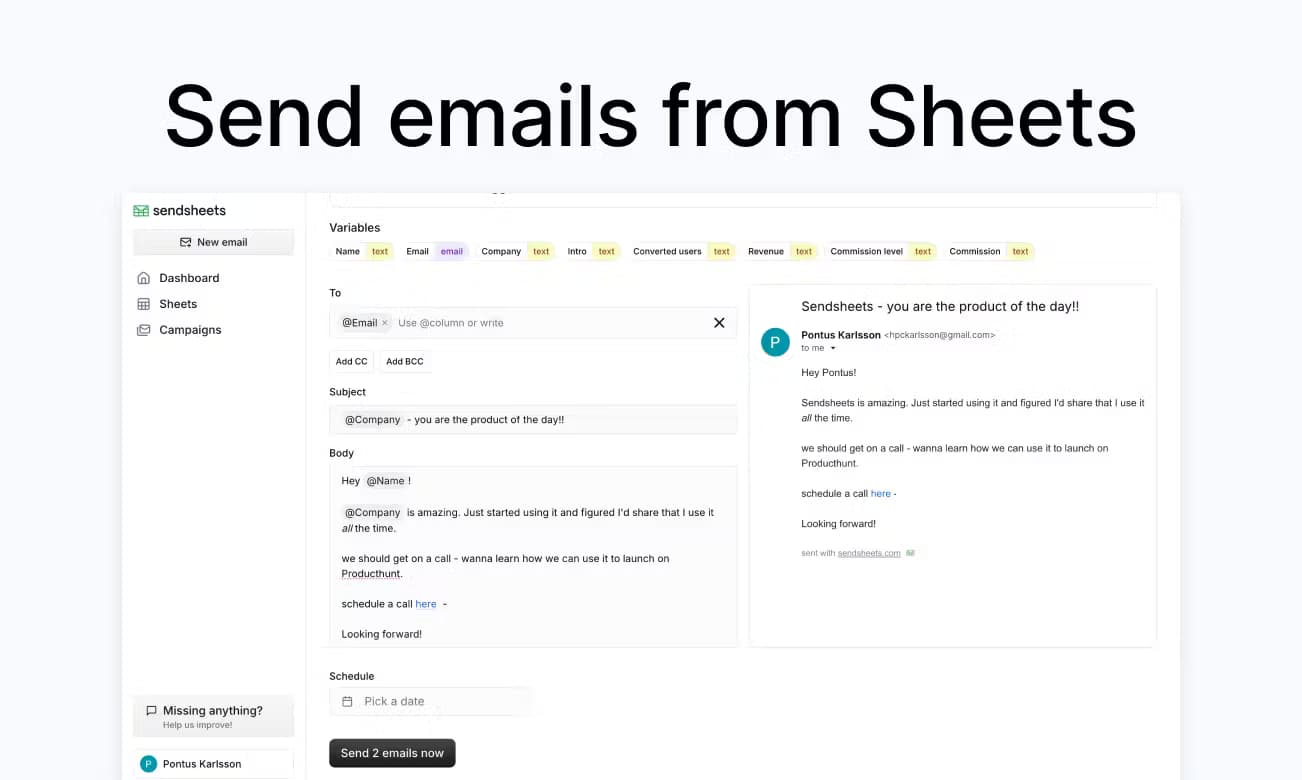
About sendsheets
What Is sendsheets
sendsheets is an email automation tool that lives inside Google Sheets. Instead of exporting a contact list into separate software, you can send personalized emails from Google Sheets directly: connect a spreadsheet, map your columns to merge tags, and go.
That last part is the whole pitch. Your data stays put.
The appeal is workflow. Everyone running outreach keeps names, addresses, and notes in a sheet. sendsheets treats that sheet as the source of truth, so a change in a cell shows up in the next send with no re-import step. Sounds obvious. But most tools make you export first.
The main limitation is scope. It's a spreadsheet email sender, not a full marketing platform. Need deep segmentation, A/B testing, or complex drip logic? You'll outgrow it fast. Note that the vendor's public site is currently offline, so confirm current availability and terms before you commit a real campaign to it.
Getting Started
- Install the sendsheets add-on for Google Sheets and grant it permission to access your spreadsheet and Gmail account.
- Build or paste your contact list into a sheet, with one column per field such as name, email, and company.
- Open the sendsheets sidebar and map each merge tag to the matching column so placeholders pull real values.
- Draft your message, preview a test send to yourself, then schedule or launch the batch.
- Check the results column for delivery and open data, then clean up bounced or unsubscribed rows.
Product Information
A quick look at sendsheets's pricing, supported platforms, and performance.
Best for
The users, tasks, and scenarios where this tool fits best.
Users
- Solo founders and freelancers who keep their contact list in a spreadsheet and want personalized outreach without paying for a full CRM.
- Small sales and marketing teams that need repeatable mail merge runs from data they already maintain.
- Recruiters and community managers sending role-specific or event-specific updates to segmented rows.
Tasks
- Mail merge campaigns that pull first names, companies, and custom fields from sheet columns into each message.
- Follow-up sequences where each row tracks its own send status and reply notes.
- Personalized newsletters and product updates sent to a hand-curated list rather than a marketing database.
Scenarios
- Weekly outreach batches where the list changes and you don't want to re-import contacts each time.
- Event invitations that need a different greeting and detail line per recipient.
- Post-purchase or onboarding messages triggered from a support sheet your team already edits.
Key features
Spreadsheet mail merge
Map any sheet column to a merge tag and each row produces its own personalized message. Placeholders like a first name or company pull live values, so a correction in the cell fixes the next send without a re-import. That's the core trick.
Send from your own Gmail
Messages go out through your connected Google account rather than a shared bulk sender. Replies land in your normal inbox and stay tied to the thread. Follow-up stays simple.
Scheduling and throttling
You can queue a batch for a set time and pace the send so it doesn't fire hundreds of messages at once. That helps avoid the spam flags that hammer bulk tools get when every message leaves in the same minute. Big difference.
Per-row tracking
The add-on writes status back into the sheet, so you can see who was sent, who opened, and who replied in columns next to the contact. Because every update lands in a cell you already own, it turns the spreadsheet into a lightweight dashboard for email tracking without extra software. No cross-app sync to babysit.
Reusable templates
Save message templates and apply them across lists so a recurring campaign only needs the sheet swapped. The greeting and body adapt to whatever columns you mapped the first time. Set once, reuse forever.
Conditional content
Different rows can get different text based on a column value, such as a plan tier or region, which is a simple way to tailor a message without splitting your list into separate sheets and re-mapping every column by hand.
Pros and cons
Pros
- Sends from your own Gmail account, so replies land in your regular inbox instead of a separate dashboard.
- Keeps contact data in the sheet you already edit, cutting out the import-and-export loop.
- Per-row send and open status turns the spreadsheet into a basic tracking view at no extra cost.
- Scheduling and throttling reduce the risk of spam flags on large batches.
- Free tier makes it cheap to test on a small list before committing.
Cons
- The official website is currently offline, so verifying current pricing and features takes extra effort.
- It's tied to Google Sheets, which means no standalone web app for people who prefer a dedicated interface.
- No deep marketing features like A/B testing or complex drip automation, so heavy campaigns outgrow it.
- Deliverability still depends on your Gmail sending limits and domain reputation, not just the tool.
Frequently asked questions
It's a Google Sheets add-on for sending personalized emails from spreadsheet data. You map columns to merge tags and the tool turns each row into its own message, which covers mail merge, follow-ups, and light outreach campaigns without any file shuffling between apps.
Related content
Explore related tools, skills, and articles for sendsheets.
sendsheets Alternatives

Google EmbeddingGemma 2
Google DeepMind · Writing · Image · CodingGoogle EmbeddingGemma 2 is a 740M-parameter open model that turns text, code, images, audio, and video frames into vectors in one 768-dimension space, running on phones and laptops.

MePersona
MePersona, Inc. · Writing · Productivity · MarketingMePersona is an AI unified inbox for creators. It learns your voice, drafts replies to fan messages from 12 platforms, and sends only what you approve.

Fluence
Yay Software (Yannick Huchard) · Writing · Voice & Language · ProductivityFluence is an Android app that reads PDFs, EPUBs, Word files and web articles aloud, follows each sentence as it speaks, and answers questions about the text on the phone itself.