

Sente
teai.io · Voice & Language · Coding · Chatbot
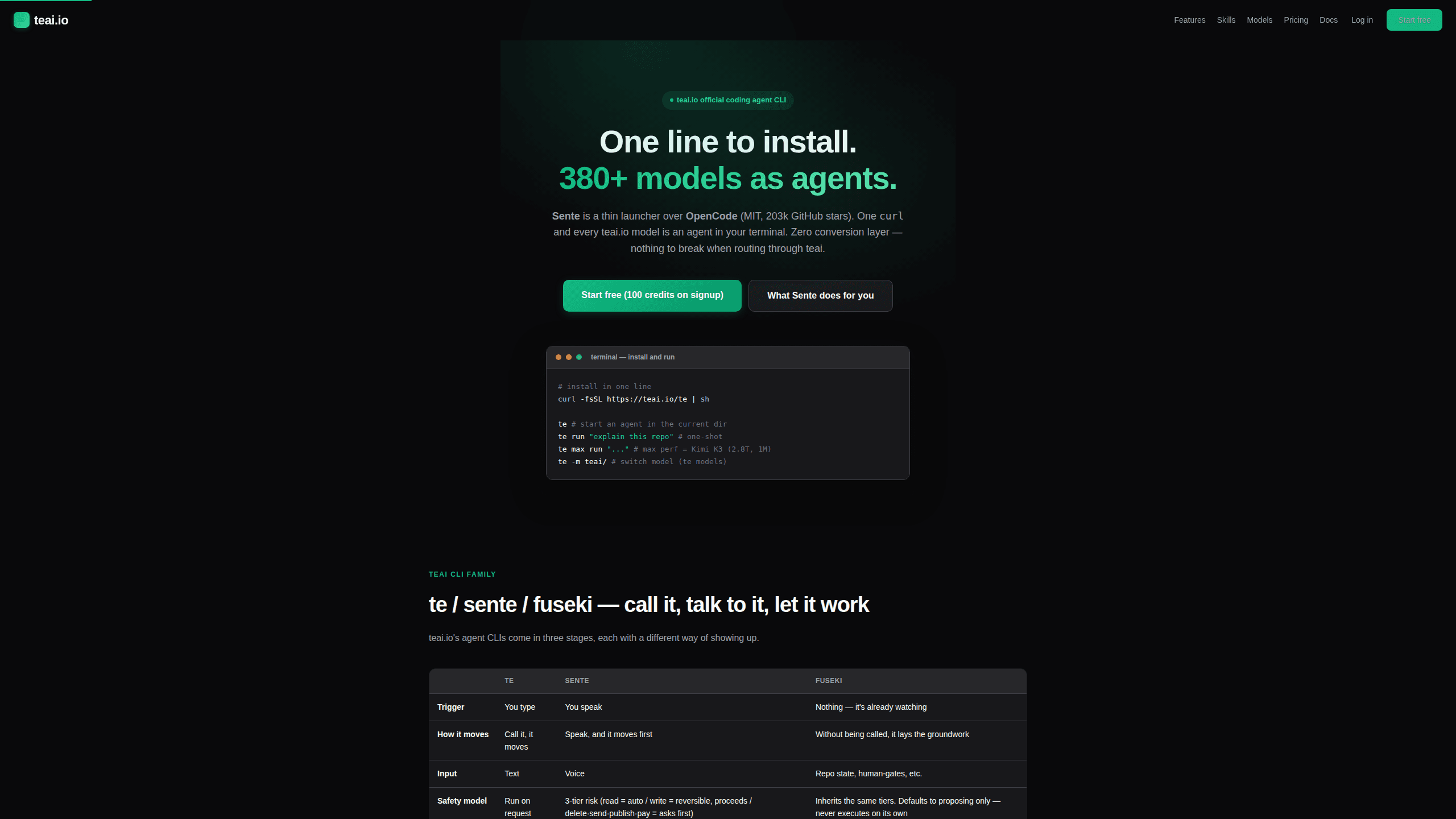
Sente is an AI coding agent CLI from teai.io: one curl command installs it, it wraps OpenCode, and it reaches more than 380 models through one OpenAI-compatible endpoint.
About Sente
What Is Sente
Sente is a command line coding agent from teai.io, a Japanese model gateway that bills in yen. The command is te, and a sente alias comes with it. Type it inside a project folder and an agent reads files, edits code, runs shell commands, and reports back.
Under the hood Sente is a thin launcher over OpenCode, the MIT-licensed terminal agent with roughly 203,000 GitHub stars. teai.io does not keep a fork. Each launch syncs the model catalog from teai.io and points OpenCode at a generated config, so upstream fixes arrive without a migration step.
The pitch is less about a new agent than about where the tokens come from. One base URL reaches Claude, GPT, Gemini, Kimi, DeepSeek, and Qwen models at published list prices, and moving between them takes a flag rather than a config rewrite. In the company's own measurement a task on DeepSeek V4 Pro costs about ¥0.03, which changes how often you let an agent take a second attempt at something.
Limits sit in the same place. Windows runs it through WSL only. The interface lives in a terminal, so anyone comparing it with an AI coding assistant that sits in an editor will find Sente thin. The free teai.io tier includes no credits. Top-ups start at ¥500.
Getting Started
- Run
curl -fsSL https://teai.io/te | shin a terminal on macOS, Linux, or WSL. The installer adds OpenCode if it is missing. - Create an account at teai.io with an email address, add credits, then run
te loginto store the key. - Open a repository folder and start
tefor an interactive session, orte run "explain this repo"for a one-shot task. - Switch models with
te models, or callte max run "..."when a task needs the largest model in the catalog. - Optional:
te app install senteadds the macOS menu bar app, andte talkstarts a spoken session.
Product Information
A quick look at Sente's pricing, supported platforms, and performance.
Best for
The users, tasks, and scenarios where this tool fits best.
Users
- Solo developers and indie hackers
- Small teams that pay in yen
- Developers who live in a terminal
Tasks
- Understanding an unfamiliar repository
- Refactors and small feature work
- Handing off a task by voice
Scenarios
- You need work to continue after the laptop closes
- Token cost decides how often you experiment
- Code that touches customer data
Key features
One-Line Install on Top of OpenCode
A single curl command installs the CLI, adds OpenCode if the machine lacks it, and writes a config that points at teai.io. There is no separate runtime to manage and no fork to update by hand. The install also drops sente-rules.md into ~/.config/teai/, and every session loads those rules: read before you write, always ship a deliverable.
More Than 380 Models Behind One Flag
The catalog covers Claude, GPT, Gemini, Kimi, DeepSeek, Qwen, and others, all reachable with te models. Short aliases hide the routing: te lux picks a Claude or OpenAI flagship, te max picks Kimi K3 with its 2.8T parameters and 1M context, and the default handles everyday edits. Changing models is one flag, not a new install.
OpenAI-Compatible Routing Without a Conversion Layer
teai.io speaks the OpenAI API natively, and OpenCode does too, so tool calls pass through without a translation step between formats. That matters for function calling, where a lossy conversion tends to break arguments or drop fields. In practice the agent's file edits and shell commands land the same way they would against a direct provider.
Voice Sessions and a Cloud Workspace
te talk turns Sente into a voice coding agent on macOS, Linux, and WSL: you describe the task out loud and the agent reads its reply back. Sente Cloud at sente.teai.io runs the same account in a browser workspace, with sign-in by emailed one-time code. The free plan allows one concurrent cloud job, and paid tiers raise that to four or eight.
Local PII Scrubbing Before the Request Leaves
te privacy scrub on masks emails, phone numbers, addresses, API keys, private keys, and high-entropy tokens on the machine before anything is sent. Names come from your Contacts dictionary, Japanese honorific patterns, and Apple's on-device recognition, and the reply is restored before you see it. The company measures about 0.1 ms per request and notes that detection is not complete: a Japanese given name with no honorific and no dictionary entry can slip through.
Five Reference Skills With Retrieval
Five beta skills answer questions from a 748-entry corpus instead of from model memory: legal (259 entries on Japanese civil, labor, and company law), security (131 on SQL injection, auth, and secrets), freelance (125 on contracts and Japanese invoicing), infra (117 on Docker, CI/CD, DNS, and TLS), and license (116 on MIT, Apache, GPL, and AGPL obligations). Retrieval runs before the answer, and unrelated questions return no match rather than a guess.
Pros and cons
Pros
- The app itself is free. You pay for tokens or credits, and an ordinary task on a budget model costs a few yen.
- Swapping providers is a flag change, so a failed model or a price shift does not force a config rewrite.
- Empty responses are not billed, and failed paid media jobs and failed MCP tool calls are refunded in full.
- Because Sente tracks OpenCode upstream instead of forking it, every improvement to that project reaches your terminal.
- Japanese support, JPY invoicing, and a Tokyo region make it a rare fit for teams that need billing and latency inside Japan.
Cons
- Windows users must go through WSL, which adds setup work and can complicate file paths for anyone on a Windows-only stack.
- There is no editor window or visual diff, so reviewing a large change means reading terminal output or opening git separately.
- Cloud concurrency is capped by plan at one, two, four, or eight jobs, and a busy period also hits a shared ceiling.
- Per-task cost moves with the model and the token count, which makes monthly spend harder to predict than a flat subscription.
Frequently asked questions
Sente is a coding agent that runs in your terminal. It comes from teai.io and installs with one curl command. Once running, it reads repository files, edits code, runs commands, and explains what it changed.
Related content
Explore related tools, skills, and articles for Sente.
Sente Alternatives

Foley
Hanamori Labs, LLC · Voice & Language · Productivity · AI AssistantFoley is a voice to-do list that turns a spoken sentence into a filed task, complete with project, date and time, then helps you plan the day around what is already there.

HireKey
HireKey · Voice & Language · Productivity · LeaningHireKey is an AI job search copilot built by a former tech recruiter. It checks role fit, tailors resumes, runs interview practice and tracks every application.

Fluence
Yay Software (Yannick Huchard) · Writing · Voice & Language · ProductivityFluence is an Android app that reads PDFs, EPUBs, Word files and web articles aloud, follows each sentence as it speaks, and answers questions about the text on the phone itself.