

SEO Utils
SEO Utils · Coding · Marketing
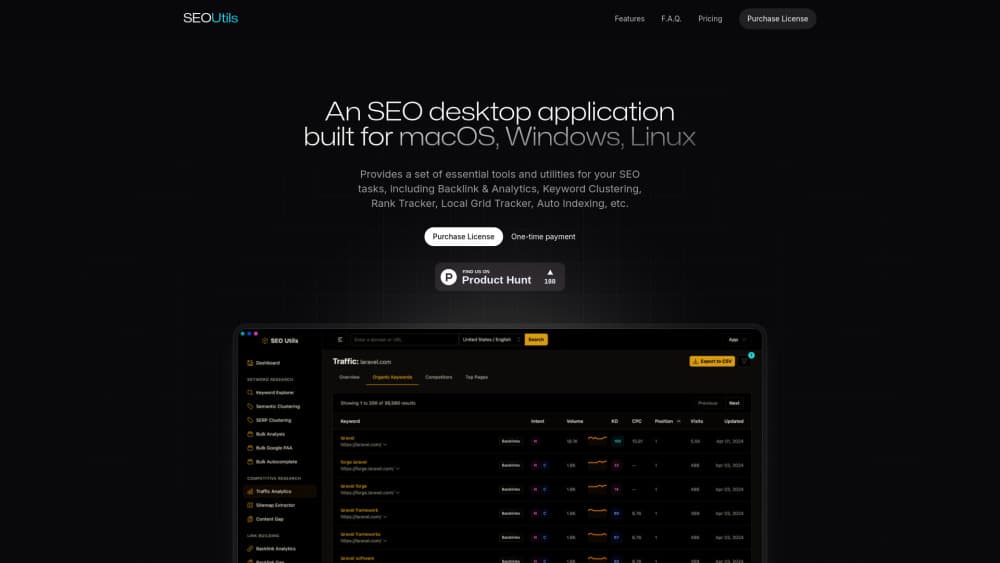
SEO Utils is a desktop SEO app for macOS, Windows, and Linux that tracks rankings, AI search visibility, keywords, and backlinks in one workspace.
About SEO Utils
What Is SEO Utils
SEO Utils is a desktop application for macOS, Windows, and Linux made by SEO Utils. Rather than a browser tab you leave open, it installs on your machine and runs keyword research, rank tracking, backlink analysis, and site audits from a single window. The pitch is control: your data sits on your own computer, and one app replaces a stack of separate subscriptions.
It covers three areas that used to need different tools. Traditional SEO handles the usual work of Google and Bing rankings, keywords, and backlinks. Local SEO manages business profiles, reviews, and report groups. AI search optimization, sometimes called GEO or AEO, tracks whether AI answer engines mention or cite your brand and how their bots crawl your site.
The main limits are real. It's a desktop app, so there's no browser-based login to fall back on, and heavy features lean on DataForSEO for data, which can add cost or dependency. Some parts, like the MCP server and automation, assume you're comfortable with a bit of setup rather than pure point-and-click.
Getting Started
- Download the installer for macOS, Windows, or Linux and open the app.
- Purchase a license, since SEO Utils is a paid product rather than a free tool.
- Add a project or workspace and connect your data, such as Google Search Console or Google Analytics 4.
- Run a tool from the sidebar: keyword research, rank tracking, backlink analysis, or an AI visibility check.
- Save results to collections, schedule tracking, or export a client report.
Product Information
A quick look at SEO Utils's pricing, supported platforms, and performance.
Best for
The users, tasks, and scenarios where this tool fits best.
Users
- SEO agencies
- In-house marketers
- Local SEO specialists
- Content teams watching AI answers
- Technical SEOs
Tasks
- Tracking rankings
- Doing keyword research
- Analyzing backlinks
- Monitoring AI search
- Querying SEO data in plain English
Scenarios
- Reporting to clients every month
- Catching traffic shifts early
- Auditing a site before a launch
- Building a content plan from gaps
Key features
AI search visibility tracking
SEO Utils includes an LLM rank tracker that checks whether AI answer engines mention, cite, or recommend your brand. It looks at Google AI Overview, AI Mode, ChatGPT, and similar services, and reports a visibility score, sentiment, and citation count. You can plot competitors on a scatter chart and set the tracking on a schedule. For teams that still measure success by Google rankings, this adds the newer question of what AI says about the brand, which increasingly shapes the traffic a site gets.
MCP server for plain-English queries
The app ships an MCP server, which lets an AI client like Claude Desktop or Claude Code read your SEO data and answer questions in plain English. You can ask which keywords are losing rankings this month, surface cannibalization, or run a content gap check without building a report by hand. It works with automation tools such as n8n, Make, and Zapier too. The catch is that it asks for a connector to be set up, so it fits users who don't mind a few minutes of configuration.
Keyword research and clustering
Keyword Explorer pulls volume, keyword difficulty, CPC, and intent for thousands of ideas, including related terms, questions, and long-tail variations. You search Google or Bing and send chosen keywords straight to Rank Tracker or Clustering, or save them to collections. Beyond single lookups, bulk tools handle keyword metrics, search intent, Google's People Also Ask, and autocomplete in batches, which is the part that saves time on a large content plan.
Rank tracking and reporting
Rank Tracker follows positions across Google, Bing, and Maps and lines them up next to traffic and conversions. You can build client workspaces, schedule report delivery, and hand each client a branded dashboard that opens in a browser. Because it sits beside GA4 and Google Search Console data, you can cross-reference a position change against sessions, key events, and revenue, which turns a ranking report into something a client can act on.
Log file analysis for AI and search bots
Log File Analysis reads your server logs and shows how AI answer engines treat the site. It tracks PerplexityBot, ClaudeBot, OAI-SearchBot, GPTBot, and ChatGPT-User alongside Googlebot and Bingbot, and splits traffic into AI versus search. You can see robots.txt compliance and pages AI may be missing, then auto-import logs over SFTP or upload archives by hand. Few desktop tools cover this, which makes it the feature that most marks SEO Utils as built for the AI search era.
Local SEO and citation tools
For businesses that depend on nearby search, SEO Utils handles Google Business Profile reports, review fetching, and GMB report groups. You can audit local citations, pull Google reviews, and organize profiles by client. It sits alongside the rankings and traffic data, so a local report and a broader SEO report come from the same place instead of two subscriptions.
Search Console and analytics integration
SEO Utils connects Google Search Console and Google Analytics 4 and keeps daily organic metrics, including sessions, key events, and revenue by landing page. It stores historical data past Google's limit and auto-syncs each day, so you can run SEO split tests or annotate algorithm updates on your charts. Bulk URL submission for indexing rounds out the technical side. The value is having first-party data beside third-party rankings in one view.
Pros and cons
Pros
- Runs on your own machine, so the data and the working files stay local rather than in a vendor's cloud.
- Covers traditional SEO, local SEO, and AI search visibility in one app, so one license replaces several subscriptions.
- The LLM rank tracker answers a question older tools ignore: whether AI engines mention or cite the brand.
- The MCP server lets you query SEO data in plain English through an AI client, which speeds up reporting.
- Broad tool list, from keyword research and backlinks to log file analysis and local citation audits.
Cons
- Desktop-only, so there's no web login and work is tied to the machine where the app is installed.
- It's a paid product with no free plan, so you have to buy before you can test the full workflow.
- Heavy data features lean on DataForSEO, which can add cost or become a dependency if that service changes.
- Features such as the MCP server and log analysis need setup, so they're less suited to users who want a zero-config tool.
Frequently asked questions
SEO Utils is a desktop SEO application and AI SEO tool for macOS, Windows, and Linux. It combines keyword research, rank tracking, backlink analysis, local SEO, and AI search visibility tracking in one app, and it adds an MCP server so you can query the data through an AI client.
Related content
Explore related tools, skills, and articles for SEO Utils.
SEO Utils Alternatives

Base Code
Base44 (Wix) · Coding · ProductivityBase Code is a shared cloud development environment from Base44. Teammates describe changes to an existing GitHub codebase in chat, preview them live and send them back as pull requests.

Google EmbeddingGemma 2
Google DeepMind · Writing · Image · CodingGoogle EmbeddingGemma 2 is a 740M-parameter open model that turns text, code, images, audio, and video frames into vectors in one 768-dimension space, running on phones and laptops.

GitGlow
GitGlow · Coding · ProductivityGitGlow is a local-first desktop Git client that lets independent developers review their own code and their AI agents' changes in one place before shipping.