

Shortwave
Shortwave · Writing · Productivity
Shortwave is an AI email assistant and Gmail client that organizes your inbox, filters mail with plain-English rules, and drafts replies in your own voice. It runs on iOS, Android, Mac, and Windows.
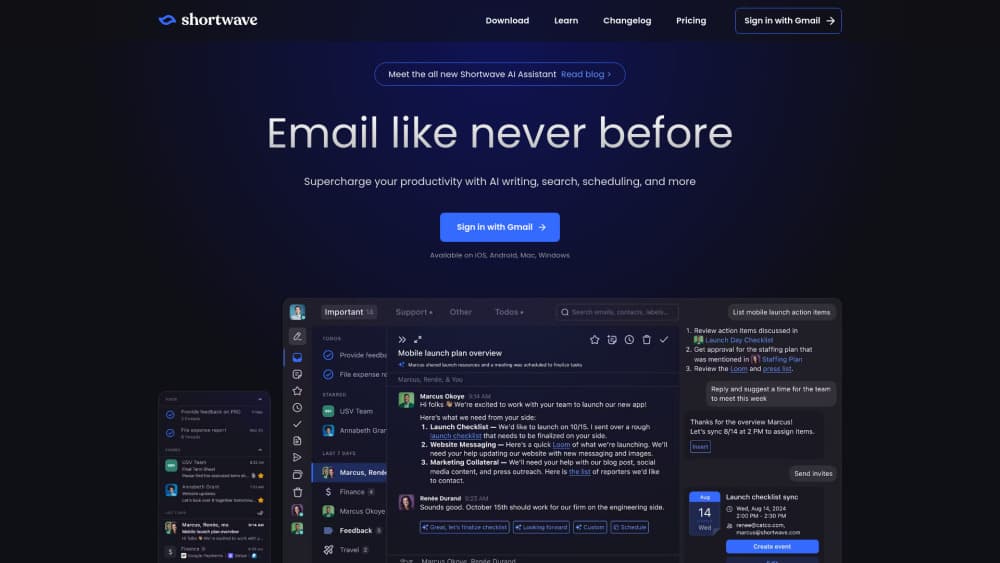
About Shortwave
What Is Shortwave
Shortwave is an email client built around Gmail, aimed at people who want an AI assistant to handle the repetitive parts of their inbox. Instead of reading every message by hand, you describe what you want in a prompt and let the assistant sort, search, and reply. The team behind it came out of Google's Firebase group, and the product leans heavily on features that Google Inbox fans missed after it shut down.
The core problem it solves is inbox overload. Shortwave turns your inbox into a task list, groups noisy senders into bundles, and uses AI search to answer questions about old threads. Writers can ask it to draft a reply in their tone of voice, or check a calendar and write a scheduling email in one step.
The biggest limitation is that it's tied to Gmail and Google Workspace. There's no Outlook or IMAP support, so if your work runs on Microsoft 365, Shortwave won't fit. It also uploads your email to its own servers for processing, which is a dealbreaker for some companies.
Getting Started
- Download Shortwave from its website or an app store, then sign in with your Google account.
- Authorize access to Gmail and, if you want scheduling features, Google Calendar.
- Pick a plan inside the 14-day trial, or stay on the limited free tier.
- Try one AI action, like "summarize unread emails," to see how the assistant works.
- Set up an AI filter so new mail gets labeled or archived automatically.
Product Information
A quick look at Shortwave's pricing, supported platforms, and performance.
Best for
The users, tasks, and scenarios where this tool fits best.
Users
- Small teams that live in Gmail and want shared inboxes, comments, and assignees without leaving email.
- Solo founders and freelancers juggling client threads who need AI to sort what matters and draft replies fast.
- Former Google Inbox users who miss bundles, snooze, and a task-style inbox on a modern client.
Tasks
- Triaging a crowded inbox
- Writing replies in your own voice
- Finding answers in old email
- Scheduling meetings
Scenarios
- A startup sales team sharing live threads and tagging teammates with comments instead of pasting screenshots into chat.
- A consultant clearing promotions and newsletters in bulk with bundles to reach inbox zero faster.
- A manager tracking who replied to which client by turning messages into todos with notes and due dates.
Key features
AI Inbox Organization
Shortwave's assistant sorts your inbox in one click. It archives and deletes low-priority mail, pulls action items out as todos, and stars the messages worth your attention. You can also describe custom rules in plain English and let an AI filter label, star, or archive matching mail automatically.
Personalized AI Writing
The assistant studies the emails you send to learn your tone, phrasing, and even recurring facts about you. When you ask for a draft, the result reads like something you'd write, not a template. You can also get one-click inline replies for simple responses.
AI-Powered Search
Beyond keyword search, Shortwave lets you phrase a question in natural language and search across your team's email history. It can read long threads and attachments, including PDFs and code files, and return the answer rather than a list of links.
Prebuilt Integrations
The assistant connects to Slack, Google Calendar, Notion, Asana, and HubSpot, so you can automate a workflow without leaving your inbox. A sister product, Tasklet, extends this to scheduled automations across thousands of apps.
Inbox Splits and Bundles
You can divide your inbox into tabs by sender, label, or custom query so important mail stays visible. Bundles group promotions, newsletters, and other automated senders so you can clear them in a few clicks.
Team Collaboration
Shared threads update live and come with a unique link you can drop into other tools. Teammates can comment privately, assign an owner, and mark a thread done, which turns email into a lightweight project tracker.
Pros and cons
Pros
- Deep AI features that go past summaries into filters, drafting, and search.
- Fast, keyboard-driven client with markdown support and a command palette.
- Team tools like shared threads, comments, and assignees in one place.
- Strong privacy stance, including CASA Tier 2 compliance and no third-party model training on your data.
Cons
- Gmail and Google Workspace only, so Outlook and IMAP users are out entirely.
- Paid plans start at $30 per seat per month, which is steep for casual users.
- The free tier is limited, and heavy AI use pushes you toward a higher plan.
- Some advanced features, like CRM logging and deep automation, expect a business setup.
Frequently asked questions
No. Shortwave is a Gmail client and only connects to Google accounts and Google Workspace. There's no Outlook, Exchange, or generic IMAP support, so Microsoft 365 users can't use it.
Related content
Explore related tools, skills, and articles for Shortwave.
Shortwave Alternatives

Google EmbeddingGemma 2
Google DeepMind · Writing · Image · CodingGoogle EmbeddingGemma 2 is a 740M-parameter open model that turns text, code, images, audio, and video frames into vectors in one 768-dimension space, running on phones and laptops.

MePersona
MePersona, Inc. · Writing · Productivity · MarketingMePersona is an AI unified inbox for creators. It learns your voice, drafts replies to fan messages from 12 platforms, and sends only what you approve.

Fluence
Yay Software (Yannick Huchard) · Writing · Voice & Language · ProductivityFluence is an Android app that reads PDFs, EPUBs, Word files and web articles aloud, follows each sentence as it speaks, and answers questions about the text on the phone itself.