

Side Space
Side Space · Coding · Productivity
Side Space is a Chrome extension that turns the browser side panel into a vertical tab manager with AI grouping, built for anyone juggling too many open tabs.
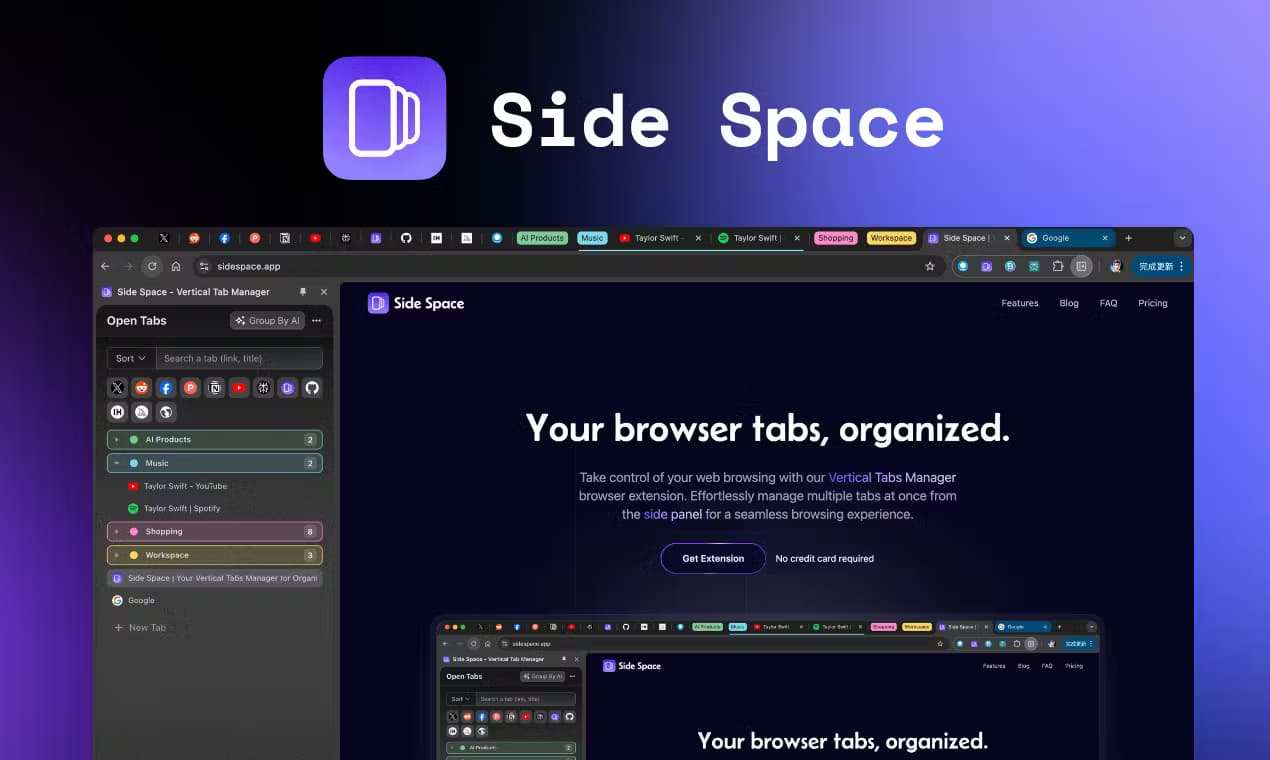
About Side Space
What Is Side Space
Side Space is a Chrome extension that fills the empty side panel area of your browser with a vertical tabs manager. Instead of a cramped row of tiny tab icons, it gives every open page a full-width row you can scan, rename, and sort into groups. The project has since grown into a broader AI copilot for the browser, and you'll see it marketed under the Side Copilot name, but the core idea stays the same: manage tabs and automate small browser tasks without leaving the page you're on.
The problem it targets is familiar. Once you pass thirty or forty tabs, Chrome's horizontal strip becomes useless. You can't read the titles. You can't find the tab you need, and you can't tell which ones are eating memory. Side Space moves that whole mess into a vertical list on the side, adds search and grouping for cleaner tab organization, and layers an AI chat on top so you can ask questions about what's open.
The biggest limitation is scope: Side Space is built for Chromium-based browsers and installs as an extension, so it won't help if you live in Safari. The free tier caps you at five spaces and one thousand URLs, and the automation features sit behind the paid plans. Heavy AI use also pushes you toward bringing your own API key or paying for Pro+.
Getting Started
- Install the Side Space extension from the Chrome Web Store and open the browser side panel where it lives.
- Create an account if you want cloud sync, then build your first space and drop your open tabs into it.
- Use AI grouping to sort tabs by domain or by custom categories, and rename groups so they make sense later.
- Try chat mode to ask questions about your current tab, or upgrade to a paid plan to get agent mode for browser automation.
Product Information
A quick look at Side Space's pricing, supported platforms, and performance.
Best for
The users, tasks, and scenarios where this tool fits best.
Users
- Researchers and writers who keep dozens of sources open at once and need to find them again, ideally on a Chromium browser where sync works across devices
Tasks
- Organizing a chaotic window into named, themed spaces so a research session survives a restart
- Asking the AI copilot a question about an open tab without copying text into a separate chatbot
- Automating repetitive browser chores like grouping tabs, moving windows, or searching history
Scenarios
- A long study or research session where you accumulate tabs across several topics and need to keep them apart
- Daily work where you switch between a handful of fixed spaces (email, docs, dashboards) and want one-click sorting
- A tab hoarder's rescue mission, where AI grouping clears duplicates and pulls order out of a window with a hundred tabs
Key features
Vertical Tabs Manager
Side Space moves your tabs out of the horizontal strip and into a full-height panel on the side of the screen. You can read complete page titles, pick tabs by clicking, and group related ones together. If you've used Arc or Edge's vertical tabs, this is the same convenience, available as an extension in any Chromium browser. That's the whole pitch.
AI Tab Grouping
One click sorts your open tabs into groups, either by domain or by categories you define yourself. The Group Guard feature watches for patterns and can auto-detect and group tabs as they come in. It's the fastest way to tame a window that's grown past the point of manual sorting.
Chat With Your Open Tabs
Chat mode gives the AI copilot context about the page you're on, so you can ask about the content without leaving the tab. No copy-paste. On paid plans you can chat across multiple tabs at once, which is handy when you're comparing a few sources side by side.
Agent Mode for Browser Automation
Agent mode turns the copilot into something that takes actions rather than just answering. It handles browser chores like grouping tabs, managing windows, searching your history, and researching topics. Pro runs a page-level agent. Pro+ adds cross-page automation for longer workflows.
Cross-Browser Space Sync
Spaces save automatically and sync across devices and browsers once you sign in. The company lists support for Chrome, Edge, Brave, Vivaldi, Sigma, Comet, Firefox, and Zen. A space you build on your laptop shows up on your desktop.
Tab Housekeeping Tools
Beyond grouping, Side Space handles the grunt work: pin key tabs like a speed dial, find anything with fuzzy search, suspend tabs to free up memory, and strip out duplicates automatically. You can also copy all URLs in a space as markdown, text, or JSON, which is useful when you're handing a research set to someone else.
Theming and Dark Mode
You can customize each space's color palette so different projects look different at a glance, and switch to dark mode for night browsing. It's a small touch. But it makes the panel easier to navigate when you're running several spaces at once.
Pros and cons
Pros
- Repositions a messy horizontal tab bar into a scannable vertical side panel that makes full titles readable
- AI grouping by domain or custom categories clears clutter in one click, and Group Guard keeps it tidy as you browse
- Syncs spaces across multiple Chromium browsers and devices, so your setup follows you
- Free tier is genuinely usable, with five spaces, cloud sync, and chat with the current page at $0
Cons
- No Safari support, which rules out Apple's default browser users
- Automation like agent mode and multi-tab chat sits behind paid plans, and free agent mode is limited to two trials a day
- The free plan's one-thousand-URL cap arrives faster than you'd expect if you hoard tabs
- The best features assume you'll bring your own API key or step up to Pro+, which adds setup for casual users
Frequently asked questions
It's a Chrome extension that puts a vertical tabs manager in your browser's side panel and adds an AI copilot for organizing and automating tabs. You get search, grouping, and sync, plus chat and agent features on paid plans.
Related content
Explore related tools, skills, and articles for Side Space.
Side Space Alternatives

Base Code
Base44 (Wix) · Coding · ProductivityBase Code is a shared cloud development environment from Base44. Teammates describe changes to an existing GitHub codebase in chat, preview them live and send them back as pull requests.

Google EmbeddingGemma 2
Google DeepMind · Writing · Image · CodingGoogle EmbeddingGemma 2 is a 740M-parameter open model that turns text, code, images, audio, and video frames into vectors in one 768-dimension space, running on phones and laptops.

GitGlow
GitGlow · Coding · ProductivityGitGlow is a local-first desktop Git client that lets independent developers review their own code and their AI agents' changes in one place before shipping.