

Silkwave
Silkwave · Other · Chatbot
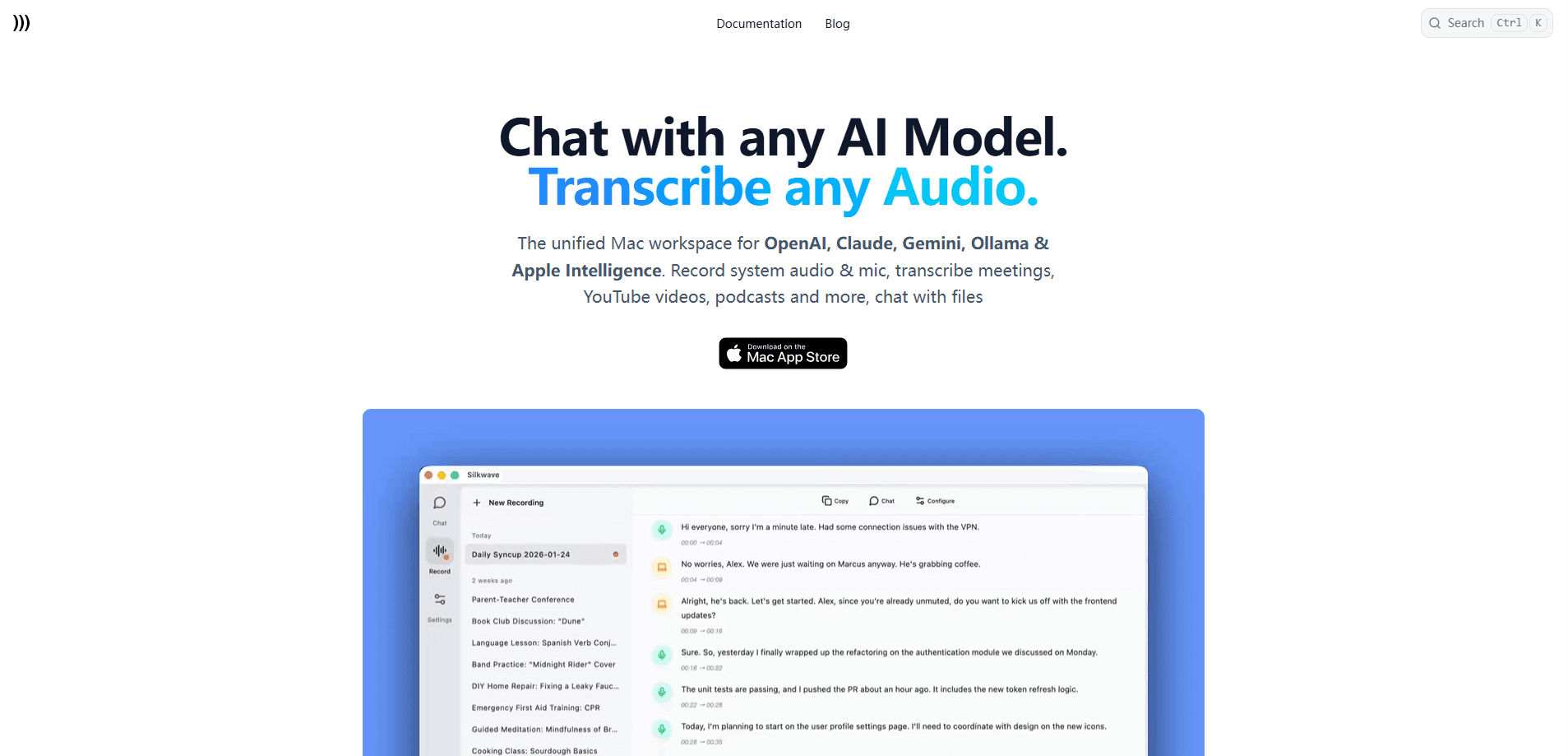
Silkwave is a Mac AI chat client that puts ChatGPT, Claude, Gemini, and Ollama into a single window. It works as a BYOK AI chat app: you connect the models with your own API keys, swap between them from the chat box, and drop files straight into a conversation. No more juggling browser tabs. No more separate subscriptions. It sits alongside a small family of related Mac apps from the same studio, so voice transcription and video summaries share the same design language.
About Silkwave
What Is Silkwave
Silkwave is a desktop AI chat client for macOS. It gives you one interface for the models you already pay for. You bring your own API keys for OpenAI, Anthropic, Google, and Nebius, or you run local models through Ollama and Apple Intelligence when you'd rather keep everything on your machine.
The appeal is control. You aren't locked into one vendor's subscription, you aren't paying a markup on API calls, and you can switch models mid-conversation without copying text between apps. What you lose is the plug-and-play of a bundled service. If you don't have API keys yet, you'll need to set those up first.
Silkwave Chat is the core app, but the studio also ships Silkwave Voice (AI transcription and note-taking), Silkwave Video (YouTube transcription), and Silkwave Clarity (noise removal). Each is sold separately and each targets a specific job rather than trying to be everything.
Getting Started
- Download Silkwave Chat from the Mac App Store. It requires macOS 14 or later.
- Open the app and paste in the API keys for the providers you want to use, such as OpenAI, Anthropic, or Google.
- If you prefer local models, install Ollama and point Silkwave at your running instance instead.
- Start a new chat and pick your model from the switcher next to the input box.
- Drop in a document, image, or audio file when you want to ask questions about it, then export or copy anything worth keeping.
Product Information
A quick look at Silkwave's pricing, supported platforms, and performance.
Best for
The users, tasks, and scenarios where this tool fits best.
Users
- Mac power users who already hold API keys for several providers and want them in one place, no subscription stack required
- Privacy-conscious users who want local models through Ollama and never send prompts to a cloud
- Developers and researchers who swap between ChatGPT, Claude, and Gemini often enough that copying answers between apps gets old
Tasks
- Chatting with long documents, images, or audio files in a single conversation instead of uploading them to a web tool
- Comparing how two models answer the same prompt without rewriting it each time
- Generating images through Gemini's image models from inside the same app
- Searching back through old conversations by keyword when you can't recall where a useful answer landed
Scenarios
- Late-night coding sessions where you want dark theme and a fast model switch right from the input
- Handling sensitive material, such as client contracts, on a local model so nothing leaves the Mac
- Keeping a running research chat where files and follow-up questions live together instead of scattered across browser tabs
Key features
One App for Cloud and Local Models
Silkwave Chat connects OpenAI, Anthropic, Google, and Nebius through your own API keys, and it also talks to Ollama and Apple Intelligence for local runs. So why does the mix matter? You can use a hosted model for hard questions and a local one for anything confidential. You decide per conversation which side handles the work.
Bring Your Own Keys, No Markup
There's no Silkwave subscription layered on top of your API costs. You pay the providers directly and pay Silkwave once for the app. Simple. For heavy users, that one-time price is the whole pitch: your usage bill doesn't grow because a middleman is taking a cut.
Chat With Your Files
You can drop documents, images, audio, and video into a conversation and ask questions about them. Summaries, quotes, and specific details all come back in the same thread, which saves the copy-paste dance between a chat window and a file preview.
Instant Model Switching
A switcher next to the chat input lets you jump between models without leaving the conversation. If Claude's answer feels thin, ask Gemini the same thing in a second. Same prompt, new model. That kind of side-by-side comparison is awkward when each model lives in its own app.
Search Across All Chats
Silkwave indexes your titles and messages, so you can search everything you've ever asked. Results highlight the matching keyword. That helps when a useful answer is buried three weeks back. It's a small feature that quietly replaces a lot of manual scrolling. You spend less time hunting for that one answer. That alone saves real minutes.
Image Generation
Gemini's image models are wired in, so you can generate images without opening a separate tool. Handy when a quick visual is part of a bigger task and you don't want to break your flow.
Privacy-First Local Option
Run models locally and your prompts never leave the Mac. The same studio extends this to its voice app, where transcription happens on-device and audio stays put unless you explicitly send a summary for processing.
Pros and cons
Pros
- Connects four major cloud providers plus local Ollama runs in a single Mac interface
- Bring-your-own-key model means no subscription and no per-token markup
- File chat handles documents, images, audio, and video without leaving the conversation
- Search across all chats with keyword highlighting makes old answers findable
- Local model support gives a genuine privacy path for sensitive work
Cons
- No free plan, so you pay $19.99 up front before you know whether the workflow fits
- No public API, which rules it out if you wanted to script or extend the client
- Requires macOS 14 or later, so older Macs are out
- You need your own API keys from each provider, which is extra setup before your first chat
Frequently asked questions
It's a Mac chat client that puts multiple AI models into one app. You use it to talk to ChatGPT, Claude, Gemini, or local Ollama models from a single window, and to ask questions about files you drop into a conversation.
Related content
Explore related tools, skills, and articles for Silkwave.
Silkwave Alternatives
BinkBink
BinkBink · OtherBinkBink is a free online game platform and AI game maker that lets anyone turn a short text description into a playable browser game. You can jump into hundreds of community-made games. Or describe your own idea and play it in seconds, then share it with friends. Want to create your own game? You don't need to code. No engine setup, no download, no hassle.

Audiogen
Audiogen Inc. · OtherAudiogen is an AI music generator built by Audiogen Inc., a small research team that spent about 2.5 years training its own generative music model and designing a web interface around it. Instead of a plain text box, this AI music tool turns the timeline into a beginner-friendly Generative Audio Workstation, or GAW, where inpainting, extending, remixing and stem editing work more like painting on a canvas. The product is still in beta, so access runs through a waitlist or an invite. Paid plans aren't published yet.

Aiml API
AIMLAPI OÜ · OtherAiml API is a unified AI model API that puts more than 1000 models from OpenAI, Google, Anthropic, and others behind one endpoint and one bill. You write code against a single OpenAI-compatible schema, then switch between chat, image, video, and audio models by changing a model string. It suits developers and small teams who want multi-model access without juggling a dozen separate provider accounts, and it removes the usual billing headache that comes with testing several vendors. One key covers it all.