

Simple Analytics
Simple Analytics · Marketing
Simple Analytics is privacy-first website analytics that counts pageviews, referrers, campaigns, and events without cookies, IP addresses, or visitor profiles.
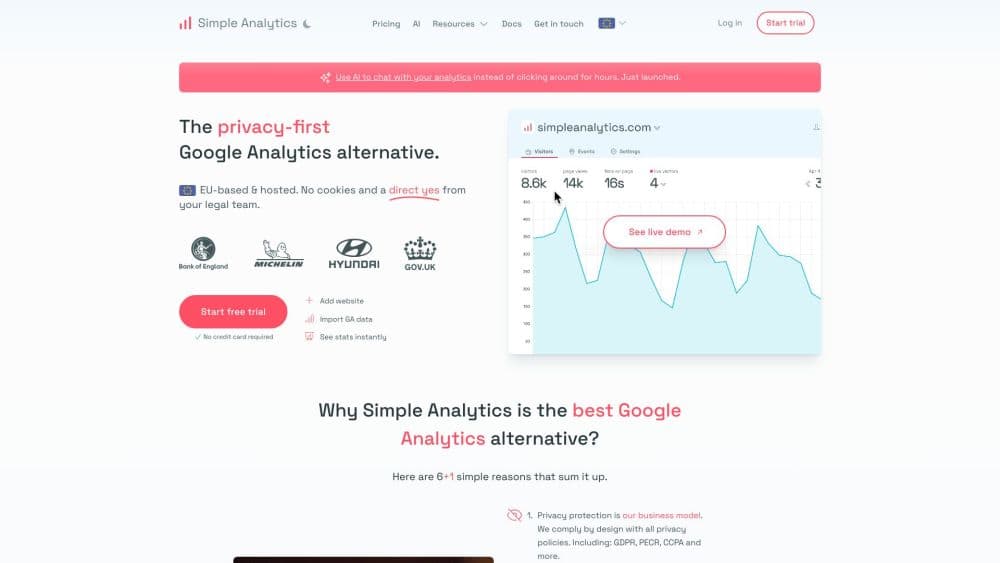
About Simple Analytics
What Is Simple Analytics
Simple Analytics is a web analytics service built around a single idea: you can measure traffic without collecting personal data. The script sends one anonymous record per pageview. Each record stands alone, with no cookie, no IP address, and no identifier tying it back to a person. Because nothing personal is stored, the service works without a consent banner, which is the main reason teams switch to it.
That trade-off cuts both ways. You get traffic numbers that include the visitors who reject consent, something Google Analytics cannot show by default. What you lose is cross-device tracking, per-user journeys, and exact visitor counts. Simple Analytics counts a visitor as someone arriving from an outside link or search result, then estimates the number. The dashboard is honest about this, and the documentation labels visitor and session figures as estimates while pageviews are exact.
The company is small, independent, and based in the Netherlands. It was founded in 2018 and states it is fully self-funded. That matters practically: the roadmap is not tied to an ad business, and the product has stayed narrow, focused on pageviews, events, goals, and the data access layer behind them. Teams that need session replay or cohort analysis should look elsewhere, since the product is designed not to create visitor identities at all.
Getting Started
- Sign up at simpleanalytics.com. The free plan needs no card, and the paid plans come with a 14 day trial.
- Add your website, then copy the script tag into your site's header. On WordPress, Next.js, Astro, and other common setups there is a plugin or framework helper that handles the paste.
- Load a page and check the dashboard. A first pageview usually appears within seconds, which confirms the script is running.
- Add events. Call sa_event for button clicks, form submissions, or signups, or load the automated events script to capture outbound links, email clicks, and file downloads without writing code.
- Group the events you care about into goals, then set up email reports or pull the same numbers through the Stats API into your own dashboard.
Product Information
A quick look at Simple Analytics's pricing, supported platforms, and performance.
Best for
The users, tasks, and scenarios where this tool fits best.
Users
- Small site owners and bloggers
- Marketing teams running GA4
- Agencies reporting for clients
- European companies with GDPR questions
Tasks
- Counting traffic without cookies
- Tracking the events that matter
- Getting analytics data into other tools
- Spotting broken installs
Scenarios
- Auditing the consent gap
- Launching on a site that cannot ask for consent
- Reporting for several client sites
Key features
Cookieless Tracking
The core feature is also the simplest. One lightweight script records a pageview, and nothing is stored on the visitor's device. No cookies, no local storage, no fingerprinting, no IP addresses, which the company says are replaced with zeros even in server logs. The practical result is that the analytics run without a consent prompt, and the numbers include people who would have clicked "reject" on a banner.
Exact Pageviews and Estimated Visitors
Simple Analytics splits its metrics by accuracy. Its cookieless pageview tracking reflects every recorded event, with no sampling and no modeling. Visitors are estimated from the referrer: a pageview arriving from an external link or search result counts as one visitor. That makes traffic source figures solid and unique visitor figures approximate. Cross-device tracking is not supported, so one person browsing on a phone and a laptop counts twice.
Events, Goals, and Metadata
Custom events run through sa_event, and a separate script captures outbound link clicks, email clicks, and downloads automatically. Any event can carry metadata, meaning extra parameters you attach to slice results later, as long as the values contain no personal data. Events and pageviews then combine into goals, including funnel steps, which is how the product covers signups and conversions without turning into a full product analytics suite.
Stats and Export APIs
Every plan above Free includes API access. The Stats API returns aggregates such as pageviews, visitors, top pages, referrers, countries, and UTM breakdowns, with wildcard filters, relative dates like today-30d, and any IANA timezone. The export API returns raw data points as CSV or JSON, streamed from the database with no export size cap, which is what makes warehouse loading practical.
Privacy-First Measurement Model
Country is derived from the browser time zone rather than the IP address, so a VPN does not distort location data. User agents are anonymized by truncating version numbers. Each website's data stays isolated, so there is no way to link a visitor across two sites. These choices are what let the company claim GDPR and ePrivacy compliance by design rather than by consent.
Automated Events and Event Explorer
Automated events cover the tracker work most sites skip: outbound links, mailto clicks, and downloads of common file types. The Events Explorer then lists everything in one table, with columns you add yourself, truncation for long values, and an export button. It is a plain tool with no charts to interpret first, which suits people who want the raw event list before drawing conclusions.
AI Assistant
A chat panel answers questions about your analytics data in plain language and returns charts and suggestions. The company positions it as a way to skip dashboard navigation rather than a separate analysis product. It is worth testing early, because the value depends on whether it answers the questions you actually ask about your traffic.
Pros and cons
Pros
- Traffic numbers stay complete when consent is rejected, which is the gap most GA4 users are trying to close.
- Setup is a single script tag, and most sites are tracking pageviews within five minutes.
- No cookie banner means less work for developers and one less element for every visitor to click through.
- The Stats API and export API return unsampled data with no export cap, so warehouse pipelines are simple to build.
- The free plan is permanent, not a trial, so a small blog can run it for years at no cost.
Cons
- Visitor and session figures are estimates, so the numbers will not match GA4 and cannot settle disagreements about unique users.
- No cross-device tracking and no user-level journeys, which rules out retention, cohort, and funnel analysis by person.
- The free plan keeps only 30 days of data and requires a badge on your site, which some businesses will not accept.
- Each extra user costs $20 per month, so a five-person marketing team pays $80 more than the base plan.
Frequently asked questions
Simple Analytics shows website owners where their traffic comes from and what visitors do on the page, without collecting personal data. It records pageviews, referrers, UTM campaigns, countries, device types, and custom events, then groups events into goals. Teams use it either as their only analytics tool or as a second source next to Google Analytics.
Related content
Explore related tools, skills, and articles for Simple Analytics.
Simple Analytics Alternatives

ngram 2.0
ngram · Video · Marketingngram 2.0 is an AI video generator for teams. It turns a prompt, a screen recording, or a product URL into a narrated explainer, product demo, or AI avatar video, and every scene stays editable.

shippedit.me
Krawlup · Marketing · Businessshippedit.me now redirects to Krawlup, a web platform that audits SEO, AEO and page speed every week, then hands the fixes to AI coding agents over MCP.

MePersona
MePersona, Inc. · Writing · Productivity · MarketingMePersona is an AI unified inbox for creators. It learns your voice, drafts replies to fan messages from 12 platforms, and sends only what you approve.