

Simpler.AI
Simpler.AI · Writing
Simpler.AI is a pay-as-you-go AI writing assistant that continues your text, answers open prompts, and checks spelling with Grammarly inside a distraction-free editor.
About Simpler.AI
What Is Simpler.AI
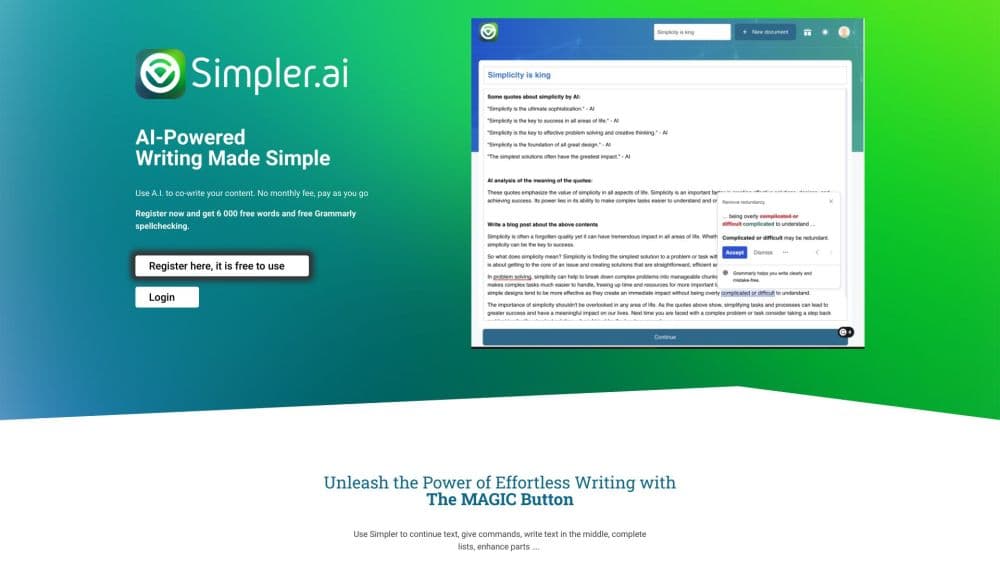
Simpler.AI is an AI writing assistant that sits inside a plain document editor, close to the way Google Docs feels. You type, and a single MAGIC button finishes what you started, or you can ask a question and get ideas, summaries, or a full draft back. There's no monthly subscription on the entry path: you buy credits and spend them as you generate text, so light use stays cheap.
The reason people pick it over a chatbot tab is the flow. Instead of copying text out to another tool and pasting it back, the assistant works where you're already writing. Continue a paragraph, write text into the middle of a document, complete a list, or rewrite a chunk you're not happy with. Grammarly runs on top, so spelling and grammar get checked as you go.
It has limits worth knowing up front. The tool is writing-focused, so it won't design graphics or build slides, and the model's output quality for niche or highly technical topics can lag behind dedicated research tools. Heavy users generating large volumes should compare credit costs against a flat monthly plan elsewhere. For notes, emails, blog drafts, and marketing copy in a simple editor, it does the job without a subscription.
Getting Started
- Create an account at simpler.ai with an email address and confirm it.
- Claim credits. You can start from $1, and early adopters get a promotional batch of free credits on top.
- Start a document in the editor and begin typing, or press the MAGIC button to let the AI continue.
- Use Ask Anything for ideas, summaries, or drafts, and let Grammarly flag spelling and grammar as you write.
- Export or copy the finished text into wherever it needs to live.
Product Information
A quick look at Simpler.AI's pricing, supported platforms, and performance.
Best for
The users, tasks, and scenarios where this tool fits best.
Users
- Students
- Bloggers and content writers
- Small business owners
Tasks
- Drafting blog posts and articles
- Writing emails and replies
- Completing and expanding lists
- Rewriting clunky passages
- Checking spelling and grammar
Scenarios
- Working on a tight budget
- Writing in multiple languages
- Late-night writing sessions
Key features
MAGIC Button Text Continuation
The MAGIC button sits in the editor and finishes text wherever your cursor is. Move the cursor to the end of a sentence and it continues from there; place it in the middle and it writes between what's already there. It can also complete lists and rewrite sections, so the same button covers most of what you'd normally switch tools to do.
Ask Anything
Beyond autocomplete, the assistant answers open prompts. You can ask for ideas before you start writing, request a summary of a dense passage, or ask it to produce a full draft from a short brief. It behaves more like a writing-minded assistant than a general chatbot, since the output lands directly in your document.
Distraction-Free Editor
The interface mirrors a simple document writer, similar in feel to Google Docs, with most buttons stripped away. The idea is to keep attention on the words. It works as an AI writing tool you can keep open next to your notes, or use for a full blog post from outline to finish.
Grammarly Spellchecking
Grammarly's checker is built into the editor and reviews your text as you type, suggesting corrections rather than waiting until the end. It means spelling and grammar are handled in the same window where you write, with no separate copy-paste step.
Multi-Language Writing
The model behind the tool was trained on a large share of internet content, and the assistant works across many languages. That makes it a reasonable fit for writing marketing copy or notes in a second language. You should still proofread output yourself before it goes public.
Dark Mode
A dark interface option reduces glare for long writing sessions and matches the setup many writers already prefer. It's a small thing, but it rounds out the tool as something people can comfortably use for extended work.
Pros and cons
Pros
- Pay-as-you-go credits mean you pay for what you generate instead of a fixed monthly fee, which keeps low-volume use inexpensive.
- The editor handles the tool's core actions, so continuing text, filling in a list, and answering prompts all happen without switching apps.
- Grammarly spellchecking is built in, so grammar and spelling get caught in the same place you write.
- Dark mode and a stripped-back interface make long sessions easier on the eyes.
- It works across many languages, which suits writers producing localized or international content.
Cons
- There's no public API, so teams that want to plug the writing engine into their own product can't.
- Output quality on niche or technical subjects can fall short of dedicated research and technical writing tools, which means more manual editing.
- It's writing-only, so anyone expecting image generation, slide design, or other media work will need separate tools.
- Credit costs climb with heavy usage, and at high volume a flat monthly subscription elsewhere can end up cheaper.
Frequently asked questions
Simpler.AI is used for writing and editing text. It continues sentences, drafts paragraphs and full passages from a prompt, completes lists, rewrites sections you don't like, and checks spelling and grammar with Grammarly. People use it for notes, emails, blog posts, taglines, and product descriptions.
Related content
Explore related tools, skills, and articles for Simpler.AI.
Simpler.AI Alternatives

Google EmbeddingGemma 2
Google DeepMind · Writing · Image · CodingGoogle EmbeddingGemma 2 is a 740M-parameter open model that turns text, code, images, audio, and video frames into vectors in one 768-dimension space, running on phones and laptops.

MePersona
MePersona, Inc. · Writing · Productivity · MarketingMePersona is an AI unified inbox for creators. It learns your voice, drafts replies to fan messages from 12 platforms, and sends only what you approve.

Fluence
Yay Software (Yannick Huchard) · Writing · Voice & Language · ProductivityFluence is an Android app that reads PDFs, EPUBs, Word files and web articles aloud, follows each sentence as it speaks, and answers questions about the text on the phone itself.