

Singify AI Vocal Remover
Fineshare · Voice & Language
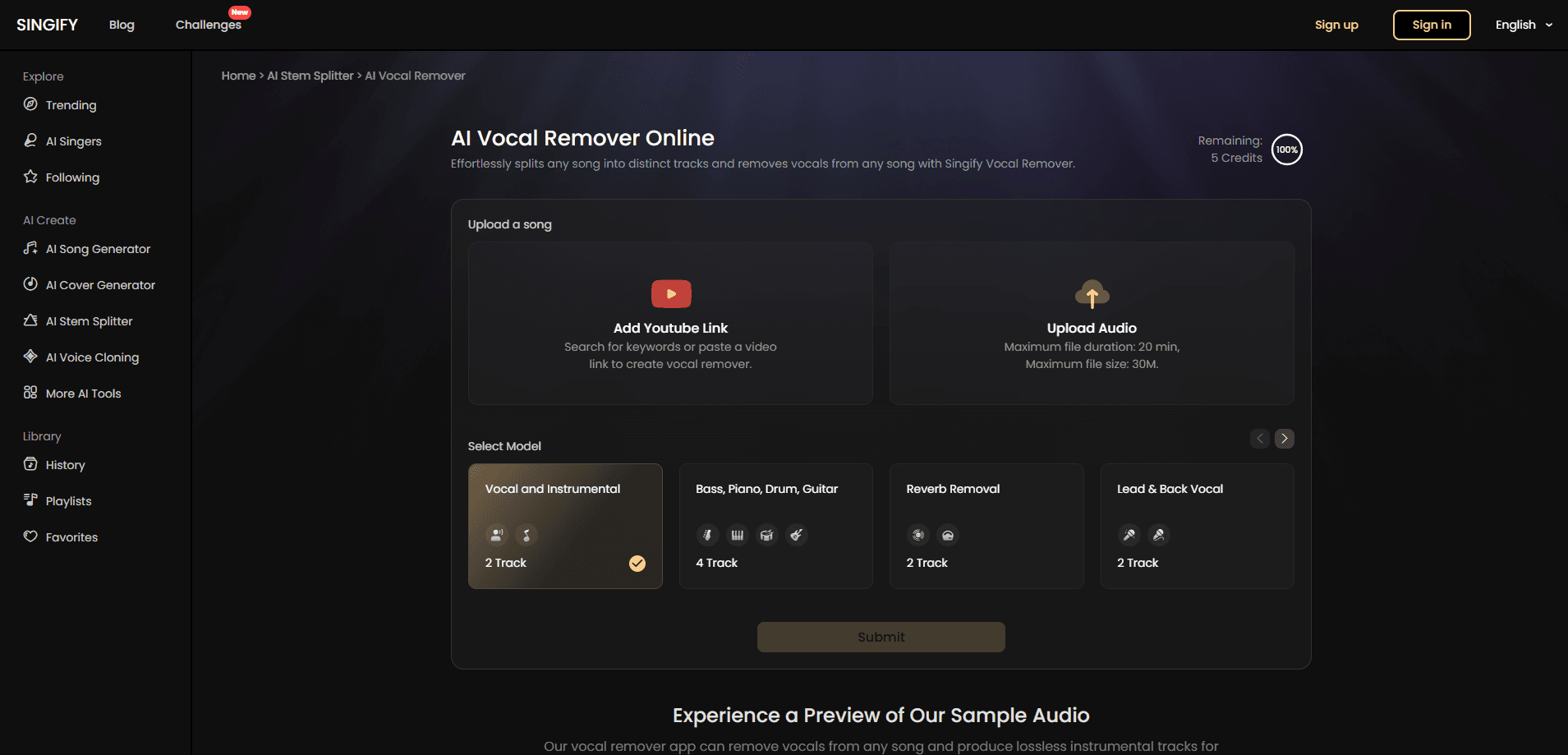
Singify AI Vocal Remover is a free online tool from Fineshare that removes vocals from songs and splits audio into up to 10 separate stems, including drums, bass, piano, and guitar. You upload a file or paste a YouTube link, and the AI handles the rest.
About Singify AI Vocal Remover
What Is Singify AI Vocal Remover
Singify AI Vocal Remover is a browser-based audio separation tool built by Fineshare. It uses AI models to pull the vocals out of a track and leave you with a clean instrumental, or to break a song into individual stems you can reuse. You don't install anything. You open the page, drop in a file, and the tool processes it in the cloud.
The tool solves a familiar problem for singers, producers, and hobbyists. Karaoke tracks are hard to find for niche songs, and pulling a guitar part out of a finished mix used to take serious studio work. Singify does both in a few clicks, and it also accepts a YouTube URL, so you can work from a song that only exists online.
The main limits are practical. Free uploads max out at 20 minutes and 30 MB per file, which rules out long DJ sets or lossless album files. Heavy reverb and layered backing vocals can leave artifacts, and some reviewers note that extreme high frequencies lose a little detail. The service also runs on a credit system, so heavy use costs money.
Getting Started
- Open the Singify AI Vocal Remover page in any browser. No account is needed to try it.
- Upload an audio or video file, or paste a YouTube link to pull the song straight from the web.
- Pick a separation model, from a simple 2 track vocal and instrumental split up to a 10 stem breakdown.
- Preview the result, then download the vocal track, the instrumental, or both.
Product Information
A quick look at Singify AI Vocal Remover's pricing, supported platforms, and performance.
Best for
The users, tasks, and scenarios where this tool fits best.
Users
- Karaoke fans
- Independent musicians and producers
- DJs and live performers
- Podcast editors
Tasks
- Making karaoke tracks
- Extracting acapella
- Remixing songs
- Music practice
Scenarios
- Prepping a song for a party or wedding
- Studying a favorite recording
- Building social videos
Key features
Voice and Instrumental Split
The core function takes a finished song and returns two tracks: the isolated vocals and the instrumental. It works on uploaded files and on YouTube links, so you can start from local storage or a streaming page. A separate reverb removal model cleans up echo when the original mix is noisy.
Multi-Stem Separation
Singify offers 2, 4, 6, and 10 stem models. Depending on the model you pick, you can isolate drums, bass, piano, guitar, organ, strings, and wind, or split lead and backing vocals. The 10 stem option adds speech, music, and effects tracks, which helps with dialogue-heavy clips and complex productions.
Specialized Split Modes
Beyond standard stems, the tool ships models for narrower jobs. There's a multi-singer separation mode, a male and female vocal split, an acapella extractor, and a speech, music, and effects breakdown. These modes matter when a generic two-track split leaves the parts you actually care about mixed together.
YouTube Link Input
You don't have to own the file to use it. Paste a YouTube URL and the tool extracts the audio in the cloud, then runs the same separation models. That covers songs that never came out as a download and saves time versus capturing the audio yourself.
Multi-Format Output and Cross-Platform Access
Separated tracks export in common formats such as MP3, WAV, M4A, and more, and the tool runs in any modern browser on Windows, macOS, iOS, and Android. There's nothing to install, and projects and history stay tied to your account.
Credit Plans with a Free Tier
New users get a free allowance, and paid plans start at $5.99 per month for the Basic tier. Credits drive every job: stem splitter credits cover separation runs, while music and cover credits cover the wider Singify suite. Pro and Enterprise tiers add priority processing and higher monthly caps.
Pros and cons
Pros
- Free to try with no credit card and no software install.
- Wide model range, up to 10 stems, covers vocals, drums, bass, piano, guitar, and more.
- Accepts both file uploads and YouTube links.
- Works across web, iOS, Android, and macOS.
- Credit system lets light users stay on free or low-cost plans.
Cons
- Free uploads cap at 20 minutes and 30 MB, so long or lossless files need trimming or a workaround.
- Dense mixes with layered vocals or heavy reverb can leave leftover artifacts.
- Some users report slight detail loss in very high frequencies, which limits studio-grade use.
- Fine-grained parameter control is limited compared with dedicated desktop tools.
Frequently asked questions
It removes vocals from a song and separates audio into individual stems. People use it to build karaoke tracks, extract acapella, remix, and practice instruments against the original recording.
Related content
Explore related tools, skills, and articles for Singify AI Vocal Remover.
Singify AI Vocal Remover Alternatives

Foley
Hanamori Labs, LLC · Voice & Language · Productivity · AI AssistantFoley is a voice to-do list that turns a spoken sentence into a filed task, complete with project, date and time, then helps you plan the day around what is already there.

HireKey
HireKey · Voice & Language · Productivity · LeaningHireKey is an AI job search copilot built by a former tech recruiter. It checks role fit, tailors resumes, runs interview practice and tracks every application.

Fluence
Yay Software (Yannick Huchard) · Writing · Voice & Language · ProductivityFluence is an Android app that reads PDFs, EPUBs, Word files and web articles aloud, follows each sentence as it speaks, and answers questions about the text on the phone itself.