
Smart Sleep Timer
BRIDGETECH SOLUTIONS LIMITED · Other
Smart Sleep Timer is an iOS app that pauses podcasts, music, or video the moment you fall asleep, using snore detection or a timer you set yourself.
About Smart Sleep Timer
What Is Smart Sleep Timer
Smart Sleep Timer is a small iOS app built to fix one specific annoyance: falling asleep to a podcast or a video and waking up hours later to playback you never heard. Standard sleep timers count down a fixed number of minutes and stop, whether you are awake or not. This app watches for the moment you actually drift off and cuts the audio then.
The core trick is snore detection. The app listens through your device's microphone, analyzes the sound, and pauses playback when it picks up snoring. If you would rather keep control, you can set a manual timer or pick a specific clock time for playback to end. Either way, it works on top of whatever app you already use for music, podcasts, or video, so you do not have to move your library anywhere.
The scope is intentionally narrow. It is a playback stopper, not a sleep tracker, an alarm, or a health tool. The developer, BRIDGETECH SOLUTIONS LIMITED, states that the app collects no data, and the App Store page lists no in-app purchases. It runs on iPhone and iPad and needs iOS 18.2 or later, so older devices are out.
Getting Started
- Download Smart Sleep Timer from the App Store on an iPhone or iPad running iOS 18.2 or later.
- Start the podcast, music, or video you want to fall asleep to in your usual app, then open Smart Sleep Timer.
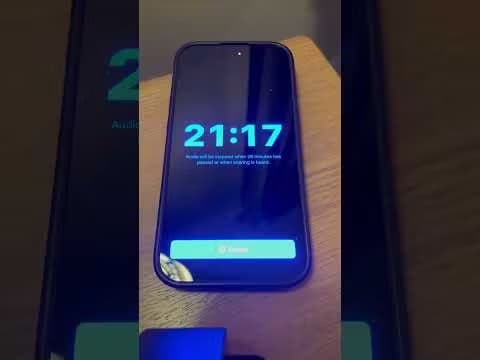
- Choose a mode: turn on snore detection to stop playback when you fall asleep, or set a manual timer or end time.
- Keep the device nearby with the microphone facing you so snore detection can hear you, and leave the session running.
- Check the snoring analysis graph in the morning, which the latest version shows while a timer session is active.
Product Information
A quick look at Smart Sleep Timer's pricing, supported platforms, and performance.
Best for
The users, tasks, and scenarios where this tool fits best.
Users
- Podcast listeners
- Music fans
- Video watchers
- Light sleepers and snorers
Tasks
- Stopping audio automatically
- Setting a fixed end time
- Saving battery and data
- Reviewing a night's snoring
Scenarios
- Falling asleep to a long podcast
- Watching a show in bed
- Dozing off unexpectedly
- Quietly winding down
Key features
Snore detection that pauses playback
The app listens through the device microphone and uses sound analysis to tell when you have started snoring. Once it picks up snoring, it pauses whatever is playing. That means playback stops at the moment you actually fall asleep rather than at a preset minute count. For people who drift off at different times each night, this adapts to them instead of the other way around.
Custom timers and end times
If snore detection is not what you want, the app also offers manual control. You can set a timer, such as 30 minutes, or choose a specific clock time for playback to end. Both routes work the same way: they stop the audio without you touching the phone. Having both options means the app fits a planned night and an unplanned one.
Works with any audio or video app
Smart Sleep Timer does not host content. It sits on top of the app you already use for music, podcasts, or video, and it handles the stopping. You start playback in your usual app, then let Smart Sleep Timer watch over it. That removes the need to move playlists, subscriptions, or libraries into a new player just to get a sleep timer.
Snoring analysis graph
The latest version adds a snoring detection analysis graph you can view while a timer session is running. It shows when snoring was picked up during the session, so you get a rough picture of your night. It is a lightweight read on the session itself, not a full sleep report.
Battery and data savings
Playback that runs for hours after you fall asleep drains the battery and, on a cellular connection, the data plan. By stopping the audio when you are asleep, the app trims both. It also keeps your playlist or queue intact, so nothing gets skipped or lost while you were out.
Privacy-first and free
The developer states that the app collects no data, and the App Store privacy label reads "Data Not Collected." There is no account to make and no in-app purchase listed, so you download it and use it at no cost. The trade-off is a narrow feature set: this is a single-purpose tool, not an all-in-one sleep suite.
Pros and cons
Pros
- Snore detection pauses playback when you actually fall asleep, so audio does not run for hours you never hear.
- Manual timers and specific end times cover nights when you want a fixed stop instead of detection.
- It rides on top of any music, podcast, or video app, so you keep your existing playlists and subscriptions.
- Stopping playback when you are asleep saves battery and, on cellular, data.
- The App Store privacy label reads "Data Not Collected," and the app is free with no in-app purchases or account.
- The in-session snoring graph gives a quick look at when snoring was detected overnight.
Cons
- It is iOS-only and needs iOS 18.2 or later, so older iPhones and Android phones cannot run it.
- Snore detection depends on the microphone hearing you, so the device has to stay close and the mode can miss quiet sleepers.
- It is a playback stopper rather than a sleep tracker, so you get no sleep stages, scoring, or health insights.
- There is no documented API, so it does not plug into other tools or workflows.
Frequently asked questions
Smart Sleep Timer is an iOS app that stops podcasts, music, or video when you fall asleep. It can use snore detection to pause playback automatically once you start snoring, or a manual timer or end time you set yourself.
Related content
Explore related tools, skills, and articles for Smart Sleep Timer.
Smart Sleep Timer Alternatives
BinkBink
BinkBink · OtherBinkBink is a free online game platform and AI game maker that lets anyone turn a short text description into a playable browser game. You can jump into hundreds of community-made games. Or describe your own idea and play it in seconds, then share it with friends. Want to create your own game? You don't need to code. No engine setup, no download, no hassle.

Audiogen
Audiogen Inc. · OtherAudiogen is an AI music generator built by Audiogen Inc., a small research team that spent about 2.5 years training its own generative music model and designing a web interface around it. Instead of a plain text box, this AI music tool turns the timeline into a beginner-friendly Generative Audio Workstation, or GAW, where inpainting, extending, remixing and stem editing work more like painting on a canvas. The product is still in beta, so access runs through a waitlist or an invite. Paid plans aren't published yet.

Aiml API
AIMLAPI OÜ · OtherAiml API is a unified AI model API that puts more than 1000 models from OpenAI, Google, Anthropic, and others behind one endpoint and one bill. You write code against a single OpenAI-compatible schema, then switch between chat, image, video, and audio models by changing a model string. It suits developers and small teams who want multi-model access without juggling a dozen separate provider accounts, and it removes the usual billing headache that comes with testing several vendors. One key covers it all.