

Sona
Florian Kiem · Writing · Productivity
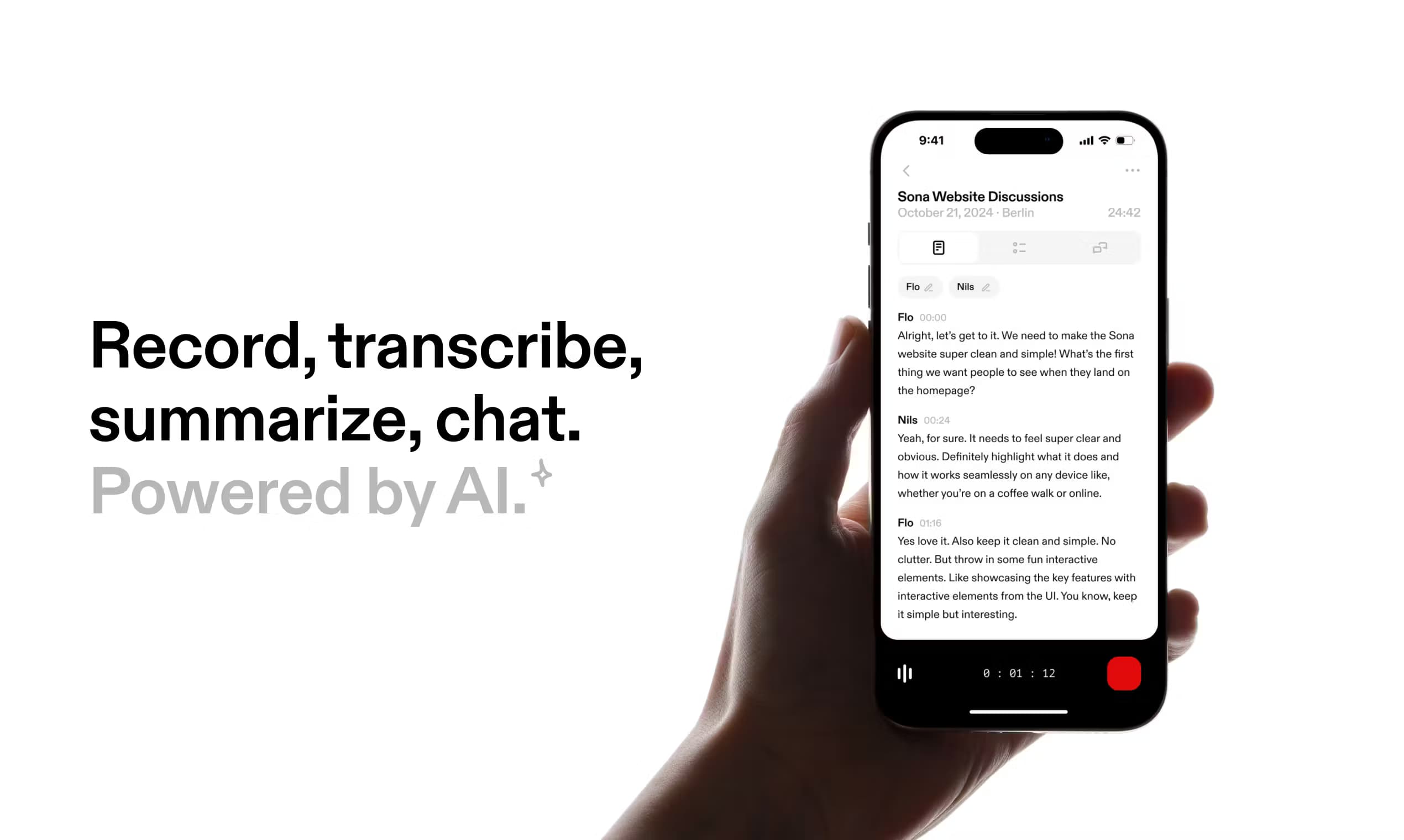
Sona is an AI conversation recorder and AI note taker that captures voice to text on Apple Watch, iPhone or desktop, transcribes in 99+ languages, then summarizes and lets you chat with the result.
About Sona
What Is Sona
Sona is an AI-powered conversation recorder built around a simple idea. You talk, and it keeps the thread. The app records audio from your Apple Watch, your iPhone or your computer, turns speech into text, then writes a summary you can actually use. It works in the background, so there is no meeting bot you have to invite to a call.
The product targets people who think out loud or sit in conversations all day: founders, students, journalists, consultants. Because capture happens on the wrist or the phone, you can start recording a thought mid-walk without pulling out a notebook. Recordings, transcripts and summaries live together in one place, and you can ask follow-up questions about anything you captured.
The main limits are scope and depth. The desktop app was still marked as coming soon at the time of writing, so the full experience leans on Apple hardware today. Summaries and chat run on AI, which means the quality depends on clear audio and a decent connection, and there is a free usage ceiling before Pro removes the caps.
Getting Started
- Install Sona from the App Store and open the app on your iPhone or Apple Watch.
- Allow microphone and speech access when prompted, then grant the app a language for transcription.
- Tap record on the watch or phone and speak; the conversation is captured in the background.
- Open the recording later to read the transcript, generate a summary and ask questions about it.
Product Information
A quick look at Sona's pricing, supported platforms, and performance.
Best for
The users, tasks, and scenarios where this tool fits best.
Users
- Founders and operators who run meetings all day
- Students and researchers
- Journalists and writers
- Note-takers who want to stop typing
Tasks
- Turning meetings into action items
- Capturing ideas while walking or driving
- Asking questions about a past conversation
- Working across languages
Scenarios
- One-on-ones and client calls
- Field work and interviews
- Personal voice journaling
- Post-meeting follow-up
Key features
Capture from Apple Watch and iPhone
Sona records from your wrist or your pocket, so the device disappears from the conversation. You start a recording with a tap and keep talking, and the app captures the audio in the background. This is the part that separates Sona from meeting-bot tools that need a calendar invite and a host to join the call.
Transcription in 99+ languages
The app turns speech into text across more than 99 languages, with automatic handling of what it hears. Transcription runs on the recording after the fact, so you read the full conversation as text rather than skimming a live feed. Accuracy tracks with audio quality and background noise.
Custom summaries
After a recording, Sona writes a summary on top of the transcript. You choose the shape of the output, from a short recap to a structured set of points, so the note fits the job, be it a sales call, a lecture or a brainstorm. The summary is the shortcut past a wall of raw text.
Action items and key points
Beyond a recap, the app extracts the decisions and the to-dos that came up. That matters for meetings where the value is not the transcript but what happens next. You get the follow-ups in one spot instead of hunting through the recording.
Chat with your recordings
You can ask questions about a recording and get answers drawn from the transcript. Instead of scrubbing a timeline, you type what you want to know, such as a figure someone quoted or the reason for a decision. This turns a pile of audio into something closer to a searchable memory.
Works invisibly in the background
Sona is built to stay out of the way. There is no meeting bot, no extra hardware and no visible presence in the call. Recording happens quietly on your own devices, which keeps the setting natural and avoids the awkward moment of announcing a note-taker to the room.
Pros and cons
Pros
- Records from the Apple Watch, so you can capture a thought or a call without lifting your phone.
- Transcribes in 99+ languages, which suits international teams and multilingual interviews.
- Turns each recording into a summary, key points and action items rather than a raw transcript.
- No meeting bot joins the call, so the conversation stays natural and nothing has to be invited in.
- Lets you chat with a recording to pull a specific detail without rereading everything.
Cons
- The desktop app was still listed as coming soon, so the complete experience depends on Apple hardware.
- Summary and chat quality falls off with noisy audio or a weak connection, since they run on AI.
- The free tier has usage limits, and unlimited recording sits behind the Pro subscription.
- There is no public API, so Sona cannot be wired into a custom workflow or a home-grown tool.
Frequently asked questions
Sona is used to record conversations, turn them into text and then into summaries you can act on. You capture audio from the Apple Watch, iPhone or desktop, read the transcript, and ask questions about what was said.
Related content
Explore related tools, skills, and articles for Sona.
Sona Alternatives

Claude for Google Workspace
Anthropic · Writing · Productivity · BusinessClaude for Google Workspace puts Claude in a sidebar inside Google Docs, Sheets, and Slides, where it reads the file you have open and edits it in place.

Claude Haiku 5.5
Anthropic · Writing · Coding · ChatbotClaude Haiku 5.5 is Anthropic's fastest and cheapest small model, built for high volume tasks at $0.10 per million input tokens with a 1M token context window.

NoteWorthy
Suman Hansada · Writing · Productivity · AI AssistantNoteWorthy is a notes app for iPhone, iPad and Mac that writes titles, tidies formatting, summarizes long notes and files each one with on-device AI. No account, no upload, no network requests.