

Song Maker AI
Song Maker AI · Voice & Language
Song Maker AI is an online AI music generator that turns a text prompt or your own lyrics into a full royalty-free song with vocals or instrumentals. It runs in the browser, needs no musical training, and lets you steer the sound by naming a genre or a famous artist through its Style Match feature. You can preview tracks for free, then download lossless MP3 or WAV files for commercial use on paid plans.
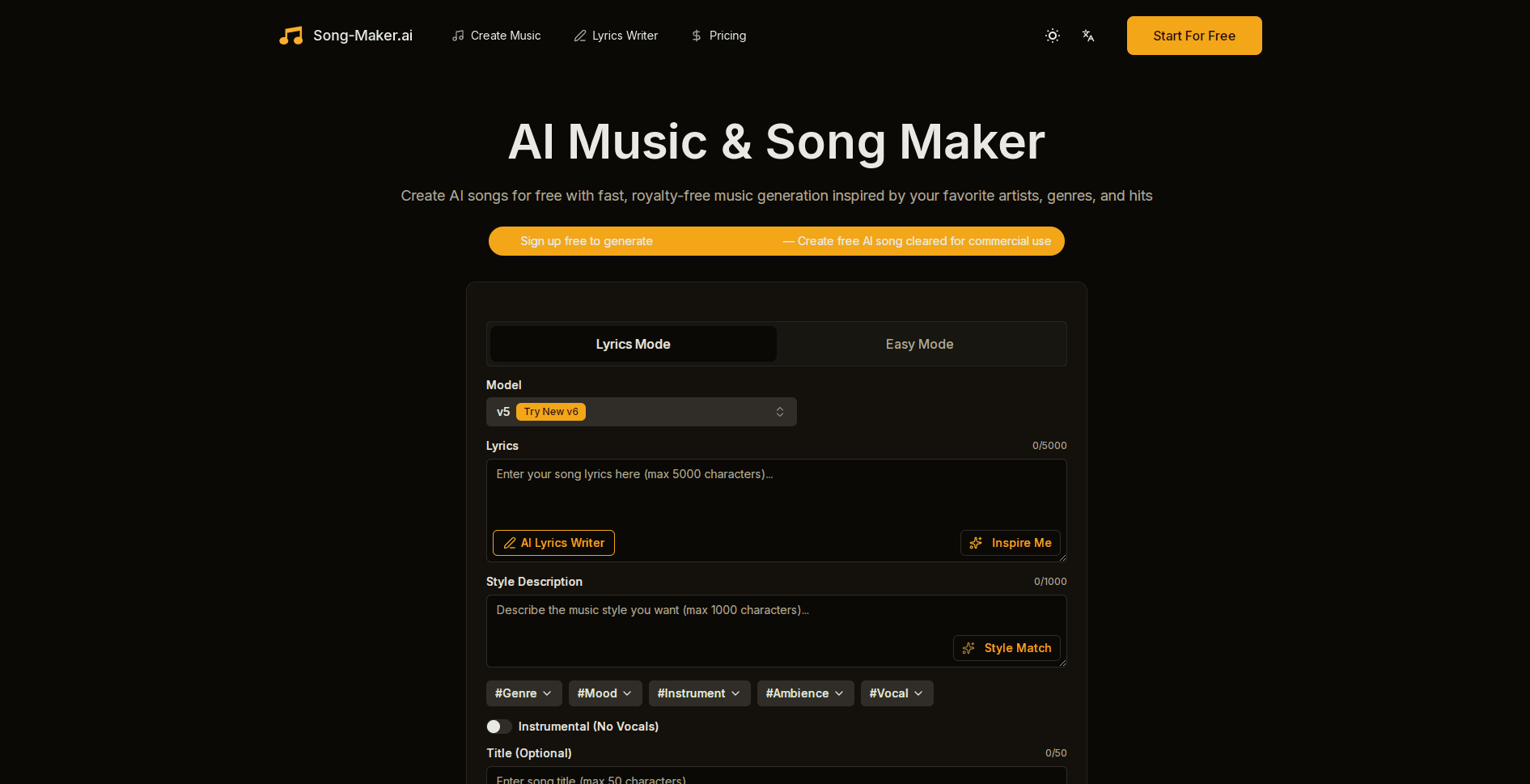
About Song Maker AI
What Is Song Maker AI
Song Maker AI is a web-based AI song maker aimed at people who need original music but don't play an instrument or write notation. You type a description of the vibe you want, or paste finished lyrics, and the tool composes a complete arrangement, including singing vocals, in minutes. It's built for creators who care about licensing: every track is royalty free, so you can drop it into a video, ad, or podcast without chasing permissions.
The main problem it solves is speed and cost. Hiring a composer or licensing a stock track is slow and expensive for small projects. That's a real blocker. Song Maker AI compresses the whole job into a text box and a few clicks, then hands you a file you own. The Styles Match option adds another layer, letting you aim at the feel of a reference artist without copying their actual recordings.
The biggest limit is that free output stays on the site. The Free tier gives you 12 credits and previews, but no download, and you need a paid plan to export audio files. Generation runs on credits, so heavy users hit monthly caps. If your project needs stems, MIDI, or fine manual editing, this isn't a digital audio workstation, and you'll want a different tool.
Getting Started
- Create an account with an email, Google, or GitHub, then verify your email address.
- Open the music creator and choose whether you want an instrumental or a track with vocals.
- Enter a style description or paste your lyrics (up to 5000 characters), and optionally add an artist or song reference for Style Match.
- Generate the track and listen to the preview, then tweak the prompt if the vibe is off.
- Upgrade to a paid plan and download the finished song as MP3 or WAV for your project.
Product Information
A quick look at Song Maker AI's pricing, supported platforms, and performance.
Best for
The users, tasks, and scenarios where this tool fits best.
Users
- Content creators
- Songwriters without production skills
- Small businesses and advertisers
Tasks
- Turning lyrics into a finished track
- Generating background music
- Sketching ideas fast
Scenarios
- Building a YouTube channel soundtrack
- Scoring a short ad or social clip
- Personal gifts and fun projects
Key features
Text to Song Generation
Type a description of the music you want and Song Maker AI composes a complete track, complete with arrangement and vocals. You can also paste your own lyrics and let the engine set them to music, which saves the back-and-forth of exporting words into a separate production tool and lining up the melody by hand. It's the core workflow: idea in, finished song out, no instruments or software required. That's the whole point.
Style Match
Style Match lets you name a well-known artist, song, or album and pulls the energy, groove, and instrumentation from that reference into a new, original track. The goal is the vibe, not a copy, so you get something that feels familiar without borrowing anyone's recordings. It works best when you name a clear reference. It's the feature that makes the AI music maker feel less generic.
Vocal and Instrumental Modes
Every generation can include AI vocals or run as a pure instrumental. In vocal mode you can influence gender, tone, and emotion, which matters when a track has to fit a specific mood and you want the singer to match a scene rather than just fill space. Instrumental mode suits background music and anyone who'd rather add their own voice later.
AI Lyrics Writer
If you don't have words yet, the built-in lyrics assistant drafts them for you from a prompt. Stuck on the first line? This breaks the blank page fast. It's handy for breaking a blank-page block, and it's available without limits on paid tiers. The Free plan includes only a limited version.
Royalty-Free Commercial Ownership
Tracks generated through Song Maker AI are royalty free, so you can use them in monetized content without ongoing fees or attribution headaches. Paid plans add downloads in lossless MP3 and WAV. That's the reason many users pick it over free generators that restrict commercial use. No rights paperwork. No credit line.
Credit-Based Generation Plans
Usage runs on credits, and each plan bundles a monthly allowance plus a set number of concurrent tasks. Free gives 12 credits and up to 4 generations; higher tiers scale to thousands of credits and songs. Credits reset monthly, so it's easy to match a plan to your output. Simple as that.
Lossless MP3 and WAV Downloads
Paid plans let you export finished songs as standard MP3 or lossless WAV, giving you flexible quality for editing or direct upload. Good quality matters here. The Starter tier caps downloads at 1000 files, while Hobby and Professional remove that limit. Higher plans also add priority support.
Pros and cons
Pros
- Turns text or lyrics into a full song, vocals included, with no musical skill required.
- Every track is royalty free and cleared for commercial use, which removes licensing work.
- Style Match captures an artist or genre vibe without copying recordings.
- Free tier lets you generate and preview before paying, so you can judge output quality first.
- Lossless MP3 and WAV exports on paid plans suit both quick uploads and editing work.
Cons
- No downloads on the free plan, so you can't use free tracks outside the site.
- Credits and monthly song caps mean heavy users may need a higher tier.
- It's a generator, not an editor: no stems, MIDI export, or fine manual mixing.
- Output quality on a given prompt varies, so expect to regenerate a few times to land the sound you want.
Frequently asked questions
It's an online AI music generator that creates royalty-free songs from a text prompt or your own lyrics. You describe the style, and it composes the arrangement and vocals for you in the browser.
Related content
Explore related tools, skills, and articles for Song Maker AI.
Song Maker AI Alternatives

Foley
Hanamori Labs, LLC · Voice & Language · Productivity · AI AssistantFoley is a voice to-do list that turns a spoken sentence into a filed task, complete with project, date and time, then helps you plan the day around what is already there.

HireKey
HireKey · Voice & Language · Productivity · LeaningHireKey is an AI job search copilot built by a former tech recruiter. It checks role fit, tailors resumes, runs interview practice and tracks every application.

Fluence
Yay Software (Yannick Huchard) · Writing · Voice & Language · ProductivityFluence is an Android app that reads PDFs, EPUBs, Word files and web articles aloud, follows each sentence as it speaks, and answers questions about the text on the phone itself.