

SongGenerator.io: AI Music Generator Free Online
SongGenerator.io · Voice & Language
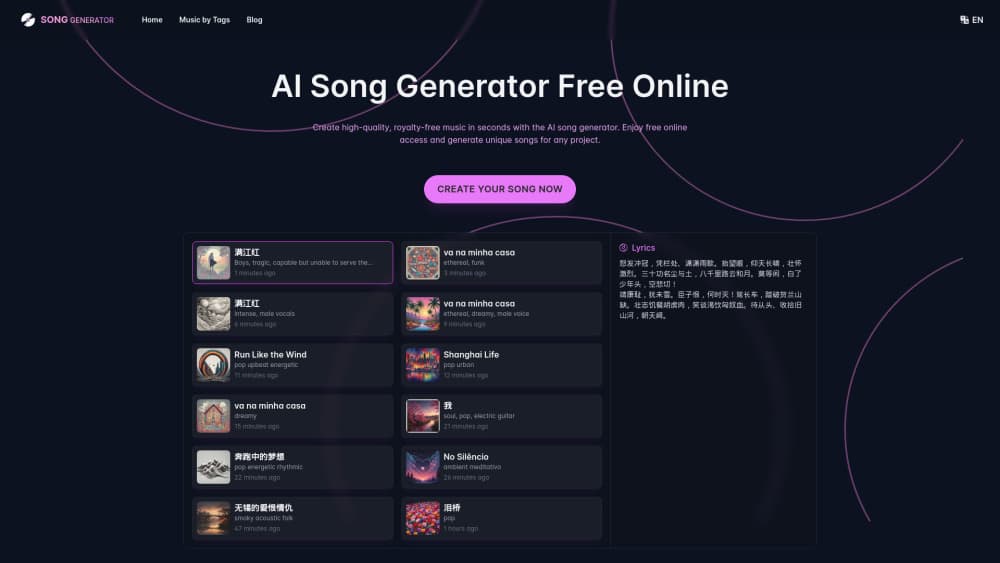
SongGenerator.io turns a text prompt or your own lyrics into a finished song with vocals. The free tier gives 20 credits a day, and paid plans add WAV files, private tracks and a commercial licence.
About SongGenerator.io: AI Music Generator Free Online
What Is SongGenerator.io
SongGenerator.io is an AI song generator that runs in the browser, and it behaves like a text to music tool: you describe the track you want, or paste lyrics you already wrote, and it returns a full song with vocals, instruments and a chorus that arrives where you expect it. No install, no plugin, no keyboard skills.
If you searched for an AI music generator free online, the generation step is the easy part. The cleanup work sitting next to it is what sets the site apart from the pile of prompt-to-song tools. Vocal remover, stem splitter, sound effects, cover art, an MP4 lyrics video and a licence PDF all live behind the same login. That matters when you're publishing. You can go from a one-line idea to a file you can upload to Spotify without opening three other tools.
The limits are credit-based and easy to read. Free accounts get 20 credits a day and one song costs 5 credits, so roughly four tracks daily. Free music stays public and personal-use only, files are deleted after 7 days, and WAV export sits behind a paid plan. Private tracks, unlimited storage and commercial rights start at $7.99/month.
Getting Started
- Open songgenerator.io/app. You can generate before signing up, which is unusual in this category and worth testing on a throwaway idea.
- Describe the song. Genre, mood, tempo, instruments and vocal type are the fields that move the result most. Pasting your own lyrics skips the writing step entirely.
- Run the generation. One song costs 5 credits. Pro allows 4 jobs at once, Ultra allows 10, so a batch of ideas doesn't sit in a queue all afternoon.
- Clean it up. Split the stems, pull the vocal out for a karaoke version, extend the outro, drop in cover art.
- Export. MP3 on every plan, WAV on paid plans, MP4 lyrics video for YouTube or TikTok, plus a licence PDF for annual subscribers.
Product Information
A quick look at SongGenerator.io: AI Music Generator Free Online's pricing, supported platforms, and performance.
Best for
The users, tasks, and scenarios where this tool fits best.
Users
- YouTube and TikTok creators who need background music
- Songwriters stuck on a demo
- Small studios and agencies
Tasks
- Turning a written brief into a demo
- Building an instrumental or acapella from an existing track
- Writing lyrics in a second language
- Producing a lyric video for a release
Scenarios
- A weekly upload schedule that can't slip
- Podcast intros, stingers and sound design
- Game jams and indie prototypes
Key features
Text to Song From a Plain Description
You write what you want the way you'd describe it to a friend, and the generator handles arrangement, singing and mixing. Genre and mood tags do most of the work. Naming an instrument or a vocal range tightens the result. Every generation is a fresh performance rather than a template with swapped words.
Free and Paid Model Lines
Free accounts work on the Core and Prime models. Paid plans open the newer v5.5 Soul model, which the company positions as its highest audio quality. The gap is audible on dense arrangements and on vocals that need to hold a note without wobbling, so it's worth comparing one paid generation against your free output before committing to a year.
Vocal Remover and Stem Splitter
The vocal remover returns two tracks: the isolated voice and the instrumental. That's the fastest route to a karaoke version or a sample you can rap over. The stem splitter separates the mix further, which helps when you only want the drums or want to rebuild a section by hand. Both cost 5 credits per file.
Cover Art and Lyrics Video in the Same Workspace
Subscribers can rename a track and generate custom cover artwork without leaving the app, and every plan can export an MP4 lyrics video. For a release, that's the difference between a folder of audio files and something you can post the same day. The lyrics video is free on all plans, which is generous given how often it's the thing people actually publish.
AI Lyrics Generator With Two Versions
The lyrics tool writes original verses and hooks in multiple languages and returns two takes on the same idea. Two versions is the useful part: you get a comparison instead of a single answer you either accept or discard. It's free on every plan, so it doubles as a drafting tool before you spend credits on audio.
Licence PDF for Distribution
Paid users can fill in a name, address and email, then download a licence PDF for tracks made during the subscription. Distribution services ask for that paperwork when you upload royalty free music made with an AI tool, and having it generated in the app removes a support email chain. Note the rule: only annual subscribers can pull licences for their tracks, monthly subscribers can't.
Pros and cons
Pros
- The free tier needs no login and no card, so you can judge output quality before spending anything.
- Credit pricing is published per action, 5 credits for a song, 2 for a sound effect, which makes cost predictable instead of mysterious.
- Finishing tools sit next to the generator: stems, vocals, cover art, lyrics video and licences in one account.
- Paid plans include private generations, unlimited storage and commercial rights, the three things that usually block a public release.
Cons
- Free tracks are public and deleted after 7 days, so anything worth keeping has to be downloaded the same week.
- WAV export and commercial use require a subscription, which rules the free plan out for monetised channels.
- Credits reset monthly with no rollover, so a quiet month wastes what you paid for.
- No public API is documented, which blocks anyone hoping to wire the generator into their own app.
Frequently asked questions
Yes, with limits. It's a free AI music generator for the first 20 credits a day, and a song costs 5 credits, so you can generate about four tracks daily without paying. WAV downloads, private tracks and commercial rights need a paid plan.
Related content
Explore related tools, skills, and articles for SongGenerator.io: AI Music Generator Free Online.
SongGenerator.io: AI Music Generator Free Online Alternatives

Foley
Hanamori Labs, LLC · Voice & Language · Productivity · AI AssistantFoley is a voice to-do list that turns a spoken sentence into a filed task, complete with project, date and time, then helps you plan the day around what is already there.

HireKey
HireKey · Voice & Language · Productivity · LeaningHireKey is an AI job search copilot built by a former tech recruiter. It checks role fit, tailors resumes, runs interview practice and tracks every application.

Fluence
Yay Software (Yannick Huchard) · Writing · Voice & Language · ProductivityFluence is an Android app that reads PDFs, EPUBs, Word files and web articles aloud, follows each sentence as it speaks, and answers questions about the text on the phone itself.