

SongR
RIFFIT, Inc. · Voice & Language
SongR turns a few keywords, your own lyrics, or a photo into a full song with vocals and backing, then exports it as an MP4 lyric video or MP3. No musical training needed.
About SongR
What Is SongR
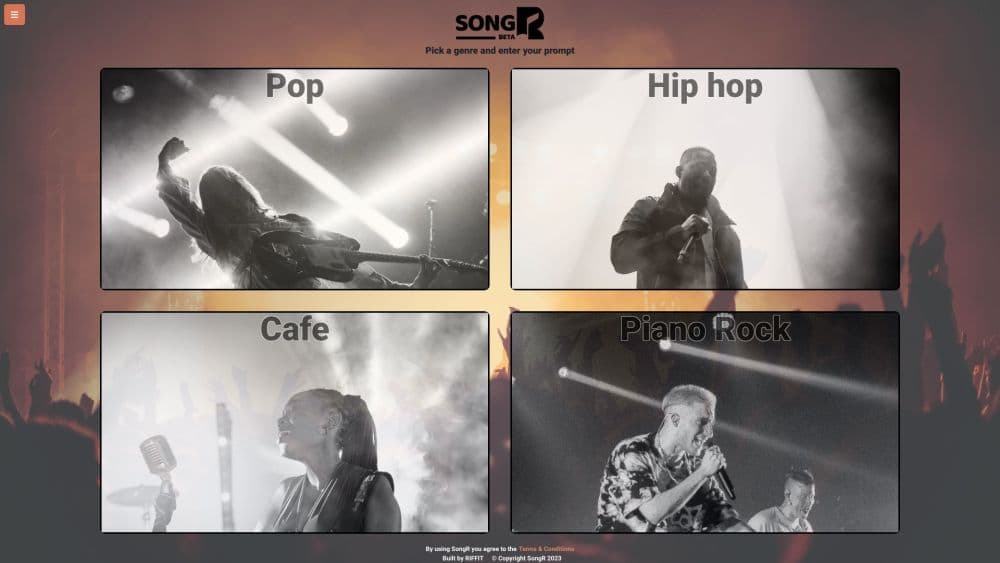
SongR is a browser-based text to song app from RIFFIT, Inc. You choose a genre, type a few keywords, and the app writes lyrics, sings them, and adds instruments behind them. A run takes about a minute. What comes back is a short song plus a lyric video you can send or post.
The product is aimed at people who have something to say and no way to sing it. Birthday messages, anniversaries, a class project, a running joke between friends: SongR turns the idea into a track without a studio, a session player, or any music theory. RIFFIT also sells a separate Song API for developers, which shows where the engineering behind the app sits.
Three limits shape what it's good for. Songs are paid for with tokens, and a new account gets exactly one free song. The terms grant personal, non-commercial use only, so paid client work and brand jingles need written permission. And there's no control over tempo, key, or mixing. You pick a genre and a voice, then take what the model gives you.
Getting Started
- Open app.songr.ai in any modern browser. Nothing to install; it runs on phones, tablets, and desktops.
- Pick a genre on the home screen: Pop, Hip hop, Country, Piano Rock, Cafe, Chant, or Children's.
- Type a few keywords in the box and let the lyrics generator write a draft, or hit "I have my lyrics" and paste your own. You can also start from an image.
- Edit the words in the lyrics editor, choose a voice, then hit Render.
- Download the MP4 lyric video or the MP3, or share the song to a social app. Sign in if you want it saved to your library.
Product Information
A quick look at SongR's pricing, supported platforms, and performance.
Best for
The users, tasks, and scenarios where this tool fits best.
Users
- Gift givers
- People with no musical training
- Teachers and tutors
- Social media creators
Tasks
- Turning a short brief into a finished song
- Writing lyrics for a photo
- Making a lyric video for a date
- Sending a song instead of a card
Scenarios
- A gift needed tonight
- A classroom or therapy session
- Testing an idea before paying for production
Key features
Keywords to Lyrics
You type a handful of words, and the lyrics generator writes verses and a chorus to match the genre you chose. It's the part that removes the blank page: no rhyming dictionary, no half-finished draft. The output is plain text in an editor, so you can keep the good lines and rewrite the rest.
Seven Genre Presets
SongR offers Pop, Hip hop, Country, Piano Rock, Cafe, Chant, and Children's. Each preset carries its own instrumentation, tempo, and voice, so a Children's song doesn't come back with a trap beat. The list is short next to a full production tool, and the odd ones (Chant, Children's) are exactly why some people choose this AI song maker over a broader AI music generator.
Lyrics Editor and Your Own Words
Every generated lyric opens in an editor before you spend a token. Fix a name, cut a verse, sharpen the last line. If you already have words, choose "I have my lyrics" and paste them in. The cap is 1,500 characters, and anything past 750 characters costs two tokens instead of one.
Image to Lyrics
Upload a photo and SongR writes lyrics based on what's in the frame. It costs one or two tokens per attempt depending on how long the song runs, so a few tries add up. The same picture can sit behind the lyrics in the video, which saves you from hunting for a background later.
Lyric Video and Audio Export
A render produces two files: an MP4 with the lyrics on screen and an MP3 of the audio. You get one image per video, not a slideshow. Sharing works best on a phone, and the share option isn't available in every desktop browser, so download the file when the button doesn't appear.
Song Tokens and Saved Library
One token buys one song of up to 750 characters of lyrics. Tokens expire a year after purchase, and a subscription drops a set number into your account each month. Signed-in accounts store lyrics, songs, and images, and everything created before October 28, 2024 was archived, so treat the library as a workspace rather than a permanent archive.
Pros and cons
Pros
- The three-click flow holds up: keywords in, finished song out, nothing to learn first.
- Lyrics stay editable until you hit Render, so a wrong name doesn't cost a token.
- The genre list includes Children's and Chant, two styles most AI music tools skip.
- One render yields both an MP4 lyric video and an MP3, which covers social and audio use.
- A free song means you can judge the vocal quality before spending anything.
Cons
- Long lyrics cost double. Past 750 characters, a single song burns two tokens.
- The terms allow personal, non-commercial use only, which rules out client work and ads.
- No tempo, key, or arrangement controls, and the genre locks once the lyrics exist.
- Songs made before October 28, 2024 were archived, so old projects are gone.
- Voice choice is narrow, and the same two or three singers show up across genres.
Frequently asked questions
SongR makes short custom songs from a text prompt, your own lyrics, or an image. It writes the words, sings them, adds instruments, and returns an MP4 lyric video plus an MP3. People use it for gifts, messages, classroom material, and social clips.
Related content
Explore related tools, skills, and articles for SongR.
SongR Alternatives

Foley
Hanamori Labs, LLC · Voice & Language · Productivity · AI AssistantFoley is a voice to-do list that turns a spoken sentence into a filed task, complete with project, date and time, then helps you plan the day around what is already there.

HireKey
HireKey · Voice & Language · Productivity · LeaningHireKey is an AI job search copilot built by a former tech recruiter. It checks role fit, tailors resumes, runs interview practice and tracks every application.

Fluence
Yay Software (Yannick Huchard) · Writing · Voice & Language · ProductivityFluence is an Android app that reads PDFs, EPUBs, Word files and web articles aloud, follows each sentence as it speaks, and answers questions about the text on the phone itself.