

Soundify
Soundify · Voice & Language
Soundify turns short text prompts into downloadable sound effects, with a ready-made prompt library, adjustable clip settings, and five free generations a day.
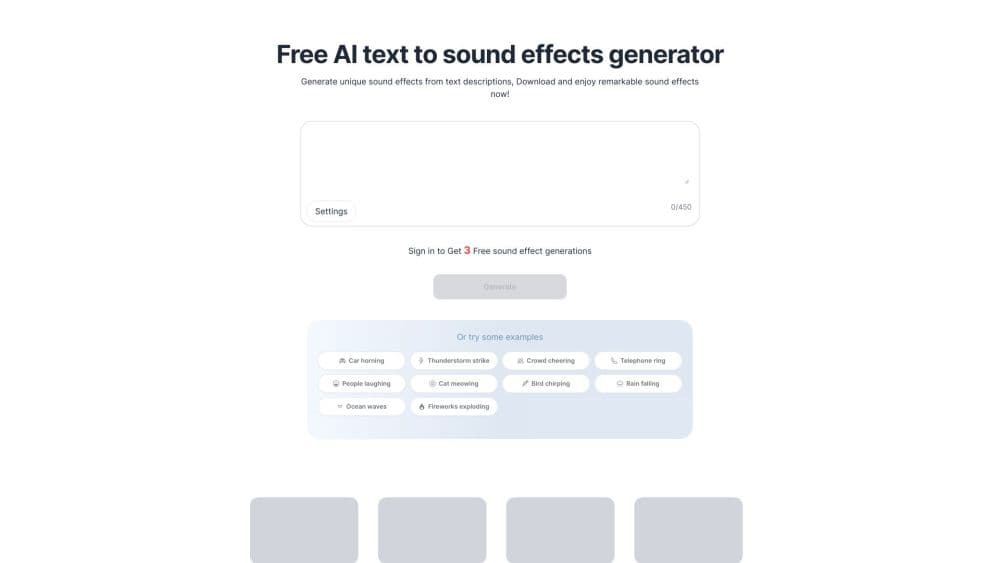
About Soundify
What Is Soundify
Soundify is a browser-based AI sound effects generator. You describe a sound in plain words, press generate, and get an audio clip you can preview and download. No timeline, no plugins, no audio engineering knowledge required.
The tool targets the small gaps in a project: a door slam for a sketch, rain under a voiceover, a cartoon boing for a meme. Those sounds are annoying to source. Search libraries return near misses, and recording them yourself takes gear you probably don't have. Soundify trades that hunt for a text box.
Limits matter here. Clips are short, output quality swings with how specific your prompt is, and the free tier caps you at five generations per day. As a sound effect generator, it works as a sketchpad for one-off effects, not a replacement for a sound library or a digital audio workstation.
Getting Started
- Open soundifytext.io in a desktop or mobile browser.
- Sign in with your account. The free allowance is five generations per day and resets at 00:00 UTC.
- Type a description in the prompt box, up to 450 characters, or pick a predefined prompt from the list.
- Adjust the clip settings, then generate, preview, and download the result you want to keep.
Product Information
A quick look at Soundify's pricing, supported platforms, and performance.
Best for
The users, tasks, and scenarios where this tool fits best.
Users
- Short-form video creators
- Game and app prototypers
- Podcasters and audio editors
Tasks
- Writing a scene as a prompt
- Adding audio to AI video
- Building a gag for social posts
Scenarios
- Editing a video on a deadline
- Testing a game level
- Making a podcast intro
Key features
Text to Sound Effects
The core loop is one box and one button. Describe the sound, and Soundify returns a generated clip you can audition on the spot. Prompts accept up to 450 characters, which is enough room to specify the source, the space, and the distance.
Predefined Prompt Library
Blank text boxes stall people. Soundify ships a browsable set of example prompts, from car horns and thunderstorms to crowd cheers and typing keyboards. Pick one, then edit the wording to push the result closer to what you hear in your head.
Adjustable Clip Settings
Before you generate, you can change the clip's duration and related settings. Short effects stay punchy, longer ones give ambience room to breathe. The tradeoff is that longer clips eat more of your daily allowance when you need retakes.
Instant Preview and Download
Every result plays in the browser, and downloads land as audio files you can drop into an editor. That keeps the workflow to three steps: generate, listen, download. No project file, no export queue.
Use-Case Starting Points
Dedicated pages cover AI sound effects for TikTok, Sora, Luma Dream Machine, games, memes, and podcasts. Each one lists prompt ideas matched to the format, which shortens the guessing phase when you're new to the AI audio generator. The video pages are the practical entry point if you mainly need sound effects for video and don't know how to phrase a request yet.
Discover Feed
A public discover page shows clips other people made, with the prompt attached to each one. It works as a reference shelf: find a sound close to yours, copy the phrasing style, then adjust the details.
Pros and cons
Pros
- Runs in a browser with no install, so you can generate a clip on a laptop or phone.
- Five free generations a day with no card needed, which is enough to test the tool on a real project.
- The prompt library removes the blank-page problem and teaches you what phrasing works.
- Downloads are plain audio files that drop into any editor.
Cons
- The five-clip daily cap disappears fast when you're iterating, so plan prompts before you spend them.
- Output is built for single effects, not full music beds or long ambience tracks.
- No documented API or batch mode, which rules out automated pipelines for teams.
- Vague prompts return generic results, so the tool rewards people who describe sounds precisely.
Frequently asked questions
Soundify generates sound effects from text. You type a description such as "an 80s alarm clock going off" and get an audio clip to download. People use it for video edits, memes, game prototypes, and podcast segments.
Related content
Explore related tools, skills, and articles for Soundify.
Soundify Alternatives

Prosp
Prosp · Writing · Voice & Language · MarketingProsp is an AI LinkedIn outreach tool built for agencies and sales teams, and it writes the message and the voice note in your own voice for each prospect so they actually reply. You connect your accounts, find leads, and let the AI draft and send personalized messages at scale, all from one inbox. It's built for people running outbound at volume. That's the whole pitch. Every touchpoint still has to feel human.

Wordly AI Translation
Wordly · Voice & Language · ProductivityWordly AI Translation is a real-time AI translation and captioning platform built for meetings, conferences, and events. It delivers live translation, captions, transcripts, and summaries in more than 60 languages, and attendees join by scanning a QR code or opening a link instead of using dedicated headsets. The platform works with Zoom, Microsoft Teams, Google Meet, and Webex, and it's designed for organizations that want multilingual access without hiring human interpreters for every session. Simple as that.
Musicful
Musicful AI · Voice & Language · VideoMusicful is an AI music generator and AI music video maker that turns text to music in minutes. Give it a text prompt, a set of lyrics, or a hummed melody and it returns a finished track with vocals and instruments. It also doubles as an AI song generator, produces music videos from the songs you create, and offers an AI cover tool plus a developer API. The platform runs in a web browser and through an Android app, so you can start a song on desktop and pick it up on your phone.