

Soup CLI
MePlay, Inc. · Coding
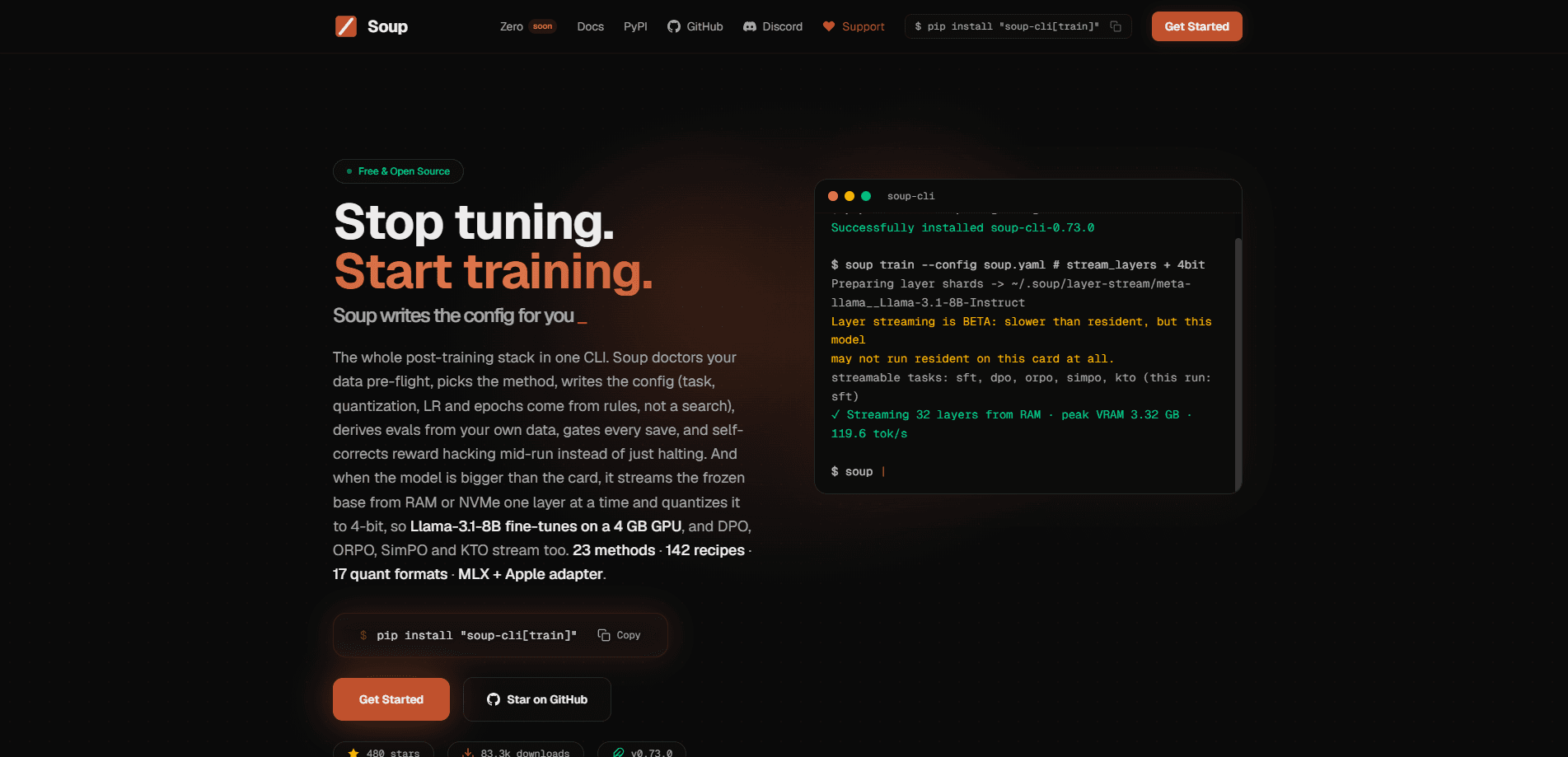
Soup CLI is an open-source, command-line tool for fine-tuning and post-training large language models. As an LLM fine-tuning tool, it turns the usual setup work into one workflow: you write a single YAML config, run `soup train`, and Soup handles GPU detection, batch sizing, and quantization on its own. The project is built for people who want to fine-tune models locally instead of renting cloud GPUs or wrestling with training scripts, and its headline feature, layer streaming, lets an 8B model train on a laptop GPU with only 4 GB of VRAM.
About Soup CLI
What Is Soup CLI
Soup CLI (also published as the soup-cli Python package) is a CLI-first stack that covers the whole post-training loop: data cleaning, method selection, config generation, evaluation, and checkpoint gating. It's maintained by MePlay, Inc. and released under the Apache-2.0 license, so you can read the source, fork it, or ship it inside your own pipeline.
The main problem it solves is friction. Anyone who has trained a model knows the drill: pick hardware, fight dependency conflicts, guess at a batch size, and debug a crash at step 400. Soup compresses that into a config file it writes for you. Why does that matter? Because the setup, not the training itself, is where most beginner fine-tunes die. It's aimed at developers, researchers, and small teams who want a working fine-tune without becoming infrastructure engineers.
The biggest limitation is hardware. Training still wants a CUDA GPU, and running a real 7B to 8B job on a normal machine means accepting QLoRA and quantized weights rather than full-precision training. That's the trade-off. Layer streaming, the feature that makes tiny GPUs viable, is still labeled BETA and has to be turned on by hand.
Getting Started
- Install the package. Use
pipx install "soup-cli[train]"oruv tool install "soup-cli[train]". The baresoup-cliinstall is a light CLI without PyTorch, so you need the[train]extra to fine-tune. - Generate a config. Run
soup init --template chatto create a startersoup.yamlfor a chat-style fine-tune. - Point it at your data and base model. Edit the YAML to set your dataset path and the model you want to adapt.
- Start training. Run
soup trainand let it detect your GPU and pick the settings. For big models on small cards, setstream_layers: truefirst. - Serve or export the result. Use
soup serveto expose the tuned model behind an OpenAI-compatible API endpoint.
Product Information
A quick look at Soup CLI's pricing, supported platforms, and performance.
Best for
The users, tasks, and scenarios where this tool fits best.
Users
- Solo developers and hobbyists
- ML engineers and researchers
- Small startups
Tasks
- Supervised fine-tuning
- Preference optimization
- Local experimentation
Scenarios
- A laptop-only workflow
- Private fine-tuning
- Turning a tuned model into a service
Key features
One Config, One Command
The core idea is that a single YAML file describes the whole job. You run soup init to generate a starting config, edit a few fields, then run soup train. Soup reads the config, checks your GPU, and picks a batch size and quantization setting that fit. For anyone who's maintained a folder of training shell scripts, that's the appeal: the config is the documentation.
Layer Streaming for Tiny GPUs
Layer streaming is the feature that gets the most attention. Instead of loading the entire frozen base model into VRAM, Soup keeps it out of memory and feeds the GPU one decoder layer at a time. On an RTX 3050 Laptop with 4 GB, the project reports an 8B model running at 3.32 GB peak memory. Big result. The catch is that it's opt-in and still BETA, and the throughput numbers come from a specific older version, so treat the speed as a floor rather than a promise.
Built-In Evaluation and Checkpoint Gating
Soup doesn't stop at training. It derives evaluations from your setup and gates checkpoints against them, so a run that regresses gets flagged instead of silently saved. For teams that train often, this matters more than raw speed. You want a pipeline that tells you when a checkpoint is worse than the last one.
OpenAI-Compatible Serving
The soup serve command turns a trained model into an API service with one command. It exposes the standard /v1/chat/completions, /v1/models, and /health endpoints, supports streaming responses, and can switch to vLLM or SGLang backends for higher throughput. LoRA adapters can be served directly, with the base model resolved from the adapter config, so you don't have to merge weights by hand first.
Local-First, No Cloud Required
Everything is designed to run on hardware you already own. No cloud required. There's no mandatory account, no hosted dashboard, and no data leaving your machine unless you set it up to. For teams handling sensitive data, that's often the deciding factor over a managed training service.
Data Tooling and Inspection Commands
The light soup-cli install still includes soup data ... and inspection commands that work without PyTorch. That means you can clean and inspect your dataset on a machine that has no GPU at all. Prep now, train later.
Pros and cons
Pros
- Open source under Apache-2.0, so there's no vendor lock-in and the source is fully auditable.
- A single YAML config replaces most of the scripting and setup that fine-tuning usually demands.
- Layer streaming makes genuinely large models trainable on small, consumer GPUs.
- Serving and evaluation are part of the same tool, not separate utilities you have to wire together.
- Works fully offline, which keeps data and weights on your own hardware.
Cons
- Layer streaming, the standout feature, is still BETA and must be enabled manually, so it isn't a set-and-forget choice.
- Best performance assumes a CUDA GPU; Apple Silicon and CPU support is experimental and slow.
- The split install can confuse newcomers, since a plain `pip install soup-cli` won't let you train until you add the `[train]` extra.
- Documentation is dense and version-specific, so advice from older guides may not match the current release.
Frequently asked questions
It's an open-source command-line tool for fine-tuning and post-training large language models. You define a job in one YAML file and run soup train, and it handles GPU detection, quantization, and batching for you.
Related content
Explore related tools, skills, and articles for Soup CLI.
Soup CLI Alternatives
Forefront
Forefront · CodingForefront is a web platform for building with open-source AI. It lets you fine-tune leading open-source language models on your own data, evaluate how they perform, and run them through an API or export them to host yourself. Developers who want the convenience of a closed-source platform but insist on owning their models and data are the target audience here.

Startkit
StartKit.AI · CodingStartkit is a boilerplate for building AI SaaS and AI wrapper products. Think of it as an AI startup boilerplate with the boring parts already wired up: authentication, Stripe and Lemon Squeezy payments, usage limits, transactional email, and an AI API starter that talks to OpenAI, Anthropic, Groq, or Llama. You clone the repo, set your price, and start on the part of your product that people actually pay for. It's Next.js under React and Tailwind, so most of the boilerplate code already feels familiar.
Testim
Tricentis · CodingTestim is an AI-powered test automation platform for building and running end-to-end tests across web, mobile, and Salesforce applications. It leans on machine learning to keep tests stable when an interface changes, so teams spend less time fixing broken selectors. Not bad for an automated testing tool you can start using today. You create tests by recording actions in a browser, then optionally add JavaScript when you need more control. It's a solid pick for busy QA teams.