

SourceGeek
SourceGeek · Writing · Marketing · Business
SourceGeek is an AI recruiting assistant that searches candidates, scores them with evidence, writes outreach, and takes action inside your ATS, email, and Slack.
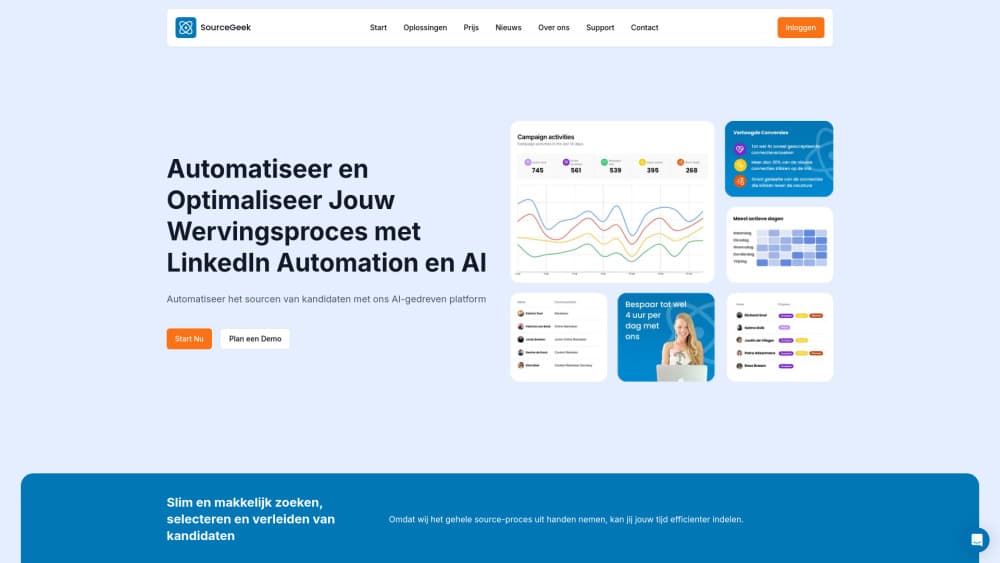
About SourceGeek
What Is SourceGeek
SourceGeek is a chat-based AI assistant built for recruiters and HR teams. You ask it for candidates in plain language, and it searches profiles, ranks them against a job description, and drafts outreach that reads like your own writing. The company positions it as an AI colleague rather than another dashboard, because it works across the hiring workflow a recruiter already uses instead of replacing it.
The problem it targets is scattered hiring data. Candidate details, notes, and conversations usually live in four or five separate tools, and recruiters lose hours moving between them. SourceGeek connects to an ATS, inbox, calendar, and Slack, then answers with that real context. It can also act on what it finds, from sending a message to updating a record. A common description of SourceGeek pricing is one line per seat, and talent acquisition software rarely gets cheaper than that once you scale.
The limits are worth naming early. SourceGeek is a paid product with no permanent free tier, only a 14-day trial. Pricing is quoted per seat and billed yearly, so a solo recruiter pays a real monthly cost. Teams that want the ATS write actions and the Slack bot need the Team plan, and the deepest security features sit behind Enterprise. It's a tool for people who hire regularly, not a casual experiment.
Getting Started
- Start a free 14-day trial from the SourceGeek site and create a workspace.
- Connect your tools: ATS, email, calendar, and messaging, so the assistant can read your live context.
- Add a role or job description, then ask SourceGeek to find and score matching candidates.
- Review the shortlist and the evidence behind each score, then approve the outreach it drafts.
- Let the assistant take action in your connected tools, and save recurring steps as automations or templates.
Product Information
A quick look at SourceGeek's pricing, supported platforms, and performance.
Best for
The users, tasks, and scenarios where this tool fits best.
Users
- Solo recruiters
- Recruitment agencies
- In-house HR and talent teams
- HR professionals new to AI tools
Tasks
- Sourcing candidates
- Screening against a job description
- Personalized outreach
- Keeping records current
- Re-engaging past candidates
Scenarios
- A recruiter handling several open roles at once
- An agency filling a niche position quickly
- A hiring manager who wants to write less outreach
- A small team sharing one hiring pipeline
Key features
Automated candidate search
SourceGeek searches profiles from a natural-language request, so you describe the role instead of building filters by hand. It ranks the results against your job description and returns a shortlist. For a recruiter used to scrolling through long result pages, that alone saves real time.
Evidence-based scoring
Rather than a single match percentage, the assistant scores candidates and shows the reasoning behind each score. You can spot why someone ranked high and judge whether the fit is genuine. The company frames this as scoring with evidence, which makes the shortlist easier to defend to a hiring manager.
Connectors for your existing tools
SourceGeek plugs into an ATS, inbox, calendar, Slack, and Teams. Personal connectors arrive on the Starter plan, while workspace connectors with ATS write actions come with Team. Because it reads your live context, answers reflect your actual roles and conversations rather than a generic database.
Action inside your workflow
The assistant does more than answer questions. It drafts and sends outreach, schedules meetings, and updates records where your work already happens. Slack and Teams bots let a team trigger it without leaving chat. This is the difference between a chatbot that suggests and a colleague that follows through.
Shared threads and projects
Team workspaces keep conversations, shortlists, and projects in one place. Shared threads mean a colleague can pick up a role and see the full context, which cuts the handover loss that comes with personal silos. Up to 15 seats share pooled credits on the Team plan.
Automations and templates
You can turn recurring steps into recruitment automation that runs in the background, and save messages as reusable templates. Over time the workspace builds a library of your own outreach, keeping tone consistent across a team. Both sit in the Starter plan, so solo recruiters get them too.
Company understanding
SourceGeek learns your roles, clients, and preferences from the data you connect, so its answers improve as it sees more of your work. The company describes it as understanding your company from day one. That memory is what separates it from a blank chat window you re-explain your business to every morning.
Security and access control
The Enterprise plan adds SSO, role-based access control, audit logs, and a dedicated account manager. For larger organizations with procurement reviews, these controls matter as much as the recruiting features themselves. Onboarding and training are included at that tier.
Pros and cons
Pros
- Chat interface means recruiters describe a role instead of learning a new sourcing tool.
- Scores come with evidence, so shortlists are easier to explain to hiring managers.
- Connectors reach your ATS, email, calendar, Slack, and Teams rather than living in one tab.
- The assistant takes action, from sending outreach to updating candidate records.
- Starter plan includes automations and templates, so solo recruiters get the core features.
Cons
- No permanent free plan, only a 14-day trial, so testing ends at a paid decision.
- Pricing is per seat and billed yearly, which adds up for a growing team.
- ATS write actions and the Slack and Teams bots require the Team plan, not Starter.
- SSO, audit logs, and role-based access control sit behind Enterprise, so smaller teams can't get them.
Frequently asked questions
SourceGeek is an AI recruiting assistant. Recruiters use it to search for candidates, score them against a job, draft outreach, and take action in tools like their ATS, email, and Slack.
Related content
Explore related tools, skills, and articles for SourceGeek.
SourceGeek Alternatives

Claude for Google Workspace
Anthropic · Writing · Productivity · BusinessClaude for Google Workspace puts Claude in a sidebar inside Google Docs, Sheets, and Slides, where it reads the file you have open and edits it in place.

Claude Haiku 5.5
Anthropic · Writing · Coding · ChatbotClaude Haiku 5.5 is Anthropic's fastest and cheapest small model, built for high volume tasks at $0.10 per million input tokens with a 1M token context window.

NoteWorthy
Suman Hansada · Writing · Productivity · AI AssistantNoteWorthy is a notes app for iPhone, iPad and Mac that writes titles, tidies formatting, summarizes long notes and files each one with on-device AI. No account, no upload, no network requests.