

Sourcely
Sourcely · Coding · Leaning · Business
Sourcely is an AI academic source finder, and it doubles as a citation finder. Paste a draft and it matches citable papers from 200M+ sources, with summaries and citation export.
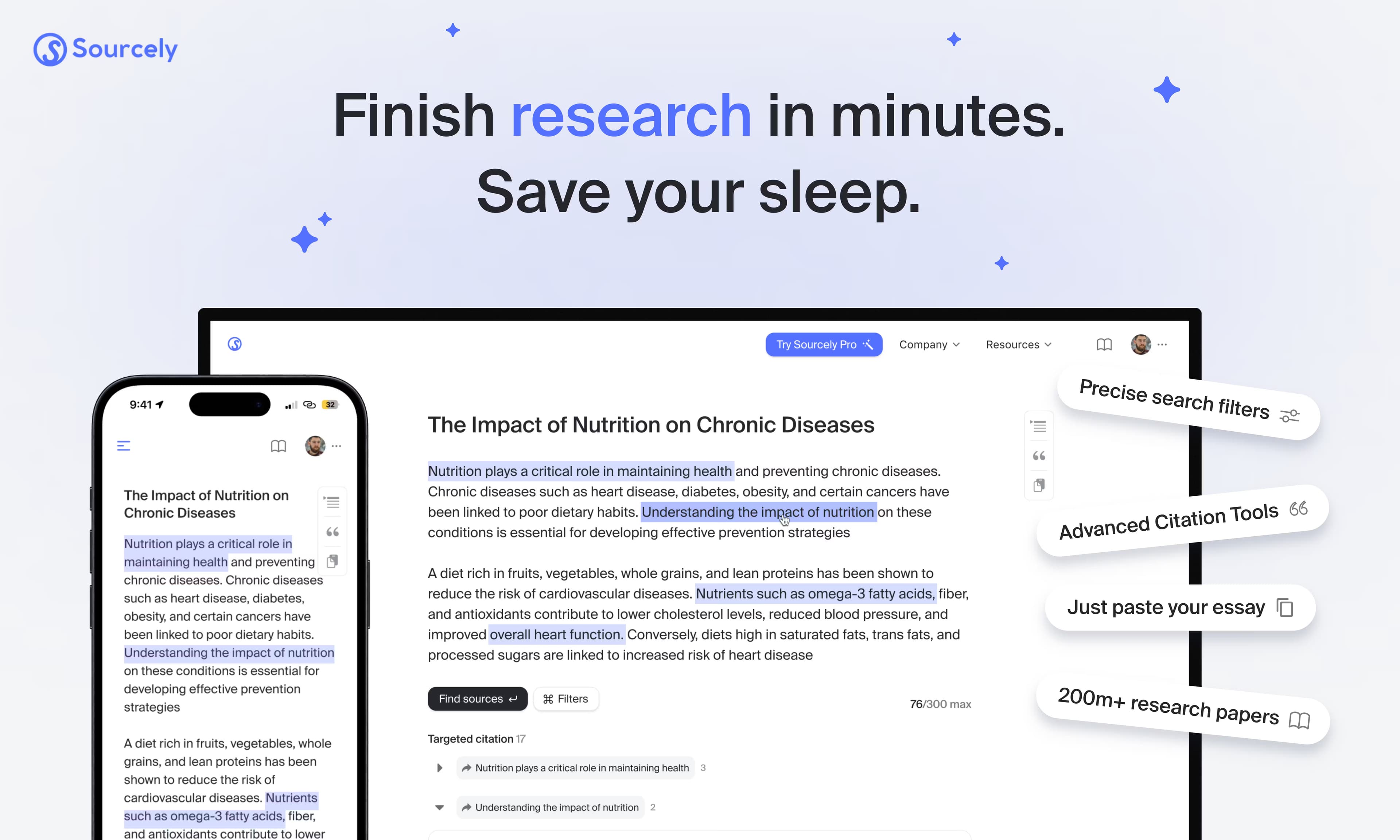
About Sourcely
What Is Sourcely
Sourcely is an AI academic source finder built for the moment a draft already exists and the evidence behind it doesn't. Acting as an academic search assistant, it takes a paragraph, an essay section or a research claim, and the engine reads the meaning of that text rather than the keywords in it. It then searches an index of more than 200 million papers and returns sources that actually back up what you wrote. The company behind it is a small team of former students and developers, and the tool is aimed at people on essay and dissertation deadlines.
The output is more than a list of links. Each suggestion comes with a summary, open-access PDF links where they exist, and a formatted citation in APA, MLA, Harvard, Chicago or another style. You can save sources into a library, chat with a paper to pull details, and run credibility checks before you lean on a source. This draft-to-citation path is the part that separates Sourcely from a plain reference finder.
Two limits matter. Accuracy shifts by discipline, and Sourcely can surface a real paper that doesn't quite support your exact claim, so you still open the source and read it. It also does not write for you, which sidesteps the academic integrity problem that AI writing tools raise. You write the argument, Sourcely finds the evidence.
Getting Started
- Open sourcely.net and paste your text. The free tier accepts up to 300 characters with no signup, enough to test the matching.
- Read the ranked suggestions. Each one shows a summary and a relevance ranking, so you can judge a paper before opening it.
- Filter by topic and open the abstract or the free PDF to confirm the source supports your point.
- Save the papers you want to your library, then export the citations in APA, MLA, Harvard or another style into your document.
Product Information
A quick look at Sourcely's pricing, supported platforms, and performance.
Best for
The users, tasks, and scenarios where this tool fits best.
Users
- University students
- Early-stage researchers
- Non-native English writers
- Academic writers and editors
Tasks
- Finding sources for an existing draft
- Building a literature review
- Generating formatted citations
- Checking source credibility
- Chatting with a source
Scenarios
- A student on a tight deadline
- A master's student scoping a thesis
- A journal-backed writer double-checking citations
Key features
Draft-to-Source Matching
The core flow starts from your writing, not a search box. You paste an argument, a thesis statement or a paragraph, and the engine matches it against the paper index by meaning. This suits anyone who already knows what they want to say. It saves the step where you guess which keywords a researcher would have used years ago.
200 Million Paper Index
Sourcely searches a corpus that the vendor says covers more than 200 million academic papers. The size matters because narrow topics still return candidates, and it pulls from fields beyond the first few search results. Coverage is the foundation the rest of the tool rests on.
AI Summaries for Each Source
Every suggested source comes with a summary, so you can judge whether a paper is worth opening before you commit to reading it. The summary, paired with a relevance ranking, cuts the time spent scanning abstracts. It turns a long candidate list into a short reading list.
Citation Export in Multiple Styles
Sourcely formats references in APA, MLA, Harvard, Chicago and other styles, and exports them ready to paste into your document. Switching styles for a different journal takes a click rather than a manual rebuild. This is the feature that turns found sources into a finished reference list.
Source Credibility Checks
A credibility check verifies that a suggested source is real and helps confirm it supports the claim you attached it to. The tool also checks DOIs, which matters after a run of AI tools that invent plausible-looking references. Use it before a source goes into a manuscript.
Chat With Your Sources
You can ask questions about a paper and get answers drawn from it, so you can pull a method, a key result or a stated limitation without reading cover to cover. It's useful when you're screening many candidates and only need one detail from each.
Deep Search
Deep search runs a broader pass than the standard match and sits behind the paid plans, with quotas of 30 a month on Ultra and 1,000 a month on Max. It's meant for heavier literature work where a single pass is not enough. Each plan bundles it with the smarter models.
Source Library
You can save sources to a personal library as you work, keeping every paper you might cite in one place. The library holds the summaries and citations too, so you don't rebuild a reference list from scratch. It fits projects that span weeks, like a thesis or a long review.
Pros and cons
Pros
- The draft-to-citation flow solves a specific problem fast, and few tools start from your text the way Sourcely does.
- It searches 200M+ papers, so even narrow topics return a workable set of candidates.
- Summaries and relevance rankings shorten the list before you start reading.
- Citations export in APA, MLA, Harvard and Chicago, which removes a manual formatting chore.
- Because it finds sources and leaves the writing to you, it sidesteps the academic integrity concerns of AI writing tools.
Cons
- Match accuracy varies by field, and STEM topics tend to return cleaner results than niche humanities subjects.
- It finds candidate sources but doesn't confirm they support your exact claim, so you still verify each one.
- There's no Word or Google Docs plugin, so the workflow is copy and paste by hand.
- The free tier stops at 300 characters, too short for a full essay section in one pass.
- It isn't built for systematic reviews or structured data extraction, so formal research projects need a different tool.
Frequently asked questions
Sourcely finds academic sources for text you've already written. You paste a paragraph, essay or claim, and it searches more than 200 million papers to surface citable sources, each with a summary, a relevance ranking and a formatted citation.
Related content
Explore related tools, skills, and articles for Sourcely.
Sourcely Alternatives

Base Code
Base44 (Wix) · Coding · ProductivityBase Code is a shared cloud development environment from Base44. Teammates describe changes to an existing GitHub codebase in chat, preview them live and send them back as pull requests.

Google EmbeddingGemma 2
Google DeepMind · Writing · Image · CodingGoogle EmbeddingGemma 2 is a 740M-parameter open model that turns text, code, images, audio, and video frames into vectors in one 768-dimension space, running on phones and laptops.

GitGlow
GitGlow · Coding · ProductivityGitGlow is a local-first desktop Git client that lets independent developers review their own code and their AI agents' changes in one place before shipping.