
Sourcer AI
Sourcer AI · Marketing · AI Detection · Business
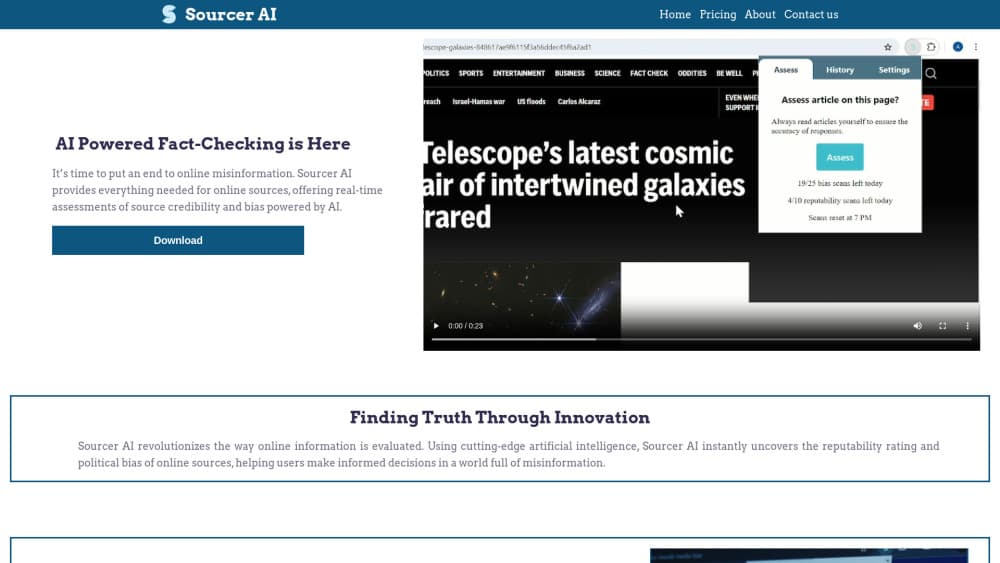
Sourcer AI is a Chrome extension that rates news articles for credibility, flags political lean, and summarizes the text in about 150 words, without leaving the page you're reading.
About Sourcer AI
What Is Sourcer AI
Sourcer AI is an AI news analysis tool that runs as a browser extension and reads the article in your current tab and hands back four things: a short summary, a reputability score, a political bias breakdown, and links to sources that cover the same topic. You press one button on the page and the panel fills in. The company behind it is a small team led by founder Alex Suscha, built out of campus and classroom pilots at the University of Wisconsin-Stevens Point.
The problem it targets is the moment before you decide to trust something. Most people don't open a second tab to check an outlet's track record, and most advice about spotting misinformation asks for work nobody does mid-scroll. Sourcer AI compresses that check into the reading flow, so the verdict shows up next to the paragraph instead of in a separate research session.
The limit is baked into the design. It judges source credibility and framing, not whether each sentence is true. A well-written piece from an outlet the tool rates poorly will still score badly, and a sloppy piece from a major paper can score well. Treat the number as a prompt to think, not a ruling.
Getting Started
- Create an account on the Sourcer AI site, then install the extension in Chrome and pin it to the toolbar.
- Open a news article and press the Automatic Assess button. The overlay scans the URL and returns a summary, a reputability score, and a bias split.
- For pages the scanner can't read, such as PDFs, blog posts, or video transcripts, paste the text into Manual Input and run the same analysis.
- Save the reads you want to keep, and upgrade to Pro if the weekly scan cap gets in the way.
Product Information
A quick look at Sourcer AI's pricing, supported platforms, and performance.
Best for
The users, tasks, and scenarios where this tool fits best.
Users
- Students
- Teachers and librarians
- Readers who follow politics or breaking news
Tasks
- Checking a headline before reposting it
- Getting the gist of a long article
- Comparing how two outlets covered the same event
Scenarios
- A family group chat forwards a screenshot with a dramatic claim
- A research paper draft needs sources you can defend
- You're scanning a news feed on your lunch break
Key features
One-Click Assessment on the Page
The extension adds a button to the article you're already reading. Pressing it sends the URL for analysis and opens a panel with the score, the bias split, and a summary. The company says the round trip usually takes a few seconds, and in practice the wait is short enough that you don't lose your place.
CRAPS-Based Reputability Score
Sourcer AI scores articles from 1 to 10 using an adapted version of the CRAPS test, which stands for Currency, Reliability, Authority, Point of View or Purpose, and Source. The Source criterion carries more weight than the other four combined, which is a deliberate choice by the developers. Each part of the score is shown in the interface, so you can see which factor dragged the number down.
Political Bias Detection in Three Buckets
The tool runs sentiment analysis on word choice, framing, and recurring themes, then sorts the article into left-leaning, right-leaning, or unbiased. It reports percentages that add up to 100, and the largest share becomes the headline label. The outlet's own political reputation is weighted heavily here, so a centrist piece from a partisan outlet still carries that outlet's lean. If you want a quick read on media bias before sharing a link, this panel is the part to check.
Abstractive Summaries at About 150 Words
The news summarizer writes in the model's own words rather than stitching quotes together, which keeps the output readable and short. That matters for long features and policy pieces where the lede buries the point. The tradeoff is interpretation: an abstractive summary can smooth over hedged language, so check the original for anything you plan to quote.
Manual Input for Stubborn Pages
Not every page exposes clean article text. Paywalled sites, PDFs, newsletters, and video transcripts often defeat the automatic scanner. Manual Input lets you paste the text and get the same score, bias split, and summary, which extends the tool well past standard news pages.
Context Panel With Reputable Source Links
After the assessment, Sourcer AI suggests sources that cover the same topic, so you can read a second account without opening a search engine. The feature sits in the Pro tier, alongside X support, more weekly scans, and a monthly newsletter. For research work, the source links are often more useful than the score itself.
Pros and cons
Pros
- It's the rare news bias checker that works inside the article you're reading, which removes the friction that kills most media literacy habits.
- The CRAPS breakdown shows why a score landed where it did, so the number isn't a black box.
- The 150-word summary makes it practical to triage several articles on the same story in a few minutes.
- Manual Input covers PDFs, newsletters, and transcripts, which most single-purpose bias checkers ignore.
- At $7.99 a month, Pro costs less than most news subscriptions and adds X support plus source linking.
Cons
- Source weight dominates the score, so smaller or newer outlets get punished even when a specific article is careful and well reported.
- Some news sites break the automatic scanner, and you fall back to copying text by hand.
- X support, source linking, and the higher scan cap sit behind Pro, so the free tier shows the concept more than the workflow.
- It evaluates tone and reputation, not factual claims, so a confidently wrong article from a trusted outlet can still score well.
Frequently asked questions
Yes. There's a free account with a weekly scan limit, and you can install the extension and run assessments without paying. Pro raises the cap by more than ten times and unlocks the context features.
Related content
Explore related tools, skills, and articles for Sourcer AI.
Sourcer AI Alternatives

ngram 2.0
ngram · Video · Marketingngram 2.0 is an AI video generator for teams. It turns a prompt, a screen recording, or a product URL into a narrated explainer, product demo, or AI avatar video, and every scene stays editable.

shippedit.me
Krawlup · Marketing · Businessshippedit.me now redirects to Krawlup, a web platform that audits SEO, AEO and page speed every week, then hands the fixes to AI coding agents over MCP.

MePersona
MePersona, Inc. · Writing · Productivity · MarketingMePersona is an AI unified inbox for creators. It learns your voice, drafts replies to fan messages from 12 platforms, and sends only what you approve.