
Spark Mail
Readdle · Writing · Productivity
Spark Mail is a cross-platform email app by Readdle that sorts your inbox by priority, drafts replies with AI, and lets teams work out of shared inboxes.
About Spark Mail
What Is Spark Mail
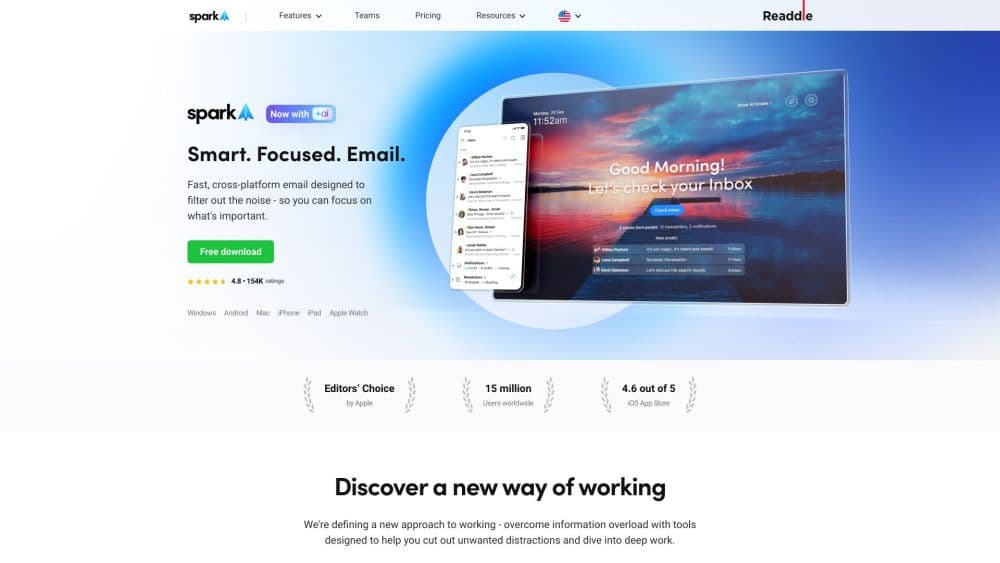
Spark Mail is an email client for people who get more messages than they can comfortably handle. It connects Gmail, Outlook, iCloud, Yahoo, Exchange and any IMAP account, then splits what lands in your inbox into priority mail, newsletters and notifications so the important stuff sits on top. The idea is that a busy inbox should look like a to-do list, not a firehose.
Readdle has shipped Spark since 2015, first on iPhone and Mac, then Android and Windows, so the same inbox follows you across devices. Spark Mail pricing starts free for basic use and moves up for the AI and team features, which puts it in the same conversation as Apple Mail, Outlook and Gmail's own apps.
The main limitation is philosophical as much as technical. Spark is a client, not a mail service: it holds none of your messages itself, and it syncs your account data through its own servers to power Smart Inbox and search. If you want your mail to stay entirely between your device and your provider, that server hop is a real tradeoff. AI replies and summaries also burn credits on the paid tiers, so heavy users do hit the ceiling.
Getting Started
- Download Spark Mail from the App Store, Google Play, Microsoft Store or sparkmailapp.com and open it.
- Sign in with Google, Microsoft or Apple, or add accounts manually with IMAP.
- Pick which accounts feed the Smart Inbox and set your swipe actions and notifications.
- Create a team if you share mail, then assign senders to Priority or block them with Gatekeeper.
- Try the AI assistant and meeting notes during the 7-day trial, then pick a plan that matches your volume.
Product Information
A quick look at Spark Mail's pricing, supported platforms, and performance.
Best for
The users, tasks, and scenarios where this tool fits best.
Users
- Busy professionals
- Freelancers and solo operators
- Small teams on shared addresses
Tasks
- Clearing a crowded inbox
- Writing and answering email faster
- Tracking who owes you a reply
Scenarios
- Running a client-facing inbox
- Managing work and personal mail side by side
- Wrapping up after a meeting
Key features
Smart Inbox
Spark Mail sorts incoming mail into priority senders, newsletters and notifications, so what needs an answer rises to the top and the rest waits below. You rarely see a flat list again. It's the feature the whole app is built around, and correcting it once trains the sorting for later.
AI Assistant
As an AI email client, Spark Mail's AI assistant finds, summarizes and drafts across your mail, attachments and calendar. On the paid tiers you also get writing help that translates, shortens and proofreads a draft before you send it, plus quick replies for common messages. Every plan gets a monthly credit allowance, and the free tier's is small.
Gatekeeper and Priority Senders
Gatekeeper vets new senders before their mail reaches you, so you can block a sender or accept them in one tap. Priority senders go further: their mail is pinned and highlighted so it never hides in the pile. Together they cut the noise without filters you have to maintain.
Send Later and Reminders
You can schedule a send for a set time, snooze a thread until it's useful again, and attach a reminder that resurfaces an email when you should follow up. Messages queue even if your device is offline. It turns your inbox into a light task manager without leaving the app.
Team Collaboration
Create a team and you can share inboxes and drafts, assign threads to colleagues, and discuss mail in private comments that live next to the message. Shared templates keep everyone's replies consistent. Editing a draft together happens in real time, like a shared document.
Meeting Notes
On paid plans Spark Mail transcribes and summarizes meetings, then stores the notes where you can search them later. Plus includes 40 notes a month, Pro is unlimited, and the free tier gets a small lifetime pool. It's aimed at people who live in calls and forget what was said.
Cross-Platform Sync
The same inbox runs on iPhone, iPad, Android, Mac and Windows, and Spark has long ranked as an Apple Editors' Choice pick. Accounts, folders and settings sync between them, so you can start a reply on your phone and finish it on a laptop. A web app covers the gaps when you're on someone else's machine.
Pros and cons
Pros
- Smart Inbox and Gatekeeper cut through clutter without you building filters, which is the biggest daily time saver.
- AI drafting, summaries and translation are built into the client rather than bolted on through a separate tool.
- Team features such as shared inboxes, assignments and comments make it a strong email app for teams, and they fit support and client-facing work well.
- Runs on iPhone, Android, Mac and Windows with matching settings, so switching devices is painless.
- A genuinely usable free tier covers unlimited accounts and the core sorting features.
Cons
- Your mail passes through Readdle's servers for Smart Inbox and search, which some privacy-minded users won't accept even with encryption.
- AI credits and meeting notes are capped by plan, so heavy users on Plus run out and must upgrade.
- The best team tools need everyone on a paid seat, which raises the cost for small groups.
- Read statuses only work when the recipient also uses Spark, so the tracking is partial.
Frequently asked questions
Spark Mail is an email client that pulls every account into one inbox and sorts it by importance. It's made for managing a high volume of mail, with AI help for drafting and team tools for shared addresses.
Related content
Explore related tools, skills, and articles for Spark Mail.
Spark Mail Alternatives

Google EmbeddingGemma 2
Google DeepMind · Writing · Image · CodingGoogle EmbeddingGemma 2 is a 740M-parameter open model that turns text, code, images, audio, and video frames into vectors in one 768-dimension space, running on phones and laptops.

MePersona
MePersona, Inc. · Writing · Productivity · MarketingMePersona is an AI unified inbox for creators. It learns your voice, drafts replies to fan messages from 12 platforms, and sends only what you approve.

Fluence
Yay Software (Yannick Huchard) · Writing · Voice & Language · ProductivityFluence is an Android app that reads PDFs, EPUBs, Word files and web articles aloud, follows each sentence as it speaks, and answers questions about the text on the phone itself.