
SpeakHints
SpeakHints · Voice & Language
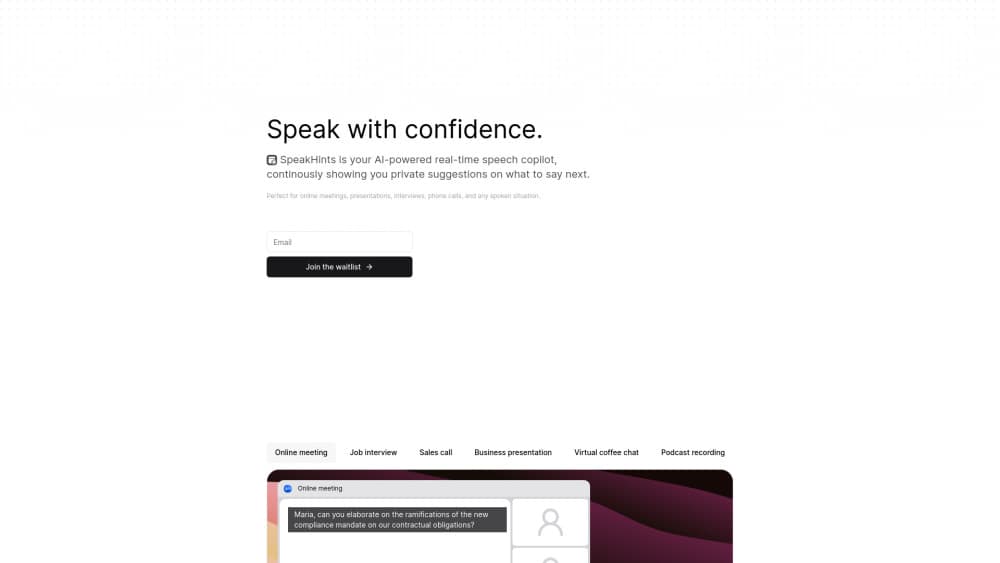
SpeakHints is a real-time AI speech copilot that listens to your calls and shows private hints on what to say next, plus quick recaps, translation, and instant answers.
About SpeakHints
What Is SpeakHints
SpeakHints is a desktop and mobile app that listens to speech in real time and feeds you short suggestions in a private overlay. It reads either your microphone or your system audio, so it doesn't need a plugin for Zoom, Google Meet, or Microsoft Teams. Whatever comes out of your speakers, it can hear.
The pitch is narrow on purpose. Plenty of AI meeting assistant apps want to write for you after the fact. SpeakHints works during the conversation, when you've lost the thread, drawn a blank on a name, or need the last five minutes condensed into three bullets. It's closer to live speaking hints than a scripted AI teleprompter.
The limits matter too. Access runs through a waitlist, pricing isn't published, and the app leans on cloud transcription, so an unstable connection hurts. It also won't make you a better speaker on its own. It buys you a second to think.
Getting Started
- Join the waitlist on the SpeakHints site with your email and wait for an invite.
- Install the app on macOS, Windows, iOS, or Android, then sign in and grant microphone and screen audio permissions.
- Pick your input source and spoken language. The app supports more than 30 languages, including English, Spanish, Portuguese, French, German, Japanese, Korean, and Mandarin.
- Start your call or presentation. Hints appear in the overlay, and you can trigger recaps, translation, or an open question whenever you need them.
Product Information
A quick look at SpeakHints's pricing, supported platforms, and performance.
Best for
The users, tasks, and scenarios where this tool fits best.
Users
- Non-native speakers on English calls
- Sales and customer success teams
- Job seekers in interview loops
Tasks
- Recovering from a blank
- Catching up after a distraction
- Capturing action items
Scenarios
- Weekly status meetings where you report but also get asked questions you didn't prep for.
- Conference talks and demo calls, where the overlay sits on your own screen and the audience sees only your shared window.
- Podcast or panel recordings, where a prompt about a stat you half-remember saves the segment.
Key features
Live Hints in a Private Overlay
The core loop is simple. Speech gets transcribed, a model drafts two or three short suggestions, and they show up in a small window only you can see. Suggestions stay short by design, usually a sentence or a phrase, because reading a paragraph while talking is a good way to sound like you're reading a paragraph.
Auto Continue on Pauses
The app watches for pauses in your speech and offers a sentence to finish your thought. This one earns its keep in the middle of a long answer, when you've made your point but haven't landed it. It's the closest thing here to a safety net.
Five-Minute Recaps
One tap summarizes roughly the last five minutes of conversation. Useful after a screen share, a side question, or the stretch where you were typing instead of listening. The recap is short enough to scan while someone else is talking.
Ask AI Mid-Conversation
You can put a question to the assistant about anything related to the call, and it answers in the same overlay. It behaves like a chat assistant bolted onto the transcript, so it can define a term, check a number, or draft a phrasing you'd rather not improvise.
Instant Translation
The translate action converts the last few phrases into your language. On a multilingual call this is the difference between nodding along and actually following the argument. Quality tracks the source audio, so a muffled headset mic will drag it down.
Custom Hints and Quick Prompts
Beyond the built-in actions, you can write your own hints and keep them as one-tap buttons. Teams tend to build a small set around their own vocabulary: pricing objections, compliance caveats, the three points they always forget in demos. Unlike a general AI note taker that produces a document afterward, this stays in the live moment.
Pros and cons
Pros
- Works with any meeting app because it reads system audio instead of relying on integrations.
- The overlay stays off shared screens, so participants see your slides, not your prompts.
- 30+ languages with translation covers most multilingual work calls.
- Custom hints turn the app into a lightweight presentation coach tuned to your own material.
Cons
- Access is invite-only and pricing isn't published, so you can't budget for it or trial it on a whim.
- Cloud transcription means a weak connection or a noisy room degrades the hints, and you won't know until mid-sentence.
- It solves the moment, not the skill. Relying on it in high-stakes interviews can leave you flat when it misses.
Frequently asked questions
Yes. It doesn't plug into any of them. SpeakHints captures system audio, so it works with whatever calling app you already use, plus phone calls on mobile and in-person conversations.
Related content
Explore related tools, skills, and articles for SpeakHints.
SpeakHints Alternatives

Foley
Hanamori Labs, LLC · Voice & Language · Productivity · AI AssistantFoley is a voice to-do list that turns a spoken sentence into a filed task, complete with project, date and time, then helps you plan the day around what is already there.

HireKey
HireKey · Voice & Language · Productivity · LeaningHireKey is an AI job search copilot built by a former tech recruiter. It checks role fit, tailors resumes, runs interview practice and tracks every application.

Fluence
Yay Software (Yannick Huchard) · Writing · Voice & Language · ProductivityFluence is an Android app that reads PDFs, EPUBs, Word files and web articles aloud, follows each sentence as it speaks, and answers questions about the text on the phone itself.