

SpeechGen.io
SpeechGen.io · Voice & Language
SpeechGen.io is an online AI voice generator with 5,000+ voices across 150 languages. It turns text into MP3, WAV, FLAC or OGG files, runs on pay-as-you-go credits, and needs no subscription.
About SpeechGen.io
What Is SpeechGen.io
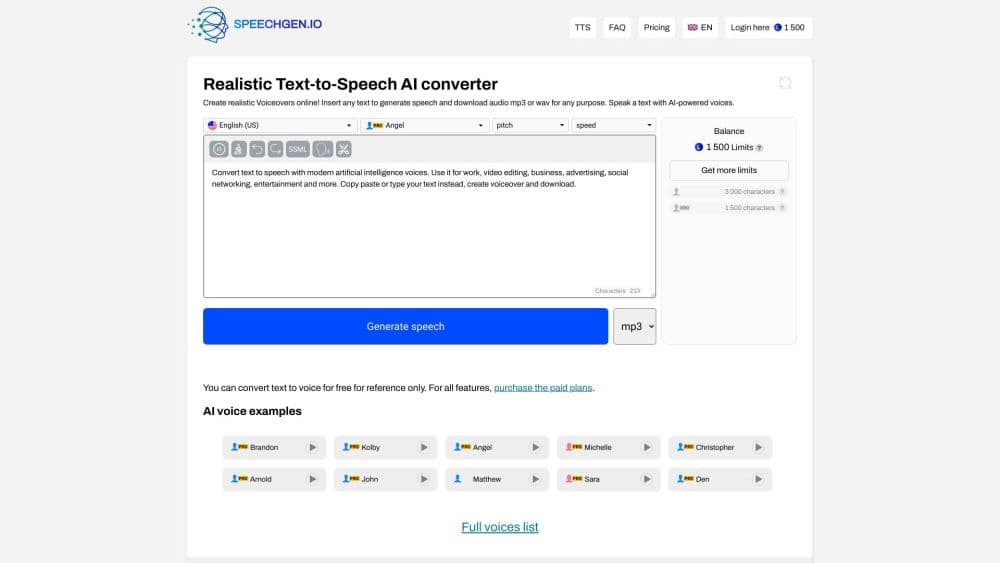
SpeechGen.io is a browser-based text to speech service, and this AI text to speech engine turns written text into natural-sounding audio. The catalog holds more than 5,000 voices spread across 150 languages, and each voice sits in one of three quality groups: Standard, Pro or HD. You paste a script, pick a voice and a language, then download the finished track as MP3, WAV, FLAC, OGG or OPUS. No install, no studio booking, and the whole thing runs in a tab.
The service targets people who need audio at volume. Content creators voice YouTube videos and Reels, e-learning teams turn lessons into narration, museums build audio guides, and small clinics set up bilingual phone menus. A free tier lets you test the engine before you spend anything: 1,000 characters with no account, or 3,000 characters a day for the first week once you register.
The model is pay-as-you-go rather than a monthly subscription. You buy a pack of credits when you need them, and the balance stays valid for a year. Two limits are worth knowing up front. High-quality voices burn credits faster than Standard ones, and the free tier is small, so a full audiobook or a long course will need a paid pack.
Getting Started
- Open the editor and paste your text, or upload a DOCX, PDF or SRT file.
- Pick the language and a voice, then filter by gender, accent or quality group.
- Adjust speed, pitch and pauses, or drop in SSML tags for finer control.
- Click Convert to Speech and wait while the engine builds the audio.
- Preview the result, then download it as MP3, WAV, FLAC, OGG or OPUS.
Product Information
A quick look at SpeechGen.io's pricing, supported platforms, and performance.
Best for
The users, tasks, and scenarios where this tool fits best.
Users
- YouTube and short-form creators
- E-learning and training teams
- Small businesses with phone systems
- Museums, campuses and tour operators
- Podcasters and audiobook producers
Tasks
- Text to speech
- Multilingual voiceover
- Document narration
- Subtitle to audio
- Multi-voice dialogue
Scenarios
- A campaign that ships to twelve markets
- A video with a tight deadline
- An industrial site with mixed-language crews
- A course that runs daily content
Key features
5,000+ Voices Across 150 Languages
The voice library spans 5,000+ options in over 150 languages, sorted into Standard, Pro and HD groups. Standard voices are the most economical and cover the widest language range, Pro voices lean on neural models for more natural delivery, and HD voices push for lifelike emotion. You can filter by gender, accent and quality, and preview any combination with your own text before spending a single credit.
Smart Cache Saves Repeat Work
SpeechGen.io builds audio sentence by sentence and caches each one for seven days. If you edit a project and regenerate it, only the new or changed sentences cost credits while the rest come back from cache for free. That makes revision cheap: you can proof a script out loud, fix a typo and re-export without paying twice for the parts that stayed the same.
Multi-Voice Dialogue in One File
Dialog mode lets you assign a different voice to each speaker inside a single project. Tag a name before a paragraph, and the engine merges every voice into one export. The same feature handles multi-language voices, so a character can keep a recognizable tone while the script switches language, which suits interviews, audiobooks and explainer videos.
SSML and Fine Pause Control
The editor accepts SSML tags for exact control over delivery. You can hold a pause for one second with a break tag, stress a word, or shift pitch and rate across a phrase. Pause length between sentences and paragraphs is set in milliseconds and tunable from 150ms to 30 seconds, and the split moment doesn't cost extra credits.
Structured Segments and Long Text
Your text can run up to 2 million characters in one generation, and the cut tag splits the output into separate files with custom names. That means one script can export as chapter files or per-scene audio without opening a second editor. Long texts process in segments so a book-length job stays manageable.
Built-In Music and API Access
A background music library is included, so you can mix a voice track with music at the right level without leaving the tab. Commercial license comes with every pack, free and paid, and a REST API covers programmatic use for apps, chatbots and automated pipelines.
Pros and cons
Pros
- Pay-as-you-go credits with no monthly subscription, and a balance that stays valid for a year.
- Smart Cache refunds repeated text, so iterative edits only charge for what changed.
- 5,000+ voices in 150 languages, with downloadable MP3, WAV, FLAC, OGG and OPUS output.
- Commercial license, background music and API access included in every pack.
- No watermark, even on the free tier.
Cons
- Credits run down faster on Pro and HD voices, so studio-grade output costs more per character.
- The free allowance is small at 1,000 characters, which won't cover a full video or course.
- Some advanced options such as intonation graphs and emotional styles only work on selected voices.
- Very long projects still take time to process despite being split into segments.
Frequently asked questions
Yes. You can paste text, pick a voice and convert it right away for 1,000 characters with no account, no card and no watermark. Registering raises the daily limit to 3,000 characters that renew every day for seven days.
Related content
Explore related tools, skills, and articles for SpeechGen.io.
SpeechGen.io Alternatives

Foley
Hanamori Labs, LLC · Voice & Language · Productivity · AI AssistantFoley is a voice to-do list that turns a spoken sentence into a filed task, complete with project, date and time, then helps you plan the day around what is already there.

HireKey
HireKey · Voice & Language · Productivity · LeaningHireKey is an AI job search copilot built by a former tech recruiter. It checks role fit, tailors resumes, runs interview practice and tracks every application.

Fluence
Yay Software (Yannick Huchard) · Writing · Voice & Language · ProductivityFluence is an Android app that reads PDFs, EPUBs, Word files and web articles aloud, follows each sentence as it speaks, and answers questions about the text on the phone itself.