

Speechmark
Speechmark · Writing · Voice & Language · Productivity
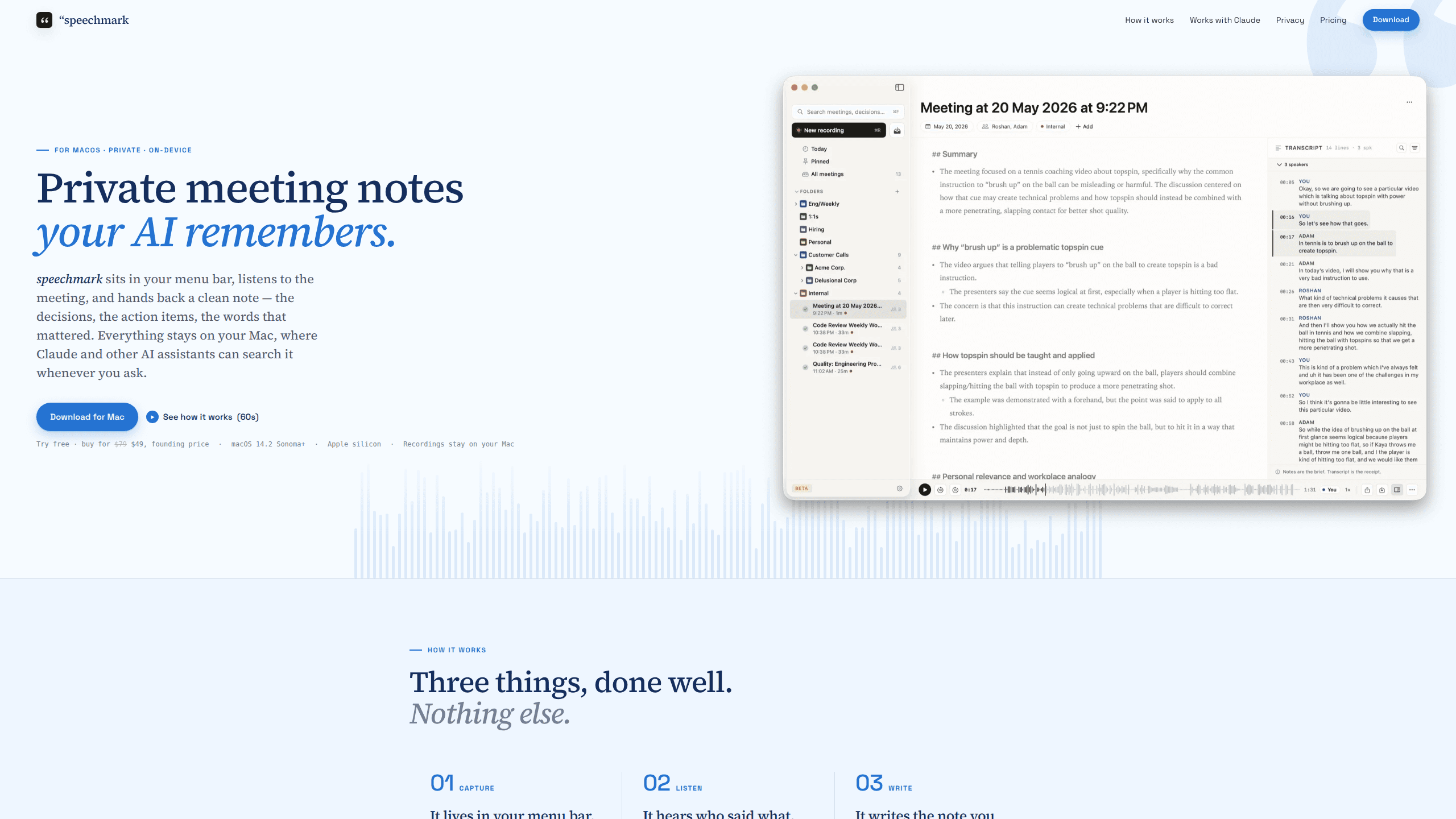
Speechmark is a private AI meeting notes app for Mac that lives in your menu bar, records your mic and the meeting audio together, then hands back a clean written note instead of a wall of bullets. Everything runs on your Mac, so recordings never leave the device unless you decide to send them somewhere. Think of it as a private meeting recorder that also writes the summary. It also connects to Claude Desktop so your own AI assistant can search your meetings, and it costs a one-time $49 at the founding price.
About Speechmark
What Is Speechmark
Speechmark is a meeting notes app built only for macOS. It sits in your menu bar, and one click starts recording. That's it. From there it captures your microphone and the meeting audio at the same time, separates the speakers, and writes a short recap with the decisions and action items that actually came up. There's no bot that joins your call and no browser extension to install, which removes most of the friction people hit with cloud recorders. Nothing to configure first.
The product's pitch is privacy by default. Audio and transcripts stay on your Mac, no account or login is required, and the machine writes the note using a model you pick. You can use Apple Intelligence, a local Ollama model, or your own OpenAI or Anthropic API key, and that last choice matters a lot if you already pay for an AI subscription and don't want to fund a second one just to get a meeting summary. That's the whole idea.
The main limits are hardware and platform. Speechmark needs Apple silicon and macOS 14.2 Sonoma or later, so Intel Macs are out. The note quality depends on which model you choose. The built-in options are tuned for meeting recaps, not deep analysis.
Getting Started
- Download the app from the official site and open it on an Apple silicon Mac running macOS 14.2 or later.
- Grant microphone and screen recording permissions so Speechmark can capture both your mic and the meeting audio.
- Pick your writing model in settings: Apple Intelligence, a local Ollama model, or your own OpenAI or Anthropic key.
- Click the menu bar icon to start recording, run your meeting, then confirm speaker names the first time you see them.
- Open the finished note to read the recap and action items, then optionally connect the transcript folder to Claude Desktop.
Product Information
A quick look at Speechmark's pricing, supported platforms, and performance.
Best for
The users, tasks, and scenarios where this tool fits best.
Users
- Product managers
- Consultants and freelancers
- Founders and small teams
Tasks
- Capturing decisions
- Pulling action items
- Reviewing past calls
Scenarios
- Back-to-back video calls
- Sensitive internal reviews
- Client onboarding calls
Key features
On-device transcription and storage
Speechmark captures your mic and the meeting audio on your Mac and keeps the recordings there. Nothing is uploaded for transcription, which is the core difference from cloud-first note takers. If your work involves confidential material, this is the reason to pick it.
Speaker separation and labeling
The app splits speakers automatically and labels them once you confirm a name. After that, every transcript reads like a script with clear attribution. No more guessing who said what. That makes it far easier to scan who committed to what, especially in calls with several participants.
Editorial-style notes
Rather than dumping bullet points, Speechmark writes the note you'd have written yourself: decisions, action items, and a short recap in plain prose. It's aimed at the meeting summary people actually read, not a transcript nobody opens.
Your choice of AI model
You pick the model that fits your privacy bar. Apple Intelligence and a local Ollama model keep everything offline, while your own OpenAI or Anthropic key lets you use a stronger cloud model if you accept the trade-off. No single forced backend.
Click-to-source playback
Every line in the note links back to the moment it was spoken. Click a decision and the audio jumps to that point, so you can verify a quote or catch a detail the summary compressed. It's a small feature that saves a lot of scrubbing.
Claude Desktop connector
Speechmark installs as a Claude extension through Settings, with no config files or terminal commands. Once connected, your transcript folder becomes memory Claude can reason over, and each answer cites the meeting it came from. Want to know what a client asked for three calls ago? Just ask, and Claude points to the exact meeting. The connector reads your notes locally and makes no network calls of its own.
No account, no bot
There's no login and no meeting bot that announces itself in the participant list. You record from the menu bar and the note appears when you're done. For people who dislike bots joining calls, this removes the awkward part entirely. Simple as that.
Pros and cons
Pros
- Audio and transcripts stay on your Mac, with no cloud upload for transcription.
- One-time pricing instead of a monthly subscription, and a free trial to test it.
- No account or login required, so setup is quick.
- You can route note writing to Apple Intelligence, a local model, or your own API key.
- Claude Desktop connector turns past meetings into searchable, cited answers.
Cons
- Requires an Apple silicon Mac on macOS 14.2 or later, so Intel-era machines can't run it.
- Note quality varies with the model you choose, and although the offline options keep your data local, they tend to be lighter and less polished than the leading cloud models that other note takers route to by default.
- It's a Mac-only tool, so there's no iPhone, iPad, or Windows version for meetings you take elsewhere.
- No public API, which limits custom automation beyond the Claude connector.
Frequently asked questions
It records a meeting on your Mac, separates the speakers, and writes a short note with the decisions and action items, all without a bot joining the call or an account tying your data to a vendor. Everything is processed on your device. Nothing is uploaded.
Related content
Explore related tools, skills, and articles for Speechmark.
Speechmark Alternatives

Google EmbeddingGemma 2
Google DeepMind · Writing · Image · CodingGoogle EmbeddingGemma 2 is a 740M-parameter open model that turns text, code, images, audio, and video frames into vectors in one 768-dimension space, running on phones and laptops.

MePersona
MePersona, Inc. · Writing · Productivity · MarketingMePersona is an AI unified inbox for creators. It learns your voice, drafts replies to fan messages from 12 platforms, and sends only what you approve.

Fluence
Yay Software (Yannick Huchard) · Writing · Voice & Language · ProductivityFluence is an Android app that reads PDFs, EPUBs, Word files and web articles aloud, follows each sentence as it speaks, and answers questions about the text on the phone itself.