

Speedwrite
Speedwrite · Writing
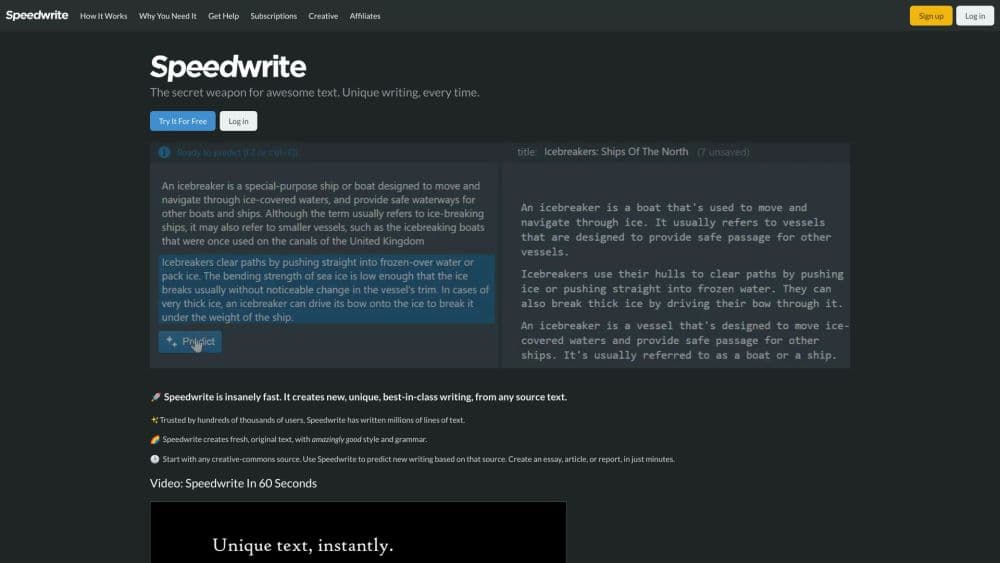
Speedwrite is an AI humanizer that rewrites ChatGPT, Claude or Gemini text one paragraph at a time, so the result sounds like a person wrote it. You can press Predict again for a fresh version.
About Speedwrite
What Is Speedwrite
Speedwrite is an AI humanizer and text rewriter that takes text from ChatGPT, Claude, Gemini, or your own rough draft and writes it again in a different voice. It works one paragraph at a time. Hover over a paragraph, click Predict, and you get a new version with different sentence shapes and a different rhythm. The facts stay put. The chatbot cadence goes away.
The problem it targets is sameness. Millions of people ask the same few assistants for the same kinds of emails, posts, and cover letters, so the output comes back in one recognizable voice. Speedwrite breaks that pattern by rebuilding whole sentences rather than swapping synonyms. Two people who paste the same paragraph walk away with two different results.
There are limits worth knowing before you start. Speedwrite only reads and writes English, so it's the wrong tool for Mandarin, Arabic, or anything far from English grammar. It's also a prediction engine, not a fact checker. It can move a date or misread a long paragraph, and the company tells users to proofread every line before use.
Getting Started
- Create a free account at speedwrite.com. Signing up gives you a set number of free predictions, and the remaining count shows in your account.
- Paste your draft into a source. You can drop in chatbot output, an older article, or your own notes.
- Add a title at the top of the screen. Naming the subject helps the engine understand what the text is about and improves the rewrite.
- Hover over a paragraph and click Predict. Each press produces a new version, so press again until one sounds like you.
- Fix anything that's off, then export. You can copy a document or download a text file, and exports aren't capped.
Product Information
A quick look at Speedwrite's pricing, supported platforms, and performance.
Best for
The users, tasks, and scenarios where this tool fits best.
Users
- Marketers
- Non-native English writers
- Bloggers and newsletter writers
- SEO and social teams producing copy at volume
Tasks
- Humanizing a paragraph of chatbot output
- Cleaning up a messy draft
- Reworking a rewrite that still sounds robotic
- Exporting text for a CMS or email tool
Scenarios
- Sending a cover letter that doesn't read like a chatbot wrote it
- Writing product pages in bulk for a small store
- Rescuing a rough draft the night before a deadline
- Polishing ESL client deliverables before sending
Key features
Paragraph-Level Prediction
Every rewrite starts with one paragraph. You hover, you press Predict, and Speedwrite returns a full new version of that paragraph in plain English. Because it works in small pieces, you keep tight control over which parts of a long document change. Fix a weak version or keep it and move on. The output length lands between 75 and 110 percent of the input, so a paragraph can come back slightly shorter when that makes it read better.
Repeated Predictions for Fresh Wording
The same paragraph gives you a different take each time you press. You generate a few, read them side by side, and keep the one closest to your normal voice. That loop is what separates this from a one-shot rewrite. Two people working from the same source paragraph end up with separate texts, which matters when a whole team draws on the same chatbot.
Whole-Sentence Rewriting Instead of Synonym Swapping
Most paraphrasers behave like a thesaurus with a random number generator, which is why people hunt for a paraphraser alternative. They swap individual words and leave every sentence in its original shape, so "internal combustion engine" comes back as something like "inner ignition motor." Speedwrite reorganizes the ideas instead, varies sentence length, and cuts filler. The point is that the structure changes with the words.
Rough Draft Cleanup
Paste a draft with grammar errors and broken phrasing and the tool returns fluent text. That's the same engine the marketing pages focus on for AI humanizing, applied in the other direction. It helps writers working in a second language, and it helps anyone who wants to rewrite AI text that came out stiff. You still read it before sending, because the prediction can smooth away a nuance.
Sources, Documents and Automatic Backups
Sources are containers where you paste the text you're rewriting. They're stored in your browser, not on Speedwrite's servers, so they don't follow you to another computer. Documents hold the predictions and stay editable. The current document saves periodically, and each save point appears as a backup you can restore.
Export With No Limits
You can copy an entire document to the clipboard or download it as a text file, and Speedwrite doesn't cap how many times you export. For anyone moving text into a CMS, a doc, or an email builder, that removes a common paywall. The company's own marketing lists unlimited exports as one of the few things you never pay for.
Pros and cons
Pros
- Each Predict press returns a genuinely different rewrite, so you can shop for a version that fits your voice.
- The engine reshapes whole sentences, which makes the output harder to spot than the word-swapped result from a standard paraphrasing tool.
- Free accounts get a set number of predictions to test with, and every import, export, and backup is free.
- It handles messy input, so an English draft with grammar mistakes comes back readable.
- Browser-stored sources mean your pasted text doesn't sit on Speedwrite's servers.
Cons
- English only. The company says it works poorly on Mandarin and Arabic, so writers in other languages get little from it.
- It can change names, dates, or the meaning of a long paragraph. Every line needs a read before you use it.
- Pressing Predict too many times on one source eventually returns near-duplicates, which limits how much variation you get from a single paragraph.
- The monthly prediction cap on each plan is easy to burn through on a long document, especially on the Starter plan.
Frequently asked questions
Speedwrite rewrites English text paragraph by paragraph. You paste a draft, press Predict on a paragraph, and it returns a new version with different sentence structure and rhythm. People use it to humanize AI text, stripping the generic voice out of chatbot output, or to clean up a rough draft.
Related content
Explore related tools, skills, and articles for Speedwrite.
Speedwrite Alternatives

Claude for Google Workspace
Anthropic · Writing · Productivity · BusinessClaude for Google Workspace puts Claude in a sidebar inside Google Docs, Sheets, and Slides, where it reads the file you have open and edits it in place.

Claude Haiku 5.5
Anthropic · Writing · Coding · ChatbotClaude Haiku 5.5 is Anthropic's fastest and cheapest small model, built for high volume tasks at $0.10 per million input tokens with a 1M token context window.

NoteWorthy
Suman Hansada · Writing · Productivity · AI AssistantNoteWorthy is a notes app for iPhone, iPad and Mac that writes titles, tidies formatting, summarizes long notes and files each one with on-device AI. No account, no upload, no network requests.