

Splitter.ai
Splitter.ai · Voice & Language
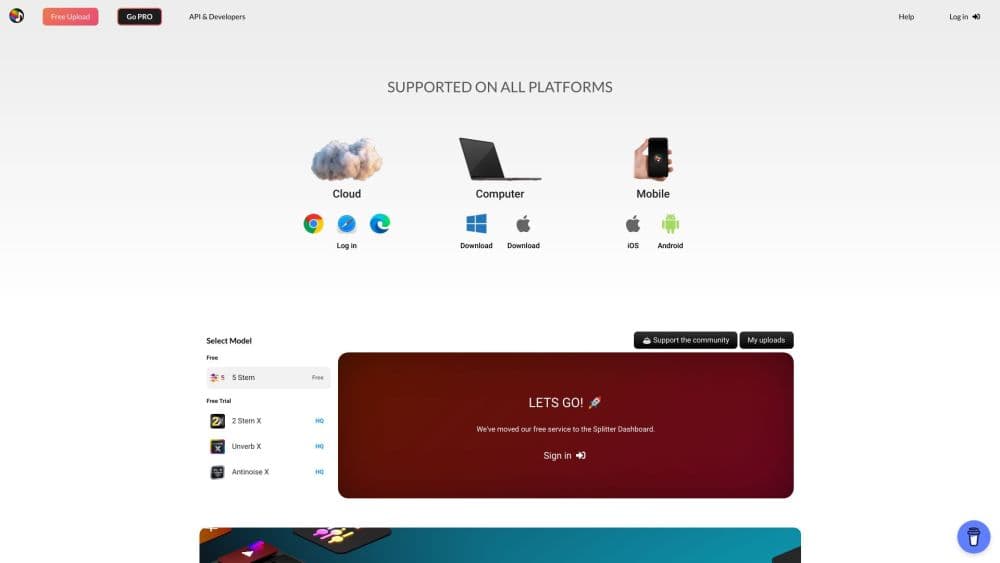
Splitter.ai is an AI audio separation tool that pulls vocals, drums, piano and bass out of a song, letting you make instrumentals and acapellas from a browser.
About Splitter.ai
What Is Splitter.ai
Splitter.ai is a web based audio separation service that takes a mixed song and splits it into the individual parts inside it. Upload a track, pick a model, and the platform returns separated stems you can download and use. It grew out of Deezer's open source Spleeter research and now runs its own neural network, which the team calls VEX, on community funded servers.
The appeal is speed and access. You don't install anything or own audio software to get a usable instrumental or acapella. A vocal remover for practice, a sampler looking for clean stems, and a video editor stripping music out of a clip all get something useful without a license. The free tier is the on ramp, and it stays free because the community backs it with donations.
The main limitation is control. Free uploads run through shared cloud servers, so long files and heavier models sit behind paid plans or require the free desktop app, Splitter Studio, for local processing. Results also vary by song: dense mixes with layered instruments separate worse than simple arrangements, and you still hear artifacts when a stem is soloed. The service is a tool for practice and experimentation, not a mastery grade replacement for the original studio stems, which usually don't exist outside the label.
Getting Started
- Open splitter.ai in a browser and upload an audio file, or install the browser extension to split straight from a YouTube link.
- Pick a separation model, starting with the 2 stem option for vocals and instrumental.
- Review the plan limits on your account, such as how many files and how much audio duration you can process.
- Start the split and wait for the cloud job to finish, which is usually about a minute per track.
- Preview each stem, then download the ones you want as audio files.
Product Information
A quick look at Splitter.ai's pricing, supported platforms, and performance.
Best for
The users, tasks, and scenarios where this tool fits best.
Users
- Singers
- Music producers
- Video editors and content creators
- Hobbyists and students
Tasks
- Making an acapella
- Building a karaoke or backing track
- Sampling for a new production
Scenarios
- Practicing a part before a session
- Cleaning up a recording
- Turning a reference song into usable parts
Key features
Multiple Stem Separation Models
Splitter.ai offers a few ways to break a song apart: a 2 stem model for vocals and instrumental, a 5 stem model that adds drums, bass, piano and other, and a newer Pro 2 stem model. The value is matching the model to the job, since a simple vocal split is fast while pulling five parts takes more processing. The Pro model uses the team's VEX neural network and is marketed as cleaner, with less bleed between parts.
Near Perfect Pro Stem Separation
The updated 2 stem Pro model is the headline feature for anyone chasing clean vocals and instrumentals. According to Splitter.ai, it separates with higher fidelity and less bleeding than the original 2 stem model thanks to the newer network architecture. In practice it narrows the gap between a separated stem and the original source, which matters most when you plan to build on the result. A free 1 day trial lets you test it before paying.
Reverb Removal
A dedicated tool strips reverb from a recording to pull a sound tighter and more upfront. Splitter.ai says it handles voice and instruments alike, from vocals to percussion, which makes it useful for salvaging a recording made in a live room. It runs in the cloud, so it needs a working connection and, for regular use, a plan that includes it.
Direct YouTube Splitting
With the browser extension you can point Splitter.ai at a YouTube video and pull audio from it without downloading the file first. The team frames this as the easiest way into a session, since you go from an idea straight to separated parts. It shortens the everyday workflow, but rights still sit with whoever owns the music.
Splitter Studio Desktop App
Splitter Studio is a free desktop application that brings local processing, VST integration and cloud tools into one place. Local processing means no upload queue: your files stay on your machine, runs go offline, and you get extra settings and batch work. The tradeoff is that some models and features require a purchase, and local runs lean on your own hardware.
Cloud and Local Processing Options
Every separation can run either in the cloud on Splitter.ai's servers or locally through Splitter Studio. Cloud processing is cheaper and works from the browser or mobile, while local processing skips queues, works offline and lets you own the results and batch them. Picking between them usually comes down to how often you process audio and whether privacy or speed matters more.
Developer API
Splitter.ai exposes its separation technology through an API so developers can build the service into other apps. The pitch is that you handle your product while Splitter.ai handles the audio processing. This makes it usable outside the website, for anyone who wants stem separation baked into their own tool rather than doing it by hand.
Pros and cons
Pros
- Handles the core job well: upload a song, get separated vocals and instrumental in about a minute, with no software to install.
- Free web tier and a community funded model keep the basic features usable without paying.
- Multiple models cover everything from a quick 2 part split to drums, bass and piano extraction.
- Splitter Studio adds local processing, offline runs and batch work for heavier use, and it's free to install.
- An API and a browser extension fit the tool into existing workflows instead of forcing you onto the site alone.
Cons
- Separation quality depends on the song, so dense, layered mixes produce noticeable artifacts when a stem is soloed.
- The free tier runs on shared cloud servers with file and duration caps, so regular or large jobs push you toward a paid plan or local processing.
- Local processing for the strongest models and features isn't free, and it depends on your own computer's power.
- Using separated parts from copyrighted tracks raises rights issues, and the site puts the responsibility for that on you.
Frequently asked questions
Splitter.ai separates a song into its parts. You upload audio or use the browser extension, choose a model, and it returns stems such as vocals and instrumental, or drums, bass, piano and other, that you can download.
Related content
Explore related tools, skills, and articles for Splitter.ai.
Splitter.ai Alternatives

Foley
Hanamori Labs, LLC · Voice & Language · Productivity · AI AssistantFoley is a voice to-do list that turns a spoken sentence into a filed task, complete with project, date and time, then helps you plan the day around what is already there.

HireKey
HireKey · Voice & Language · Productivity · LeaningHireKey is an AI job search copilot built by a former tech recruiter. It checks role fit, tailors resumes, runs interview practice and tracks every application.

Fluence
Yay Software (Yannick Huchard) · Writing · Voice & Language · ProductivityFluence is an Android app that reads PDFs, EPUBs, Word files and web articles aloud, follows each sentence as it speaks, and answers questions about the text on the phone itself.