

Splutter AI
Digital Agency Inc. · Marketing · Chatbot
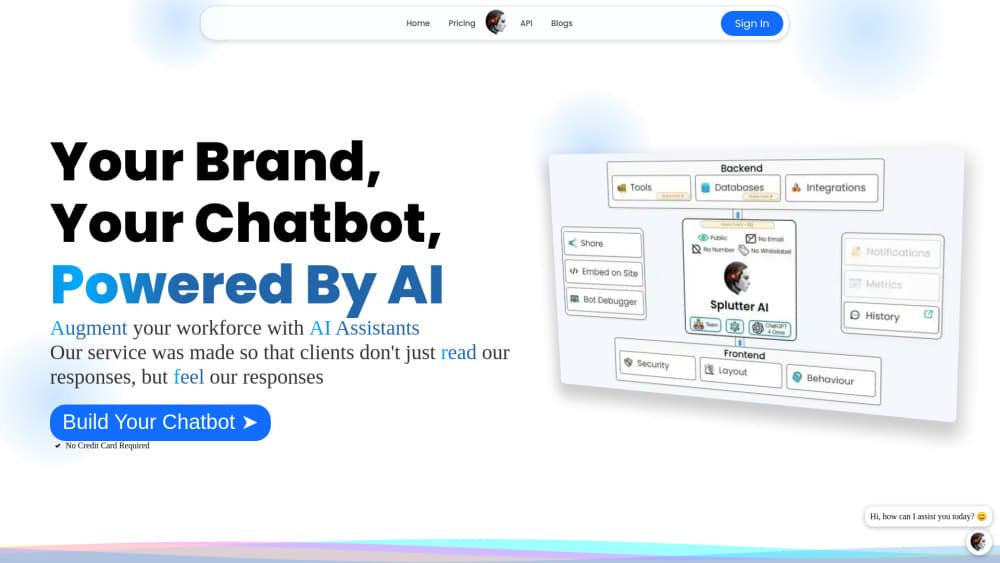
Splutter AI is a no-code platform for building AI chatbots and voicebots that handle support, lead capture, and sales across your website, SMS, WhatsApp, and Slack.
About Splutter AI
What Is Splutter AI
Splutter AI is a no-code chatbot builder from Digital Agency Inc. that also ships voice agents. You upload your own material, pick a language model, and publish an agent that answers customers in a site widget or over the phone. There's no code to write and no separate console for each channel.
Most support setups make you bolt pieces together: a chat widget from one vendor, a help desk from another, a telephony provider somewhere else. Splutter keeps the bot, the conversation log, the lead form, and the revenue tracking inside one account. That's the pitch, and it's the first thing worth checking against your own workflow.
The limits are worth knowing up front. Splutter targets small and mid-sized teams that need a working agent this week, not engineering groups that want control over inference. You work inside its configuration screens, so an unusual process usually means bridging the gap with API calls and webhooks.
Getting Started
- Create an account at splutter.ai. The free tier asks for no credit card, so you can build a bot before you pick a paid plan.
- Load your knowledge. Upload documents, connect a database, or link a Notion workspace so answers come from your own content.
- Pick a model and write the prompt. Swap between OpenAI, Anthropic, and Gemini models, then use the structured prompt editor to set tone, scope, and refusal rules.
- Test before you ship. Chat with the bot on the web, or let the voicebot call your phone and hear how it handles a real conversation.
- Embed and connect channels. Paste the snippet into WordPress, Webflow, or Bubble.io, then attach SMS, WhatsApp, Messenger, or Slack.
Product Information
A quick look at Splutter AI's pricing, supported platforms, and performance.
Best for
The users, tasks, and scenarios where this tool fits best.
Users
- Small business owners
- Customer support teams
- Sales and marketing teams
Tasks
- Answering the same twenty questions all day
- Qualifying leads before a call
- Taking after-hours phone calls
- Tracking which chats turn into revenue
Scenarios
- A small e-commerce store fielding order status questions on WhatsApp during a sale.
- A service business that misses calls after 6pm and wants a voice agent to cover the gap.
- A SaaS site with a docs library and no support staff on weekends.
Key features
Hot-Swappable Language Models
You can change the model behind a live bot without rebuilding it. Splutter connects to OpenAI, Anthropic, and Gemini, and the debugger lets you run the same conversation through two models to compare answers. That's useful when a cheaper model handles routine questions and a stronger one takes the hard ones.
Voice Agents With Real Phone Calls
The voicebot runs on speech-to-text, a language model, and text-to-speech, with Deepgram and ElevenLabs handling the audio and OpenAI's Realtime API available for lower latency. You can have the agent call your own phone to test it. Telephony runs through Twilio, so an existing number usually works.
Structured Prompt Dashboard
Prompts are split into structured sections instead of one long text box. You define the role, the rules, and the fallback behavior separately, which makes edits safer. Change one rule and you don't accidentally break the rest of the persona.
Built-In Bot Debugger
Every conversation can be inspected turn by turn, with the retrieved context and the model's response side by side. When an answer goes wrong, you see whether the knowledge base was thin or the prompt pushed the model off course. Model comparison lives in the same view.
Omnichannel Deployment
One omnichannel chatbot serves the website widget, SMS, WhatsApp, Messenger, and Slack. The layout editor handles colors, animation, background, blur, and a custom home screen, so the widget can match your brand rather than looking like a stock chat bubble.
Tools, Webhooks, and Revenue Attribution
On paid plans you can attach API calls, webhooks, a ticketing tool, a lead capture form, and a booking tool to the bot. A restricted Stripe key plus custom events ties a conversation to a visitor ID, an email, or a phone number, which is how the revenue attribution report gets its numbers.
Pros and cons
Pros
- Setup is genuinely fast. A working chatbot for WordPress is an afternoon job, not a project.
- Model flexibility without a rebuild. Swapping from OpenAI to Anthropic takes a dropdown, not a migration.
- Channels in one place. Web, SMS, WhatsApp, Messenger, and Slack share the same knowledge base and transcript log.
- Revenue attribution is rare at this price. Most chatbot builders stop at lead capture and leave you guessing what happened next.
Cons
- The price ladder is steep. Hobby sits near $39.99 a month and Business near $399.99, a jump that hurts a team of three.
- Public developer docs are thin. If you need to script against the platform, expect to work through webhooks and trial and error.
- Voice quality depends on third parties. Latency and accent handling are mostly Deepgram, ElevenLabs, and Twilio, not Splutter.
- Deep configuration takes practice. The debugger is useful, but reading it well is a skill you build over a few weeks.
Frequently asked questions
It builds AI agents that talk to your customers. You supply the content and the instructions, and Splutter handles the chat widget, the phone calls, the messaging channels, and the analytics behind them.
Related content
Explore related tools, skills, and articles for Splutter AI.
Splutter AI Alternatives

ngram 2.0
ngram · Video · Marketingngram 2.0 is an AI video generator for teams. It turns a prompt, a screen recording, or a product URL into a narrated explainer, product demo, or AI avatar video, and every scene stays editable.

shippedit.me
Krawlup · Marketing · Businessshippedit.me now redirects to Krawlup, a web platform that audits SEO, AEO and page speed every week, then hands the fixes to AI coding agents over MCP.

MePersona
MePersona, Inc. · Writing · Productivity · MarketingMePersona is an AI unified inbox for creators. It learns your voice, drafts replies to fan messages from 12 platforms, and sends only what you approve.