

Starlie
David Zukhbaya · Coding · Productivity · Business
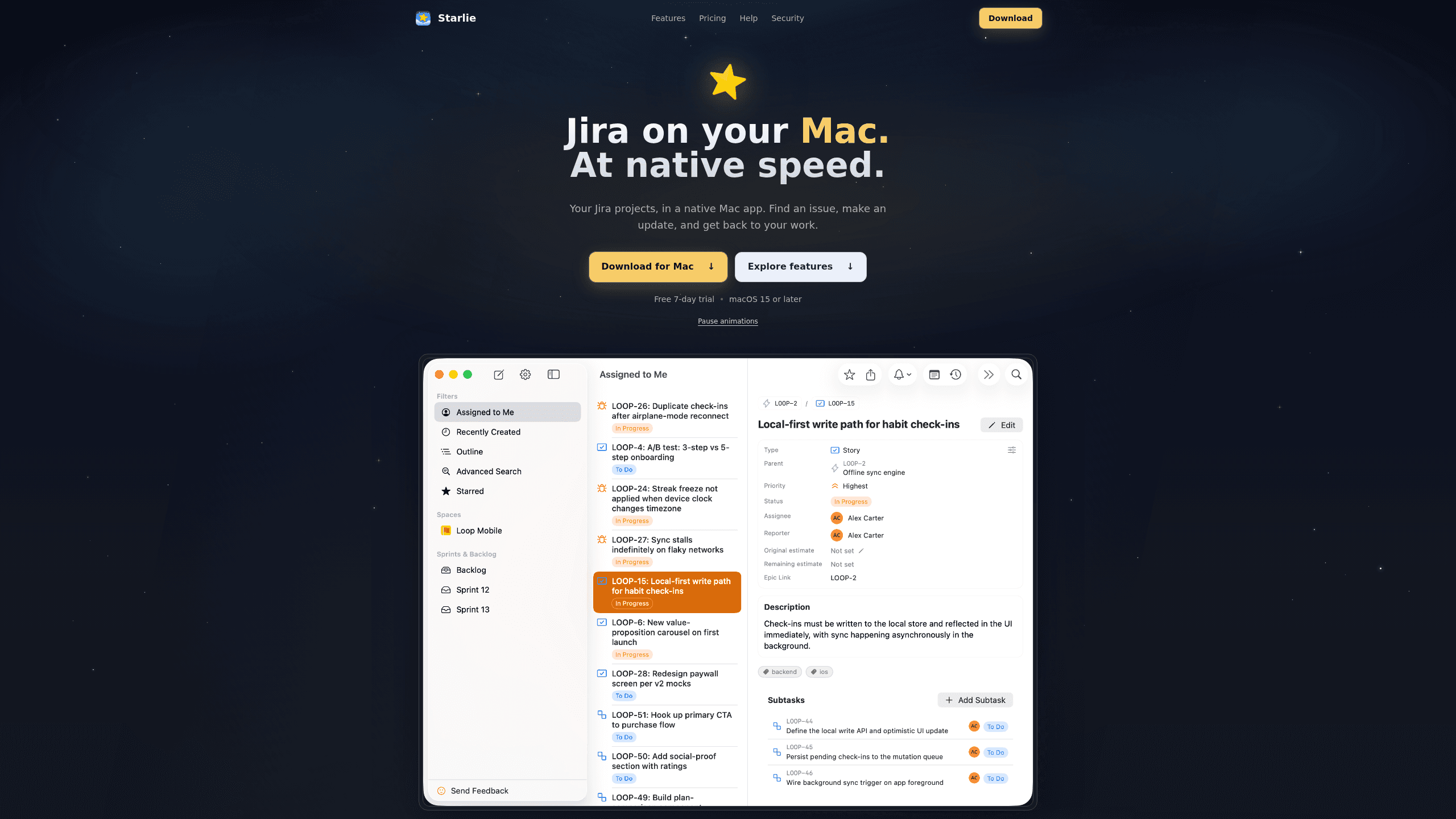
Starlie is a native Jira client for Mac. It puts issues, sprint boards, and JQL search in a Mac window instead of a browser tab, and signs in with Atlassian OAuth.
About Starlie
What Is Starlie
Starlie is an issue tracking app for Mac that connects to Jira through Atlassian's official API. Your projects, boards, and workflows stay in Jira. Starlie is the window you read and edit them in, built in SwiftUI instead of being wrapped in Electron, so it launches quickly and follows Mac keyboard habits.
The gap it fills is real. Atlassian retired its own Jira Cloud for Mac app in February 2022 and left Mac users with the browser or a phone. Starlie is a Jira desktop app for Mac aimed at people who sit in Jira all day and lose minutes to page loads, tab hunting, and mouse work. It handles Jira Cloud and self-hosted Jira, and it can hold several accounts open at once.
Three limits matter before you download it. It needs macOS 15 or later, so older machines are out. There's no Windows or mobile build. And it's a client, not a replacement: administration, reports, and Marketplace app screens stay in the browser.
Getting Started
- Install Starlie from the Mac App Store and open it. Every feature is available free for 7 days.
- Add your Jira site and approve the Atlassian OAuth prompt in your browser. You don't create a separate Starlie account.
- Choose the projects you work in, or press ⌘K and search for an issue by key, summary, or project.
- Open a sprint board, an issue, or an Outline view, then change a status or leave a comment to confirm the connection works.
- Star the issues you check daily and set a reminder, or connect a second Jira account once the basics feel familiar.
Product Information
A quick look at Starlie's pricing, supported platforms, and performance.
Best for
The users, tasks, and scenarios where this tool fits best.
Users
- Developers who keep Jira open all day
- Product managers running a sprint
- Consultants juggling client sites
- Teams using Claude or Codex for code work
Tasks
- Daily triage
- JQL searches
- Sprint board upkeep
- Reading long threads
Scenarios
- Standup prep on a laptop
- Split work across two companies
- Deep work with one issue
Key features
Command palette and JQL search
Press ⌘K and type an issue key, a word from the summary, or a project name. Results come back as you type. For narrower searches, write JQL directly and the editor suggests fields, operators, and values as you go, which helps when a query needs three conditions and you only remember two. There's also a visual query builder for people who don't want to memorize Jira's syntax.
Sprint boards that sync with Jira
The board shows the active sprint with its columns and cards. Drag a card to the next column and the transition is written back to Jira, so the board in Starlie matches the board your team sees. It's a practical way to run a standup or clear a queue of ready tickets without opening a browser.
Issue detail with inline editing
One view holds the description, subtasks, comments, and attachments. Status, assignee, and priority can be changed from the issue itself. Comments support @mentions and attachments, and you can write in a rich text editor or switch to raw Jira wiki markup when you need exact formatting.
Outline across projects
Outline pulls epics, stories, and subtasks from several projects into a single tree you can expand and collapse. Grouping, sorting, and saved views let you build a picture of a release rather than a single board. You can see who owns each task and how far along it is, which is the part Jira's board view tends to hide.
Handing an issue to an AI agent
Any issue can open in Claude or Codex with its context attached, and the agent starts with the local project folder already connected. That removes the copy and paste step between a ticket and a coding session. It's the feature that makes Starlie more than a faster viewer, especially for developers who already work this way.
Native Mac behavior and a direct data path
Multiple windows, macOS notifications, menu bar access to starred issues, and light or dark mode all work the way Mac users expect. Sign-in uses Atlassian OAuth 2.0, tokens live in the macOS Keychain, and issue data travels directly between your Mac and Atlassian over TLS. Starlie's own server, auth.starlie.app, handles the token exchange and doesn't receive Jira content.
Pros and cons
Pros
- Native SwiftUI build: fast launch, real Mac menus, and none of the memory overhead that comes with an Electron wrapper.
- Keyboard-first navigation makes repeated status changes and searches quicker than the web interface.
- A $49.99 lifetime license is rare for a subscription-heavy category, and it removes the yearly renewal decision.
- Data handling is easy to defend to a security team: OAuth tokens sit in Keychain and Jira content never touches the vendor's servers.
- Multiple Cloud and self-hosted accounts stay connected at once, which suits agencies and contractors.
Cons
- macOS 15 or later is a hard requirement, so anyone on an older Mac can't install it at all.
- Administration, reports, and Marketplace app screens are missing, which means the browser stays open for anything beyond daily issue work.
- No public API, CLI, or automation hooks are documented, so scripts and internal tooling can't drive the app.
- The 7-day trial is the only free option. Teams that want to evaluate it slowly end up paying $4.99 for a month.
Frequently asked questions
No. Starlie is a third-party app from developer David Zukhbaya, sold through the Mac App Store. It connects with Atlassian's official API and OAuth, but Atlassian doesn't publish or support it.
Related content
Explore related tools, skills, and articles for Starlie.
Starlie Alternatives

Base Code
Base44 (Wix) · Coding · ProductivityBase Code is a shared cloud development environment from Base44. Teammates describe changes to an existing GitHub codebase in chat, preview them live and send them back as pull requests.

Google EmbeddingGemma 2
Google DeepMind · Writing · Image · CodingGoogle EmbeddingGemma 2 is a 740M-parameter open model that turns text, code, images, audio, and video frames into vectors in one 768-dimension space, running on phones and laptops.

GitGlow
GitGlow · Coding · ProductivityGitGlow is a local-first desktop Git client that lets independent developers review their own code and their AI agents' changes in one place before shipping.