

Startkit
StartKit.AI · Coding
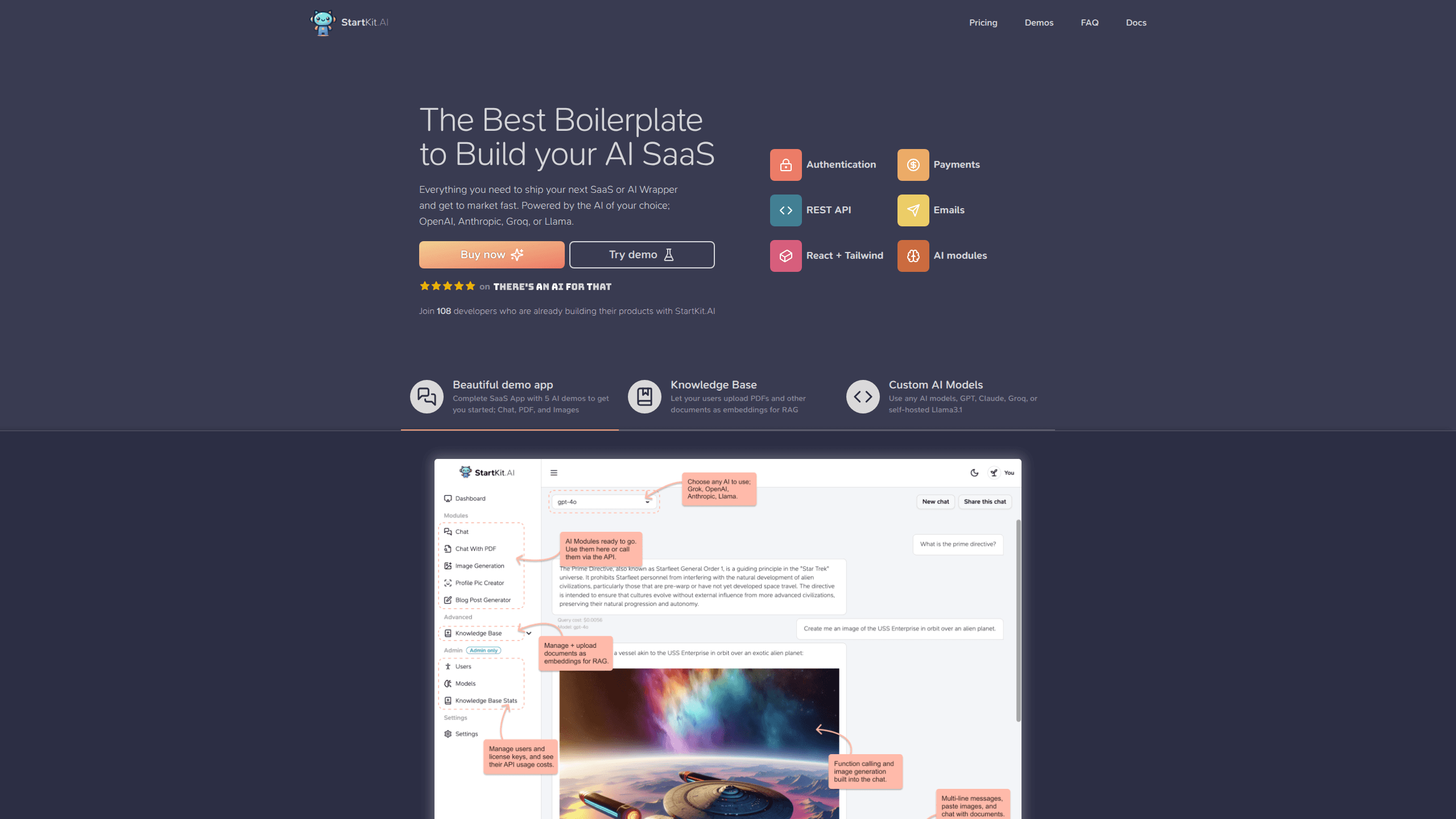
Startkit is a boilerplate for building AI SaaS and AI wrapper products. Think of it as an AI startup boilerplate with the boring parts already wired up: authentication, Stripe and Lemon Squeezy payments, usage limits, transactional email, and an AI API starter that talks to OpenAI, Anthropic, Groq, or Llama. You clone the repo, set your price, and start on the part of your product that people actually pay for. It's Next.js under React and Tailwind, so most of the boilerplate code already feels familiar.
About Startkit
What Is Startkit
Startkit is a paid code template, not a hosted platform. You buy a license, pull the private repo, and run it as your own app. Under the hood it's React, Next.js, and Tailwind, so the frontend stays familiar if you've built with those before.
The problem it solves is setup time. Auth, billing, webhooks, rate limits, and email are the same in almost every AI product, and each one takes days to get right. Startkit hands you those pieces connected, then leaves the business logic to you. Its own docs frame the sales pitch that way: no AI experience required.
The catch is scope. Startkit assumes you're comfortable deploying a Next.js app, managing environment variables, and holding your own API keys. There's no visual builder and no drag-and-drop editor. So if you can't read JavaScript, this isn't your tool.
Getting Started
- Buy a license on the Startkit site. You'll get access to the private GitHub repo and the documentation.
- Clone the repo and install dependencies, then open the example environment file to add your keys.
- Connect the services you plan to use: an AI provider such as OpenAI or Anthropic, Stripe or Lemon Squeezy for payments, and Resend for email.
- Set your subscription plans and prices, then run the app locally to test signup, checkout, and a rate-limited API call.
- Deploy to your host of choice, and git pull whenever Startkit ships new features.
Product Information
A quick look at Startkit's pricing, supported platforms, and performance.
Best for
The users, tasks, and scenarios where this tool fits best.
Users
- Solo developers
- Indie hackers shipping an AI wrapper
- Small teams testing an idea
Tasks
- Charging for AI usage
- Adding multi-provider AI
- Launching a paid AI landing page
Scenarios
- A weekend build where you'd rather demo something users can pay for than a half-finished prototype.
- A side project where you want to test willingness to pay before committing serious time.
- Migrating a free tool that outgrew a single API key and now needs per-user usage caps.
Key features
Payments and Subscriptions
Startkit connects to Stripe or Lemon Squeezy out of the box, and plans come pre-configured. It's a Stripe subscription boilerplate first, and a payments layer second. You set the price and the webhooks handle the rest: subscription updates, product provisioning on payment, and customer records. For anyone launching a paid AI tool, this is the piece that normally eats the most time.
Authentication and Usage Limits
Signup runs on secure authentication with license keys and usage limits built in, plus magic link sign-in and token-based authentication. Rate limits and usage monitoring are part of the same layer. So an abusive account gets throttled before it drains your AI credits.
Multi-Provider AI Modules
You pick the AI behind the product: OpenAI, Anthropic, Groq, or Llama. Chat and generation modules are already written, which means you're configuring a provider rather than building request handling, streaming, and error cases from zero.
REST API Layer
The template includes a REST API with limits and usage monitoring attached to each key. If your product needs to serve other developers, this gives you a starting point instead of a blank file.
Transactional Email
Email is wired through Resend. It sends transactional messages and collects newsletter subscribers. Welcome emails and receipts? No separate integration needed.
Detailed Documentation and Tutorials
The docs walk through the whole stack, and included walkthroughs cover building a ChatGPT clone and a Telegram chatbot, plus deploying to DigitalOcean. For a template, this matters as much as the code. The fastest way to get stuck is a missing setup step.
Pros and cons
Pros
- Payments, auth, rate limits, and email come connected, which removes the bulk of pre-launch plumbing.
- Multi-provider AI support means you can switch models without rewriting your API calls.
- New AI features arrive through git pull, so there's less chasing of provider changes.
- The multi-project license covers personal and client work, which suits freelancers and indie makers.
- Documentation goes past setup into full build tutorials, which shortens the learning curve for the stack.
Cons
- There's no free tier, so you pay before you can inspect the code.
- One-time license pricing means updates depend on the vendor continuing the project; if they stop, you own the last version you pulled.
- It's Next.js and Tailwind only, so it won't help if your stack is something else.
- Custom-branded interfaces and unusual billing models take real work. You're editing code, not switching settings.
Frequently asked questions
It's used to start AI SaaS products and AI wrappers faster. The auth, billing, usage limits, and AI request handling are already written, so your first commit lands on your actual product feature rather than on infrastructure.
Related content
Explore related tools, skills, and articles for Startkit.
Startkit Alternatives
Forefront
Forefront · CodingForefront is a web platform for building with open-source AI. It lets you fine-tune leading open-source language models on your own data, evaluate how they perform, and run them through an API or export them to host yourself. Developers who want the convenience of a closed-source platform but insist on owning their models and data are the target audience here.
Testim
Tricentis · CodingTestim is an AI-powered test automation platform for building and running end-to-end tests across web, mobile, and Salesforce applications. It leans on machine learning to keep tests stable when an interface changes, so teams spend less time fixing broken selectors. Not bad for an automated testing tool you can start using today. You create tests by recording actions in a browser, then optionally add JavaScript when you need more control. It's a solid pick for busy QA teams.

Screenshot to Code
Abi Raja · CodingScreenshot to Code is an AI code generator that turns a screenshot, a mockup, a Figma design, or a screen recording into working front-end code. Drop in an image, pick a stack such as HTML with Tailwind, React, or Vue, and it builds a clean first draft of the page. You can convert a screenshot to code in minutes. The tool runs as a hosted app at screenshottocode.com, and the source is open, so you can also self-host it and plug in your own model keys.