

Stately
Stately · Coding
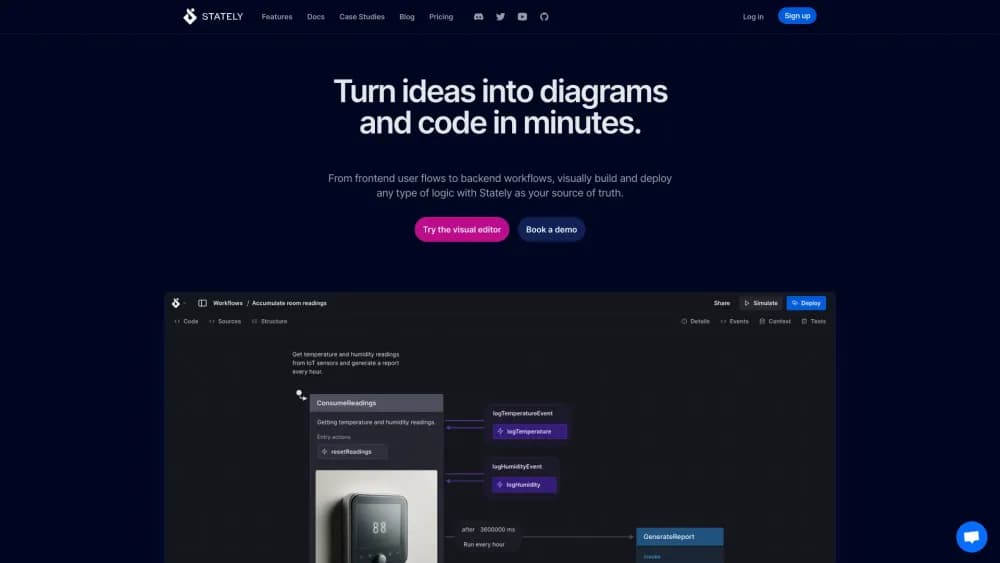
Stately is a visual state machine editor for planning app logic, generating flows with AI, and exporting XState code. It fits teams that want diagrams and code to stay in sync.
About Stately
What Is Stately
Stately is a browser based tool for drawing state machines and statecharts, the diagrams that describe how an app moves from one state to another. The company also maintains XState, the open source JavaScript library that runs those diagrams as real code. Stately Studio is the paid product wrapped around that library: an editor, a simulator, and a set of code export and sync features. It started as an XState visualizer and grew into a full statechart tool for teams.
The problem it targets is drift. A flow diagram in a design file says one thing, the code says another, and nobody notices until a bug report lands. Stately keeps one machine as the source and pushes it out in both directions, to a picture your team can read and to TypeScript your app can run. Change the diagram, and the exported code changes with it.
Three limits shape who gets value here. You need some comfort with state machine ideas, since events, guards, and nested states are the vocabulary of the tool. The free plan caps you at two public projects and three machines. And the AI generation feature is labeled experimental, so treat its output as a first draft that a person reviews.
Getting Started
- Open state.new, which drops you into the Stately Studio editor without an install. Sign in when you want to save.
- Build the flow. Drag states onto the canvas, add events between them, and name transitions in plain language. Or type a description and let the AI flow generator sketch a first version.
- Switch to Simulate mode and click through the events. You can see which transitions fire and where the machine gets stuck.
- Export the machine as JavaScript or TypeScript, or connect GitHub so the file syncs with your repository.
- Invite teammates on a Team plan, set project visibility to private, and assign roles such as editor or viewer.
Product Information
A quick look at Stately's pricing, supported platforms, and performance.
Best for
The users, tasks, and scenarios where this tool fits best.
Users
- Frontend developers
- Product managers and designers
- QA engineers
- Platform teams with shared workflows
Tasks
- Modeling a multi step signup or payment flow
- Scaffolding a machine from a written description
- Documenting backend job logic
- Auditing existing state code
Scenarios
- Sprint planning where the team argues about edge cases
- A stakeholder review that needs something clickable
- Pre refactor cleanup on an old feature
Key features
Drag and Drop Editor With Design and Simulate Modes
The canvas is the product. You place states, draw transitions, and edit event names in place, with an inspector panel for guards, actions, and descriptions. Design mode is for building, Simulate mode is for walking the machine event by event. Neither mode asks you to write code first, which is why designers can contribute to the same file as engineers.
Generate With AI
Describe a flow in a sentence or two and Stately builds a machine with states, events, and transitions. You can also select an existing machine and ask for a modification, such as adding a retry branch. Every prompt is saved in a history panel, and each generation auto-saves a version you can reopen. The feature is experimental, the monthly generation count is limited, and modifying a flow sends the machine definition to OpenAI.
Runnable Prototypes and Live Simulation
Simulation isn't a slideshow. Stately can generate a React UI for a machine, so reviewers click real buttons and trigger real transitions. Pro accounts also get live simulation, which runs the machine as you edit it. For a team that keeps misreading a diagram, this is the fastest way to show what "cancel during payment" actually does.
XState Export and Codebase Sync
Every machine exports to JavaScript or TypeScript that runs on XState, the open source library Stately maintains. That means no lock-in: the code works in a plain Node script, a React app, or a backend worker. On paid plans you can connect GitHub or use the CLI to sync machines with a repository, and edits flow both ways between the diagram and the code.
Test Paths, Versions, and Living Documentation
Pro accounts can generate test paths, which list the routes a machine can take so a tester knows what to try. Version history keeps snapshots you can restore, and the editor exports flows as markdown stories, Mermaid diagrams, or JSON. Add Figma frames and you get a diagram that carries the design context with it.
Projects, Teams, and Access Control
Projects group related machines and control who sees them. Public projects appear on the Discover page, unlisted ones open by link, and private ones stay inside a team. Roles cover owner, admin, editor, and viewer. Enterprise adds single sign on, audit logs, custom hosting, and the option to embed Stately in your own app.
Pros and cons
Pros
- The diagram and the code come from one source, and the export runs on open source XState, so you can leave without rewriting your app.
- AI generation solves the blank canvas problem, and the prompt history plus auto-saved versions make it easy to compare drafts.
- The free plan includes code export and the VS Code extension, which is enough to test the workflow on a real feature.
- Simulate mode catches dead ends and unreachable states before they reach code review.
- Enterprise controls cover SSO, audit logs, and custom hosting, which matters for regulated teams.
Cons
- The free plan stops at two public projects and three machines, and every fork counts toward the limit. Private work needs Pro at $39/mo, or $33/mo billed yearly.
- AI generation is experimental and quota limited. When you modify an existing flow, the machine definition leaves your account for OpenAI, which some security teams will question.
- The tool assumes you understand statecharts. A PM can drag boxes, but nested and parallel states take a session or two to click.
- Programmatic access runs through GitHub sync and the CLI. Teams that want a REST API for project data should confirm availability with Stately before committing.
Frequently asked questions
Yes. The free plan allows two public projects, including your Drafts project, and three machines. It includes the editor, simulation of public machines, code export, and the VS Code extension. Pro costs $39 per month, or $33 per month on annual billing, and removes the project and machine caps while adding private projects and AI features.
Related content
Explore related tools, skills, and articles for Stately.
Stately Alternatives

Base Code
Base44 (Wix) · Coding · ProductivityBase Code is a shared cloud development environment from Base44. Teammates describe changes to an existing GitHub codebase in chat, preview them live and send them back as pull requests.

Google EmbeddingGemma 2
Google DeepMind · Writing · Image · CodingGoogle EmbeddingGemma 2 is a 740M-parameter open model that turns text, code, images, audio, and video frames into vectors in one 768-dimension space, running on phones and laptops.

GitGlow
GitGlow · Coding · ProductivityGitGlow is a local-first desktop Git client that lets independent developers review their own code and their AI agents' changes in one place before shipping.