

Story321 Music AI
Story321 · Writing · Voice & Language · Other
Story321 Music AI turns a mood, genre, or short keyword list into royalty-free tracks you can download as MP3 or WAV. No musical training needed.
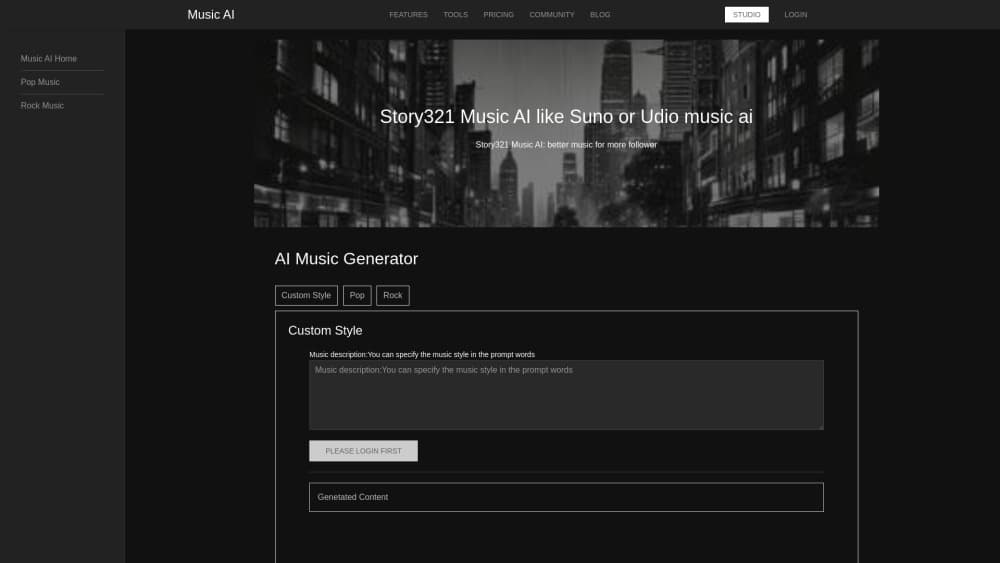
About Story321 Music AI
What Is Story321 Music AI
Story321 Music AI is a browser-based AI music generator that sits inside the wider Story321 creative suite. You pick a mood and a genre, add a few keywords if you want direction, and the tool composes an instrumental track in under a minute. Finished audio downloads as MP3, WAV, or a high-resolution file, and every track comes with a commercial license.
The pitch is simple. Most creators need a 90-second bed of music for a video, a podcast intro, or a game level, and licensing a stock track costs more time than money. Here you describe the feeling you're after and get something usable without leaving the tab.
Genre coverage is broad: classical, lo-fi, techno, jazz, ambient, pop, hip-hop, and cinematic orchestral. Mood does most of the work. The system reads a description of feeling and maps it onto tempo, instrumentation, and intensity, which is why two people asking for "tense" and "epic" get very different results from the same genre tag.
Three limits are worth knowing before you sign up. Credits are shared across the whole Story321 platform, so music competes for the same balance as story writing, character art, and podcast audio. The tool page lists MP3, WAV, and high-resolution downloads but no stem export or MIDI handoff, so treat the output as a finished mix rather than a session you'll rebuild in a DAW. And the free tier is a trial, not a permanent free music source: 10 one-time credits, then a subscription.
Getting Started
- Create a Story321 account and open the AI Music Generator from the tools list. No instrument, plugin, or local install is involved.
- Choose a mood and a genre. Happy, epic, melancholic, and energetic are the obvious starting points, and picking one narrows the output more than picking a genre alone.
- Add keywords if the track needs a subject. Short phrases like "space adventure," "romantic sunset," or "cyberpunk city" push the arrangement toward a scene instead of a generic loop.
- Hit generate and listen. Regenerate as many variations as you need, adjust tempo, instruments, intensity, or length on the version you like, then download the file in the format your editor accepts.
Product Information
A quick look at Story321 Music AI's pricing, supported platforms, and performance.
Best for
The users, tasks, and scenarios where this tool fits best.
Users
- YouTubers and short-form video editors
- Podcasters
- Indie game developers
- Musicians sketching ideas
Tasks
- Scoring a video cut
- Building a podcast identity
- Prototyping game audio
Scenarios
- A weekly upload schedule that needs new background music every few days
- A brand video due tomorrow and the music budget not approved yet
- Worldbuilding for a story or tabletop campaign
Key features
Mood and Genre Selection
Mood is the primary dial, and genre is the filter around it. You pick something like "melancholic" and "lo-fi" and the model shapes tempo, chord color, and instrumentation to match. It's a faster route to a usable track than writing a long prompt and hoping the model reads it correctly.
Keyword Direction
Optional keywords tilt a track toward a subject. "Desert chase" and "quiet library" produce different arrangements even under the same mood tag, which is useful when a video has a specific setting. Keep phrases short; a paragraph of description tends to muddy the result.
Controls for Tempo, Instruments, Intensity, and Length
After generating, you can adjust the parts that matter for editing: how fast the track moves, which instruments carry it, how hard it hits, and how long it runs. Length control is the practical one, since trimming a track in a video editor usually costs you the ending.
Unlimited Regeneration
There's no cap on how many variations you can request, only on credits. That changes the workflow: instead of coaxing one track into shape, you generate five and keep the best. Most people land on something usable within two or three passes.
Download Formats and Commercial License
Tracks export as MP3, WAV, or high-resolution audio, and the license covers commercial use, including YouTube, games, apps, and client work. That removes the attribution requirement and the per-project licensing conversation that comes with stock music. Check the plan terms before a large campaign, since the license sits with your account tier.
Pros and cons
Pros
- You get royalty-free music with a commercial license on every track, which covers monetized video and client work without extra paperwork.
- The text to music flow is short: mood, genre, keywords, generate. First-time users produce a listenable track without reading documentation.
- Regeneration is unlimited, so picking the best of several attempts is the normal workflow rather than a budget decision.
- Format coverage is wider than most free AI music generator tools, with MP3, WAV, and high-resolution downloads for editing.
Cons
- The free AI music generator tier is 10 one-time credits, so it works as a test drive and nothing more. Ongoing use means a subscription.
- Credits are shared with every other Story321 tool. If you also generate story chapters or character art, your music budget shrinks accordingly.
- No stem export or MIDI is listed on the tool page, so you can't isolate a drum part or rework the arrangement in a DAW.
- Pricing is billed annually, and the monthly figure shown is the annual rate divided by twelve. Expect a larger single charge than the number suggests.
Frequently asked questions
It generates instrumental music from a mood, genre, and optional keywords, then lets you download the result for video, podcasts, games, or websites. It's built for creators who need background music quickly, not for full song production with vocals.
Related content
Explore related tools, skills, and articles for Story321 Music AI.
Story321 Music AI Alternatives

Claude for Google Workspace
Anthropic · Writing · Productivity · BusinessClaude for Google Workspace puts Claude in a sidebar inside Google Docs, Sheets, and Slides, where it reads the file you have open and edits it in place.

Claude Haiku 5.5
Anthropic · Writing · Coding · ChatbotClaude Haiku 5.5 is Anthropic's fastest and cheapest small model, built for high volume tasks at $0.10 per million input tokens with a 1M token context window.

NoteWorthy
Suman Hansada · Writing · Productivity · AI AssistantNoteWorthy is a notes app for iPhone, iPad and Mac that writes titles, tidies formatting, summarizes long notes and files each one with on-device AI. No account, no upload, no network requests.