

Strut
Targa Limited · Writing · Productivity
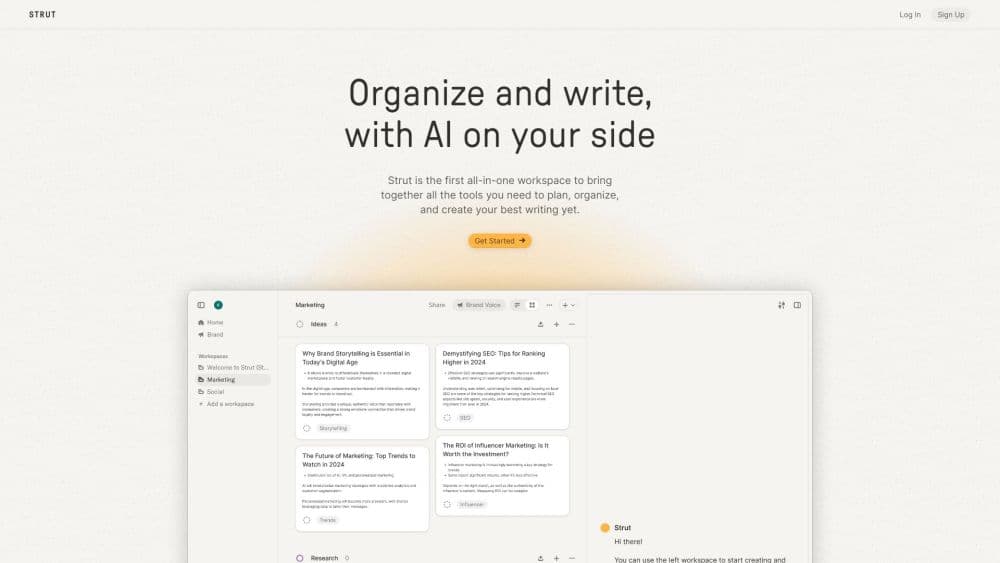
Strut is an AI writing workspace that keeps rough notes, imported sources, an outline, and a full draft in one project, so long-form pieces grow one thought at a time.
About Strut
What Is Strut
Strut is a browser-based AI notebook and writing workspace built for work that takes more than one sitting: essays, reports, theses, long newsletters, and book manuscripts. You drop rough notes and imported documents into a project, shape them into an outline, then draft inside the same window where the research sits.
Most writing stacks split this into three rooms: a notes app, a document editor, and a chat window. Strut acts as the note to draft bridge between them. Strut merges them into one place, and the AI writing assistant works on the material already in the project instead of starting from an empty chat box.
The trade is scope. Strut won't research for you, won't publish, and isn't built for a two-line social post. You also get a free outline generator in the field guide if you want to try the method before signing up. Free accounts get one project with three documents, which is enough to check whether the notebook suits how you write.
Getting Started
- Sign in with a Google account. No card is needed, and a new account starts with 50,000 AI tokens.
- Create a project and give it a title, a short description, and the thread you want the piece to follow.
- Capture rough notes, fragments, and questions in the notebook, then import PDF, Word, Excel, CSV, Markdown, or text sources into the same project.
- Build an outline from your notes with the Outline operation, or write one by hand and drag sections into place.
- Draft in the editor and run named writing operations on a passage you select. Results land beside the draft, and you accept, edit, or discard them.
- Invite reviewers for inline comments, then export the manuscript as PDF, Word, Markdown, or plain text.
Product Information
A quick look at Strut's pricing, supported platforms, and performance.
Best for
The users, tasks, and scenarios where this tool fits best.
Users
- Students writing essays and dissertations
- Journalists and essayists working from interviews
- Newsletter writers past the short post
Tasks
- Turning fragmented notes into a first draft
- Tightening a passage without changing its claim
- Building an applied outline for a long report
- Giving feedback on someone else's chapter
- Drafting in a consistent voice across chapters
Scenarios
- Returning to a manuscript after two weeks away
- A research-heavy week with a Friday deadline
- A ghostwriting job with several voices
Key features
Named Writing Operations
Strut replaces the open chat box with a short list of operations: Expand, Outline, Strengthen, Summarize, Critique, Tone, Plot, Rewrite, Editorial Report, and Title Ideas. You select a passage or the whole document, pick one, and add a direction in your own words. Each result arrives beside the draft rather than inside it, so the manuscript only changes when you accept.
Rough Notes and Sources in One Project
The notebook holds fragments, quotations, and questions, and the project also accepts imports from PDF, Word, Excel, CSV, Markdown, and text files. Because the assistant reads the same material you do, a request like "expand this section" pulls in the notes and sources attached to that project. Nothing needs pasting into a prompt.
Version History with One-Click Restore
Strut saves a version before any AI result replaces text. You can compare a revision against the earlier state, roll back weeks later, and keep separate snapshots for each document in a multi-chapter manuscript. That makes an experiment with the AI cheap to undo.
Context-Aware Drafting and Outline Building
The Outline operation acts as a hands-on outline generator: it turns scattered notes into a hierarchical structure and flags gaps where evidence is thin. Expand grows a rough passage into a coherent section at a length you set. Both run with the project title, thread, notes, and neighbouring sections in view, which is why the output fits the piece rather than reading as generic advice.
Voice Profile
A Voice Profile learns from samples of your own writing and steers revisions toward your cadence and word choices. It targets editing rather than generation: transforming text you wrote keeps more of your voice than asking a model to produce fresh prose in your style.
Collaboration, Search, and Exports
Reviewers can be invited to any project and leave inline comments that resolve in place. Search reaches across notes, drafts, and sources at once. Any document exports as Markdown, PDF, Word, or plain text, and those local tools keep working even after the monthly AI token allowance runs out.
Pros and cons
Pros
- The notebook, outline, sources, and draft share one project, which removes the copy-paste loop between a notes app, a document editor, and a chatbot.
- Every AI action is bounded to a passage and saved as a version first, so a bad suggestion costs one click to undo.
- Local features keep working when tokens run out, so the workspace doesn't lock you out of your own draft.
- Strut states that your text is never used to train models, and imported sources are treated as reference text rather than instructions.
- Exports cover PDF, Word, Markdown, and plain text, so a manuscript isn't trapped inside the service.
Cons
- The free plan allows one project with three documents, which is tight for anyone juggling several papers at once.
- AI tokens cover writing operations, transcription, OCR, and image creation from one balance, so heavy use of any one of them eats into the rest.
- The workspace is web only, which rules out offline work on a laptop during a commute.
- There's no public API, so teams can't wire Strut into their own publishing or review systems.
Frequently asked questions
Strut is an AI writing workspace for long-form projects. You collect rough notes and research in a project, build an outline, and draft in an editor that has the material beside it. The AI assistant then runs named operations on passages you select, from expanding a note into a section to critiquing a chapter.
Related content
Explore related tools, skills, and articles for Strut.
Strut Alternatives

Google EmbeddingGemma 2
Google DeepMind · Writing · Image · CodingGoogle EmbeddingGemma 2 is a 740M-parameter open model that turns text, code, images, audio, and video frames into vectors in one 768-dimension space, running on phones and laptops.

MePersona
MePersona, Inc. · Writing · Productivity · MarketingMePersona is an AI unified inbox for creators. It learns your voice, drafts replies to fan messages from 12 platforms, and sends only what you approve.

Fluence
Yay Software (Yannick Huchard) · Writing · Voice & Language · ProductivityFluence is an Android app that reads PDFs, EPUBs, Word files and web articles aloud, follows each sentence as it speaks, and answers questions about the text on the phone itself.