

Study Potion AI
Study Potion · Writing · Leaning
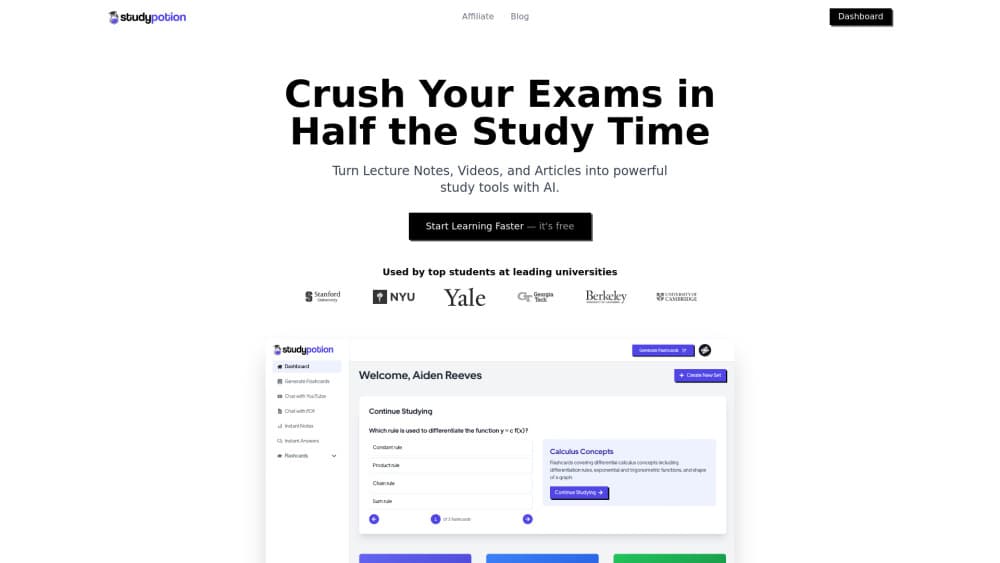
Study Potion AI is an AI study assistant that turns PDFs, lecture notes, videos and articles into flashcards, notes and practice questions, with a chat for follow-up questions.
About Study Potion AI
What Is Study Potion AI
Study Potion AI is a web study tool and AI study assistant that reads your course material and turns it into the study aids students normally build by hand. You upload a PDF, paste a link or drop in a YouTube video, and it produces flashcards, formatted notes and multiple choice questions in seconds. The point is to cut the hours spent making cards and rewriting notes, and move that time into actual review.
The people it fits are students juggling several subjects at once. It ships with ready study paths for SAT and ACT prep, medical coursework, language learning and computer science, so you start from a template instead of a blank page. It also keeps a chat box next to your notes, which turns a static document into something you can question the way you would a tutor.
A few limits are worth knowing before you commit. The output is only as good as what you feed it, so a messy scan or a thin set of slides yields thin cards. There is no group or shared study space, and the tool reads typed or digital text rather than your handwriting. Support and depth of customization are on the lean side, which suits self-directed students more than whole classrooms.
Getting Started
- Create a free account at app.studypotion.ai and open the study dashboard.
- Upload your source material, such as a lecture PDF, a website link or a YouTube video.
- Pick the output you want, a flashcard set, formatted notes or a multiple choice quiz.
- Generate the materials, then trim or edit any card that reads oddly.
- Review the set and use the chat to ask questions about anything that stays unclear.
Product Information
A quick look at Study Potion AI's pricing, supported platforms, and performance.
Best for
The users, tasks, and scenarios where this tool fits best.
Users
- University students
- High schoolers prepping for the SAT or ACT
- Medical and nursing students
- Non-native speakers learning a language
Tasks
- Turning a lecture PDF into flashcards
- Writing study notes from a video
- Building a practice quiz
- Asking questions about your own notes
Scenarios
- The night before a midterm
- A subject with heavy jargon
- Revising across several courses in one week
Key features
Flashcards From Your Own Material
The core of Study Potion AI is turning documents you already have into flashcards. Treat it as an AI flashcard generator that reads the file, pulls out the facts that tend to get tested, and lays them out as question and answer cards. Sets are generated in bulk, so you cover a whole lecture in one pass, and you can edit any card that misses the point.
Instant AI Notes
Upload a document and the tool returns formatted notes with summaries and an outline instead of a wall of raw text. The structure makes a long chapter skimmable before a review session. It reads best as a first pass, since you will still want to confirm the details that matter for your course.
Chat With Your Documents
A chat panel sits alongside your material, so you can ask questions and get answers grounded in what you uploaded. When a note leaves a term unexplained, you can press on it right there. This is the feature that most changes how the tool feels, since it turns reading into a conversation.
Multiple Choice and Practice Questions
Study Potion AI doubles as a quiz generator, so it produces multiple choice and practice questions, not just cards. That gives you a way to test recall the way an exam does, rather than only recognizing a term when you see it. For SAT and ACT prep it also leans on strategy and timed-drill templates that mirror the real test.
Multi-Format Input
You can feed it PDFs, web pages, YouTube videos and audio files rather than typed text alone. That covers most of what a course hands you, from a slide deck to a recorded lecture. The wider the input, the less reformatting you do before studying.
Subject Study Paths
Ready-made paths for language learning, medical students, SAT and ACT prep, and computer science set the tone for each subject. A language path focuses on vocabulary and grammar drills, while a medical path leans on spaced repetition and clinical cases. They give a starting structure, but the cards still come from your own material.
Pros and cons
Pros
- Turns the PDFs and videos you already have into flashcards, notes and quizzes without hand-building a deck.
- Generates a full set in seconds, so a whole lecture can become reviewable before you close the laptop.
- The chat panel answers questions tied to your own material, which helps when a note skips a step.
- Ready study paths for SAT, ACT, medical, language and CS mean less setup time up front.
- The free route lets you test the workflow before paying, and Pro lifts the main usage caps.
Cons
- Card quality tracks the quality of your source, so a messy scan or thin slides give you weak cards you have to fix.
- There's no shared or group study space, so classmates can't build a deck together in one account.
- It reads digital text, not handwriting, so handwritten notes have to be typed or scanned cleanly first.
- No public API, so you can't script the tool into another study app or pull sets into a separate workflow.
Frequently asked questions
It's an AI study assistant that turns your own documents, videos and articles into flashcards, notes and practice questions. You upload the material, pick the output, and study from what it generates, with a chat panel for follow-up questions.
Related content
Explore related tools, skills, and articles for Study Potion AI.
Study Potion AI Alternatives

Google EmbeddingGemma 2
Google DeepMind · Writing · Image · CodingGoogle EmbeddingGemma 2 is a 740M-parameter open model that turns text, code, images, audio, and video frames into vectors in one 768-dimension space, running on phones and laptops.

MePersona
MePersona, Inc. · Writing · Productivity · MarketingMePersona is an AI unified inbox for creators. It learns your voice, drafts replies to fan messages from 12 platforms, and sends only what you approve.

Fluence
Yay Software (Yannick Huchard) · Writing · Voice & Language · ProductivityFluence is an Android app that reads PDFs, EPUBs, Word files and web articles aloud, follows each sentence as it speaks, and answers questions about the text on the phone itself.