

Stupid Easy Names
Stupid Easy Names · Business
Stupid Easy Names is a free AI name generator that turns scattered naming ideas into a short list you can actually use. You pick words from a wall of suggestions, drop them into an Idea Bar, and check whether the matching domain is free to register. It works as a brand name generator and a project naming tool in one browser tab. That makes it useful for founders, indie makers, and anyone who needs a startup name without bouncing between ten open tabs.
About Stupid Easy Names
What Is Stupid Easy Names
Stupid Easy Names is a browser-based naming tool with one job: get you from "I have no idea what to call this" to "here's a name and here's the domain" fast. Most naming sessions stall because you're juggling a notes app, a dictionary, and a domain registrar at the same time. This tool pulls those steps together.
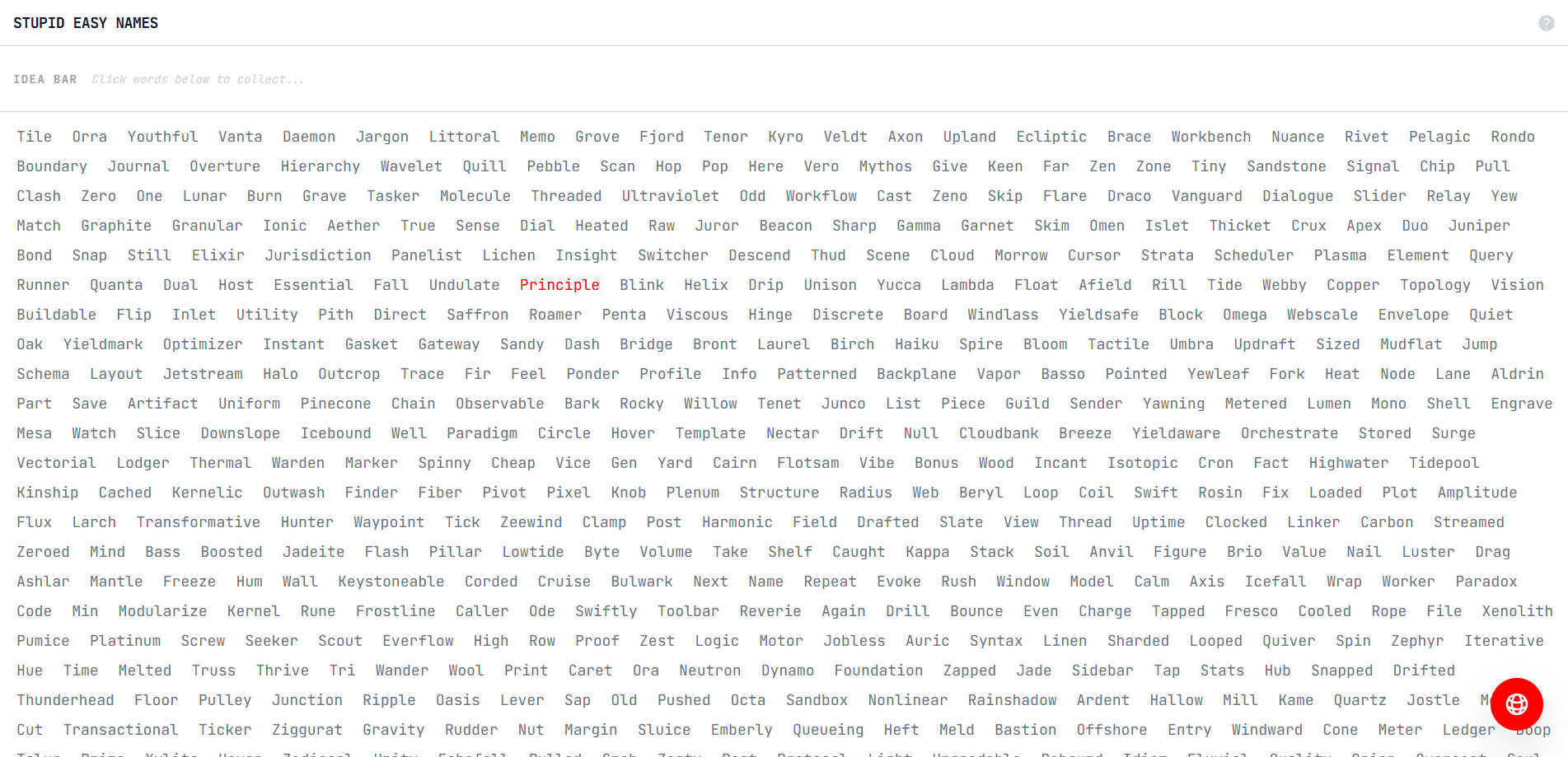
The core idea is a word wall. Instead of staring at an empty text box waiting for inspiration, you scan a grid of words and click the ones that click with you. Each click adds the word to your Idea Bar, a running list at the top of the screen. Double-click any saved word to rename it, so you can morph "bright" into "brightly" or "brightly.io" as your thinking shifts.
The main limit is scope: this is an early-stage idea tool, not a full brand studio. It won't generate logos, check trademark conflicts, or hand you a finished style guide. Think of it as the first ten minutes of naming, done well.
Getting Started
- Open the site in your browser. There's no signup and no account wall, so you can start clicking right away.
- Scan the word wall and click any words that fit your project. They stack up in the Idea Bar at the top.
- Double-click a saved word to edit it, or remove ones that no longer work. Build a short list of two or three combinations.
- Hit the red button to check whether the matching domain is free, which opens the registrar of your choice with the name pre-filled.
- Keep or export your final picks before you close the tab, since the list lives in your own browser storage.
Product Information
A quick look at Stupid Easy Names's pricing, supported platforms, and performance.
Best for
The users, tasks, and scenarios where this tool fits best.
Users
- Solo founders
- Indie makers and side-project builders
- Small teams in early brainstorming
Tasks
- Generating business name ideas
- Checking a domain before you fall in love with a name
- Shortlisting startup names
Scenarios
- Late-night naming sessions when you just need momentum
- Naming a new app, newsletter, or brand
- Parking an idea you're not ready to build
Key features
The word wall
The wall is the whole entry point. It shows a dense grid of words you can scan in seconds, and every one is a single click away from being saved. You browse instead of invent. That alone kills the empty-text-box freeze that stalls most naming sessions. If you've ever sat for twenty minutes trying to invent a name from nothing, clicking through a curated wall of words is a far faster way to find a starting point you can build on.
The Idea Bar
Every word you click lands in the Idea Bar, a horizontal list pinned near the top so it stays visible as you scroll. From there you can remove a word, double-click to edit it, or rearrange your thinking. It's a working canvas, not a permanent archive.
Instant domain checks across registrars
When you've got a name you like, the red button checks if the domain is free. Rather than one registrar, it routes your query to several, including GoDaddy, Namecheap, Porkbun, Hostinger, Vercel, Squarespace, and Cloudflare. You pick where to land and the search runs with your name already filled in.
Local, no-account storage
Your word list saves in your own browser storage, so you don't create an account or hand over an email to keep working. Close the tab and come back later, and your list is still there on the same device.
Built-in help and privacy notes
A help panel explains how the wall and Idea Bar work, and a separate privacy panel lays out what the tool stores and what it doesn't. Everything runs client-side, so there's no server holding your half-formed names.
Pros and cons
Pros
- Completely free, with no account, login, or paywall blocking the core flow.
- Combines word collection and domain checking, cutting out the usual tab-switching.
- Works in the browser on any device with no install step.
- Supports a range of popular registrars, so you're not locked into one.
- Saves your words locally, so you pick up where you left off.
Cons
- No trademark or availability check beyond the domain, so you'll still need to screen names for legal conflicts.
- Your saved list lives in browser storage, meaning it disappears if you clear site data or switch devices.
- It's a lightweight brainstorming aid, so teams expecting structured brand strategy or logo generation will need other tools.
Frequently asked questions
Yes, Stupid Easy Names is free. There's no paid tier, no account requirement, and no limit on the names you explore. The tool runs entirely in your browser.
Related content
Explore related tools, skills, and articles for Stupid Easy Names.
Stupid Easy Names Alternatives

Knocket
Knocket (Tencent RTC team) · Productivity · Business · ChatbotKnocket is a free live chat and contact page tool that lets visitors message you from your website, app, or a shareable link, with every reply handled from Telegram or one inbox.

shippedit.me
Krawlup · Marketing · Businessshippedit.me now redirects to Krawlup, a web platform that audits SEO, AEO and page speed every week, then hands the fixes to AI coding agents over MCP.

Ayven
Alknoma · Productivity · BusinessAyven is an AI control centre by Alknoma that turns a plain-language goal into a dated plan, hands the work to your people and AI agents, and asks for your approval only when the call is yours.