
SubTranslateAI.com
Flux AI Lab · Writing
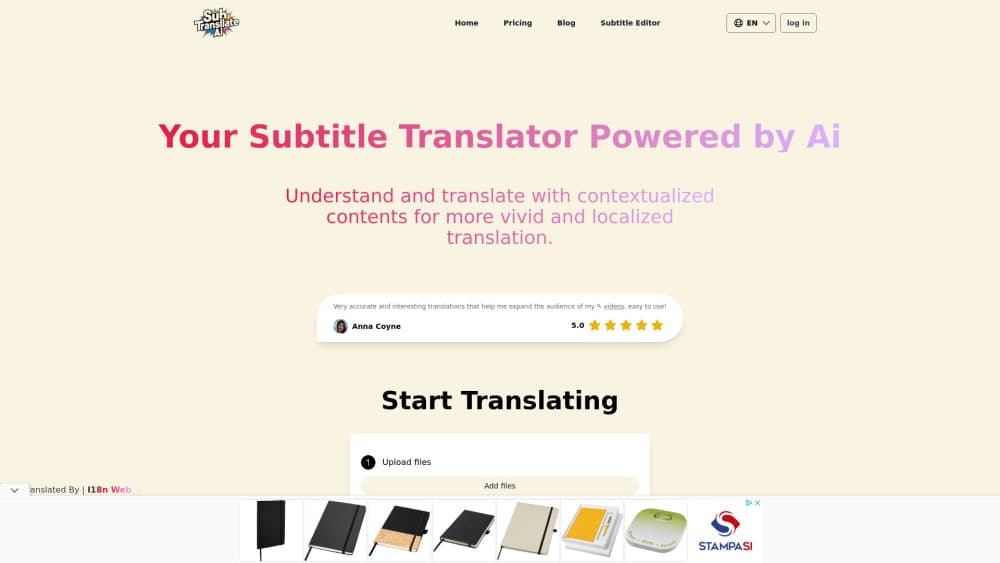
SubTranslateAI.com is a browser-based AI subtitle translator. It turns SRT, VTT and media files into more than 100 languages and keeps the original timecodes in place.
About SubTranslateAI.com
What Is SubTranslateAI.com
SubTranslateAI.com is a web tool from Flux AI Lab that handles subtitle translation and file conversion in one place. Drop in an SRT, VTT, STL or TXT file, or upload an audio or video clip, choose your target languages and download the finished subtitles. Nothing needs installing. The whole job runs in the browser, which matters if you translate SRT files from a laptop and a desktop in the same week.
The pitch here is context. Most SRT translator tools send each line to a translation engine on its own, which is why jokes land badly and pronouns drift halfway through a scene. SubTranslateAI reads consecutive lines together and holds the tone of the exchange. Paid tiers add glossary rules and style instructions, so a character name or a brand term stays the same from episode one to episode twenty.
The free plan is a demo, not a workflow. One file, one language and 90 subtitles, plus ads and a translation queue that makes you wait. Paid access runs on credits that reset monthly and expire when a subscription ends. The pricing page names the tiers and credit counts, but the dollar amounts only appear at checkout. There's no public API either, so automation stops at the web interface.
Getting Started
- Open subtranslateai.com and drop a subtitle file (SRT, VTT, STL or TXT) or a media file into the upload box.
- Choose one or more target languages from the list of 100+.
- Add glossary entries or a custom instruction if your plan supports it.
- Start the job and let the queue work through the file.
- Download the translated subtitles and check the timings in your player or editor.
Product Information
A quick look at SubTranslateAI.com's pricing, supported platforms, and performance.
Best for
The users, tasks, and scenarios where this tool fits best.
Users
- YouTube creators
- Anime and drama fansub teams
- Course and training teams
- Freelance localizers
Tasks
- Translating a finished SRT into Spanish and Portuguese
- Subtitling a video that has no subtitle file
- Keeping a series consistent
- Converting between formats
- Fixing a rough machine translation
Scenarios
- Launching a channel in a second language
- Preparing a course for an international intake
- Testing a new market
Key features
Translation Into More Than 100 Languages
The language list covers the usual European and Asian pairs plus smaller markets, and one upload can target several languages at once. On Starter that means five files and five languages per run, and Premium doubles both limits to ten. For a creator shipping the same video to three audiences, that removes two extra uploads and two extra waits.
Context-Aware Line Handling
The engine reads consecutive subtitle lines as a conversation rather than isolated strings. That changes how idioms, sarcasm and short answers come out, since the model can see what was said two lines earlier. It's the difference between a translation that reads like subtitles and one that reads like a dictionary lookup.
Timecodes and Line Breaks Preserved
Translated files keep the original timings, so nothing needs resyncing in a player or editor. Line breaks stay where they were, which keeps a two-line cue from spilling onto three lines and covering the picture. For anyone who has hand-fixed a drifting subtitle track, this is the feature that saves the evening.
Glossaries and Style Rules
You can store term pairs and a style instruction, then apply them to every job. Names, invented words, product names and forms of address are the obvious candidates. A sci-fi series with three made-up factions is the clearest case: without a glossary, each episode invents its own spelling.
Batch Jobs for Series and Channels
Starter allows five files and five languages per run, Premium and Platinum allow ten. A 12-episode season still takes two passes on the lower tiers, but it's minutes of setup instead of an afternoon of tab switching. This is where batch subtitle translation earns its keep for channel work.
Media Uploads and Subtitle Tools
Besides subtitle files, the uploader accepts MP3, WAV, MP4, MKV and AVI, with a 5GB cap for video and 2GB for audio. The service pulls the audio track out and works from that, so a video without subtitles is still usable. A separate subtitle converter and subtitle editor cover format changes and manual clean-up.
Pros and cons
Pros
- The free tier translates 90 subtitles in SRT, VTT or STL, which is enough to judge quality before paying.
- Timings and line breaks survive the translation, so files open correctly in VLC, Premiere or a web player.
- Glossary rules keep names and recurring terms stable across a whole season.
- Batch mode handles up to ten files and ten languages in one run on the higher tiers.
- Media uploads mean a raw MP4 can become translated subtitles without a separate transcription step.
Cons
- Plan prices aren't shown on the pricing page, so you can't compare cost per credit until checkout.
- Credits reset each month and unused ones expire, which hurts anyone with an irregular upload schedule.
- Translated files are stored for 15 days, so you have to download and archive them yourself.
- No public API and no documented integrations, which rules out automated pipelines for large catalogs.
Frequently asked questions
It's an online AI subtitle translator from Flux AI Lab. You upload a subtitle file or a video, pick target languages, and download translated subtitles with the original timings intact.
Related content
Explore related tools, skills, and articles for SubTranslateAI.com.
SubTranslateAI.com Alternatives

Google EmbeddingGemma 2
Google DeepMind · Writing · Image · CodingGoogle EmbeddingGemma 2 is a 740M-parameter open model that turns text, code, images, audio, and video frames into vectors in one 768-dimension space, running on phones and laptops.

MePersona
MePersona, Inc. · Writing · Productivity · MarketingMePersona is an AI unified inbox for creators. It learns your voice, drafts replies to fan messages from 12 platforms, and sends only what you approve.

Fluence
Yay Software (Yannick Huchard) · Writing · Voice & Language · ProductivityFluence is an Android app that reads PDFs, EPUBs, Word files and web articles aloud, follows each sentence as it speaks, and answers questions about the text on the phone itself.