

Subanana
Subanana · Voice & Language · Video
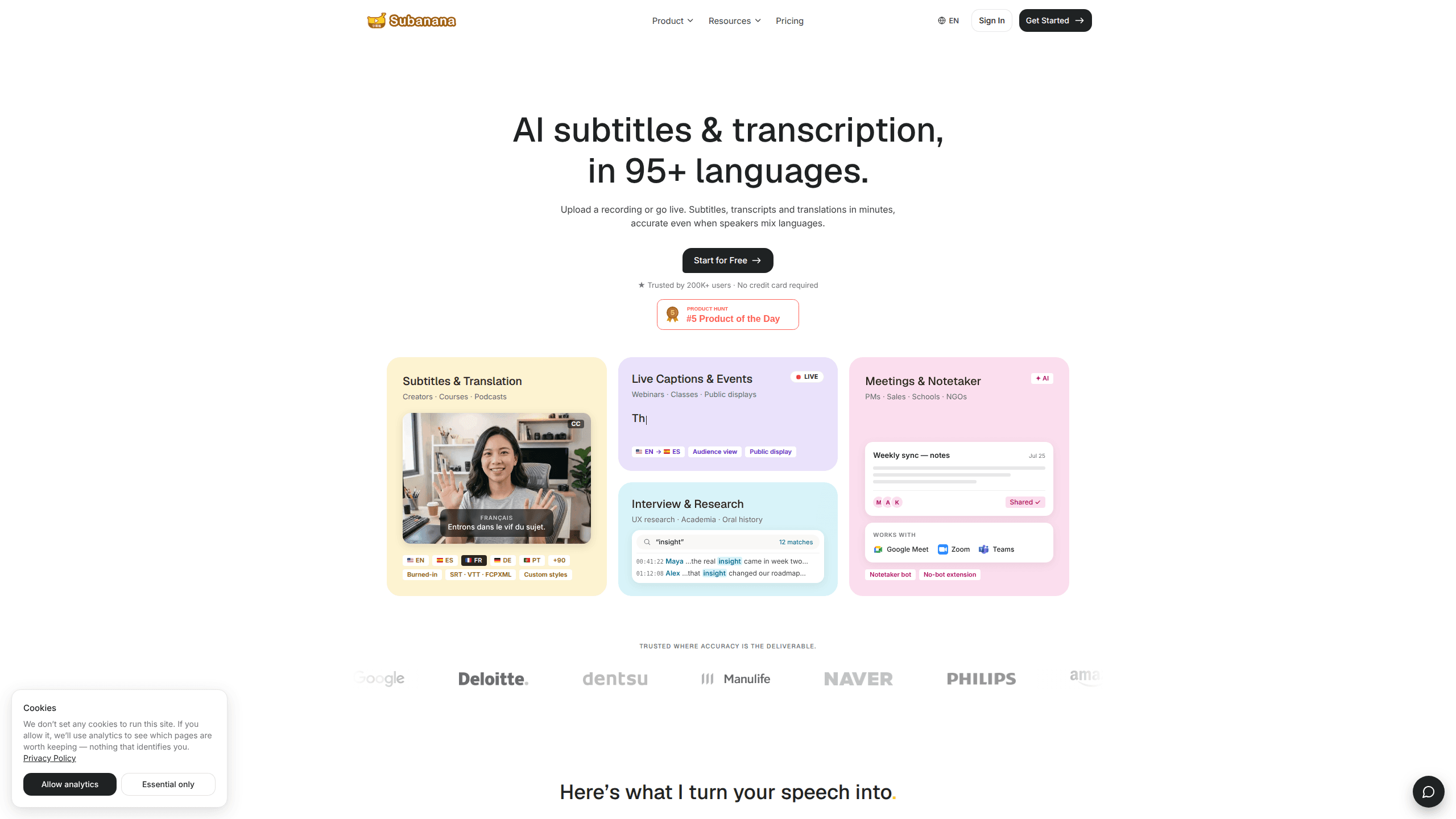
Subanana is an AI subtitling and transcription tool that turns recordings, live audio, and meetings into accurate subtitles, transcripts, and translations across 95+ languages. It handles the messy real-world cases most transcript tools trip on, like speakers switching languages mid-sentence, and it ships those results as polished deliverables rather than a rough draft you still have to clean up yourself. Creators, course teams, researchers, and sales teams use it to take one piece of audio and publish it in many languages. One transcription job. Many outputs.
About Subanana
What Is Subanana
Subanana is a browser-based AI subtitling and transcription platform. You upload a recording or go live, and it generates a transcript, a subtitle file, or a translation in minutes. The pitch is the last mile between raw speech and something you can actually publish: styled captions, burned-in video, and clean export files. Not a rough wall of text.
The tool targets spoken-content workflows rather than general dictation. That means courses that ship in six languages, podcasts with bilingual subtitle files, meetings that need notes, and interview archives that someone downstream has to conform to a house spec. Subanana's own site reports an average word accuracy of 98% across everything it transcribes, and even after you account for marketing polish, that number sets the bar the product is asking you to judge it against. It markets accuracy hardest on hard languages where other tools quietly fall apart. Accuracy is the selling point.
The main limits are volume and control. Free and paid plans cap your transcription time, storage, and context, and the full workspace, SSO, and custom AI models sit behind a custom-priced Team plan. If you need pixel-perfect brand styling or a formal SLA, you're in sales-conversation territory. No self-serve checkout for the big stuff. So what does that change for a solo creator? Not much. Enterprise buyers will want that sales call.
Getting Started
- Create a free account at subanana.com. No credit card is required to start.
- Pick your workflow: subtitles and translation, meetings and notetaker, live captions, or interview and research.
- Add your source material by uploading a file, pasting a link, recording your screen or voice, or importing an existing SRT or VTT file.
- Run the AI to get your transcript, subtitle file, or translation, then style the captions to match your channel or brand.
- Export the result as SRT, VTT, DOCX, XLSX, TXT, Markdown, or a video with subtitles burned in.
Product Information
A quick look at Subanana's pricing, supported platforms, and performance.
Best for
The users, tasks, and scenarios where this tool fits best.
Users
- Course and training teams
- Podcast and video creators
- Marketing and brand teams
- UX researchers and academics
Tasks
- Generating subtitles in 95+ languages
- Transcribing meetings
- Producing live captions
- Research analysis
Scenarios
- Publishing one video in multiple markets
- Running a bilingual or remote meeting
- Captioning a live class or webinar
- Archiving oral history or long-form interviews
Key features
Multilingual Subtitles and Translation
Subanana takes one video and produces subtitles you can translate into as many languages as you need. You style the captions the way your channel styles them, then export either the subtitle file or the video with subtitles burned in. The point is that shipping a second language doesn't mean doing the subtitling work a second time. It's transcription and translation in one pass, not two separate projects.
Speech Recognition That Handles Mixed Languages
The tool is built for what its team calls hard languages, where speakers often mix tongues inside a single conversation. Subanana says it holds an average word accuracy of 98% measured across everything it transcribes. For anyone who's scrubbed through a garbled auto-transcript, that claim is the whole reason to care.
Meetings and AI Notetaker
The meetings workflow works with Google Meet, Zoom, and Teams. It captures your call and turns it into notes, aimed at project managers, sales teams, schools, and NGOs who need a record of what was said. You get a transcript and notes without assigning someone to type the whole time.
Live Captions for Events
Captions appear on screen as people speak, so you can show them to an audience or on a public display. That covers webinars, classes, and any live setting. People follow along in real time. Nobody waits for a file.
Interview and Research Tools
The interview workflow is built around finding things across sessions. You can scan a transcript for repeated terms and see each hit with its timestamp, then tag passages by theme so a research team can group every mention of the same idea across different sessions. For UX research, academia, and oral history projects, that turns unstructured audio into something you can actually analyze.
Flexible Input and Export Options
You can upload a file, paste a link, record your screen or voice, or import an existing SRT or VTT. On the way out you get SRT, VTT, DOCX, XLSX, TXT, Markdown, custom spreadsheet columns, or a shareable link. There's also find and replace, a timeline with soundwaves, custom watermarks, and export history. Call it a subtitle generator with a full pipeline attached.
Workspace Roles and Team Controls
The Team plan adds a shared workspace, centralized billing, admin roles and permissions, team usage analytics, and optional SSO or SAML, plus corporate invoicing and a dedicated success manager for organizations that need tighter controls. That's the tier for teams that need shared workflows and stronger controls rather than a single creator's account.
Pros and cons
Pros
- Strong multilingual story: one upload feeds subtitles in 95+ languages, so the second language is cheap.
- Handles mixed-language speech, which is where a lot of transcript tools quietly fail.
- Multiple input methods, including screen recording and direct SRT/VTT import, fit existing workflows.
- Wide export range covers subtitle files, documents, spreadsheets, and burned-in video.
- Separate workflows for meetings, live captions, and research, so you're not forcing one mode onto every job.
Cons
- Pricing isn't transparent. The self-serve tiers don't publish numbers, and the Team plan is custom-priced, so budgeting means contacting sales.
- The most useful controls, like SSO, admin roles, and custom AI models, are locked behind the sales-gated Team plan.
- API availability isn't clear from the public site, which matters if you want to automate transcription inside your own product.
- Free and paid plans cap transcription time and storage, so heavy users will hit limits.
Frequently asked questions
It's an AI subtitle generator and transcription tool. You feed it audio or video, and it produces subtitles, transcripts, and translations in 95+ languages, plus exports like SRT, VTT, and burned-in video.
Related content
Explore related tools, skills, and articles for Subanana.
Subanana Alternatives

Foley
Hanamori Labs, LLC · Voice & Language · Productivity · AI AssistantFoley is a voice to-do list that turns a spoken sentence into a filed task, complete with project, date and time, then helps you plan the day around what is already there.

HireKey
HireKey · Voice & Language · Productivity · LeaningHireKey is an AI job search copilot built by a former tech recruiter. It checks role fit, tailors resumes, runs interview practice and tracks every application.

Fluence
Yay Software (Yannick Huchard) · Writing · Voice & Language · ProductivityFluence is an Android app that reads PDFs, EPUBs, Word files and web articles aloud, follows each sentence as it speaks, and answers questions about the text on the phone itself.