
Sumazon
Sumazon · Leaning
Sumazon is an AI study tool that turns your PDFs, lecture videos, and notes into summaries, flashcards, and practice exams so students can study faster.
About Sumazon
What Is Sumazon
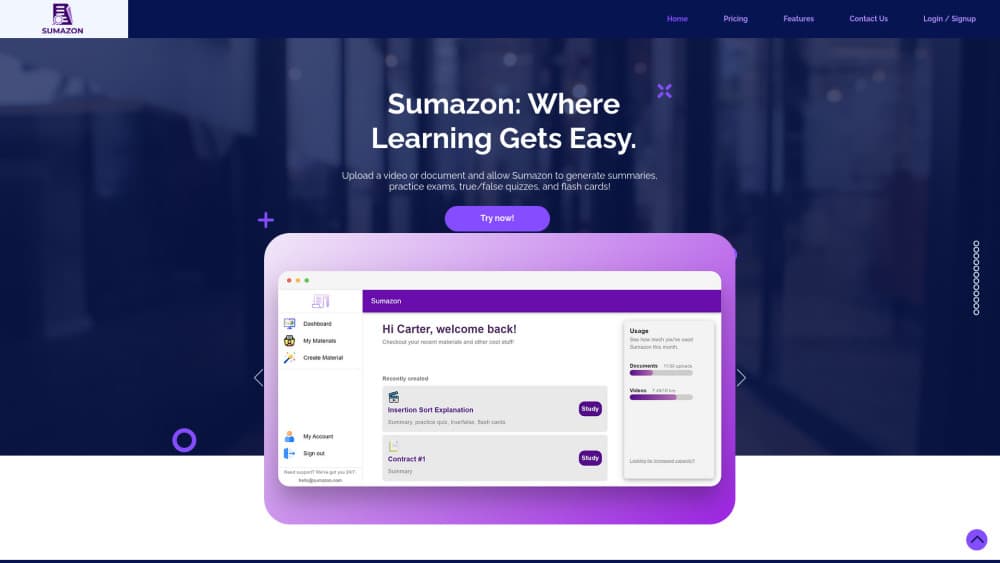
Sumazon is a web-based AI study assistant built for students. You upload a document, a lecture video link, or even a photo of handwritten notes, and it generates study material from that source: summaries, flashcards, true/false quizzes, and full practice exams. The pitch is simple. Instead of re-reading a 40-page chapter, you get the key points pulled out for you and a set of questions to test whether they stuck.
The tool sits in the same space as ChatGPT and Quizlet, but it's narrower on purpose, since it doesn't try to be a general chatbot that answers anything you type into it. Every feature points back to coursework. Picture a student studying for a biology midterm. They drop in a lecture PDF and walk out with a self-test a few minutes later.
The obvious limits matter here. Sumazon only works as well as the material you feed it, and it's a subscription product with no free tier beyond a 14-day trial. There's no Android or iOS app either, so everything runs in the browser. If your internet is unreliable, or you want offline flashcards on your phone, that's a real gap. The output is also starting material, not a finished answer. You still have to actually read and practice. Treat it as a way to cut prep time, not a way to skip learning.
Getting Started
- Sign up at app.sumazon.com with an email address and start the 14-day free trial.
- Upload your source material: a PDF, a Word file, a YouTube lecture link, or a photo of handwritten notes.
- Pick the study set you want. Flash cards, practice exams, summaries, and true/false quizzes are all options.
- Review the generated material, then practice with the questions until the material sticks.
- Upgrade to the Student or Academic plan if you want to keep going after the trial ends.
Product Information
A quick look at Sumazon's pricing, supported platforms, and performance.
Best for
The users, tasks, and scenarios where this tool fits best.
Users
- University students
- High school students preparing for exams
- Non-native English speakers
Tasks
- Turning a long chapter into a short summary
- Building flashcards from lecture slides
- Generating practice exams
- Summarizing recorded lectures
- Speech and interview practice
Scenarios
- The week before finals
- Reading assignments in a second language
- Last-minute review on a deadline
Key features
Document Summarization
Sumazon condenses long text into a short summary you can scan in a couple of minutes. It handles PDFs and Word files, which covers most assigned readings. The value shows up when a chapter runs 30 pages and you mainly need the argument, not every worked example buried in the middle of it. It's a first pass. Keep the original nearby when accuracy matters.
Video and Audio Summarization
You paste a YouTube lecture link, and Sumazon breaks it into key insights instead of a transcript dump. That's useful for recorded classes and long explainer videos where the useful part is buried in the middle. Catch up on a lecture you missed without rewatching the entire hour, which is a real time saver when a course posts new recordings every week and you've fallen two weeks behind.
AI-Generated Study Sets
The tool produces practice exams, true/false quizzes, summaries, and flash cards from a single upload. Several formats from one source is the real draw here. Your brain responds to each one differently. Mix a flashcard session one day with a practice test the next and the material tends to stick better than repeating the same format over and over.
Handwritten Notes Support
You can photograph handwritten notes and upload the image as source material. That covers the student who takes notes on paper and never types them up. Quality depends on legibility. Clean lighting and clear writing help.
Speech and Interview Practice
Sumazon includes a rehearsal mode for speeches and interviews. You practice your delivery and build confidence before the real thing. It's aimed at presentations and job interviews, not just coursework. That stretches the tool beyond pure study.
Study Dashboard and Cloud Sync
Your study sets sync across devices through your account, so you can start on a laptop and pick up on another machine. Progress tracking on the dashboard shows what you've covered. It's a browser-only setup, which means there's no phone app to sync your study sets to when you're away from a computer.
Pros and cons
Pros
- Turns the same source document into multiple study formats, so you don't make flashcards and a quiz separately.
- Handles PDFs, Word files, YouTube links, and photos of handwritten notes in one place.
- Video and audio summarization means recorded lectures aren't a dead end.
- Speech and interview practice adds a use case beyond standard coursework.
- Cloud sync across devices keeps your study sets available wherever you log in.
Cons
- No free tier. The 14-day trial is the only way to try it without paying, and it's short for evaluating a full semester.
- No mobile app. Everything runs in the browser, so there's no offline flashcard practice on your phone.
- Summaries can drop detail, which matters in subjects where the specifics are the whole point, like law or medicine.
- It's only as good as your source material, so a messy scan or a noisy recording produces weak study sets.
Frequently asked questions
Sumazon generates study material from content you upload. You feed it a document, lecture video, or notes, and it produces summaries, flashcards, quizzes, and practice exams to help you prepare for coursework and exams.
Related content
Explore related tools, skills, and articles for Sumazon.
Sumazon Alternatives

Kaggle AI
Google · Coding · LeaningKaggle AI is a community platform where people build, test, and compare machine learning models against shared data. It combines data science competitions, tens of thousands of public datasets, and free cloud notebooks with GPU and TPU access, so anyone with a browser can train a model without buying hardware. Google owns the platform, and joining costs nothing.

Bunch
Bunch AI · Leaning · BusinessBunch is an AI leadership coaching app that turns a few spare minutes a day into real management practice. It hands you one short, personalized tip each day, tracks how you respond, and lets you compare notes with peers inside private groups. The pitch is simple: you lead better by practicing a little, often, instead of sitting through a weekend seminar. Think of it as a leadership training app you actually open.

AI Mock Interview
SQLPad · Coding · LeaningAI Mock Interview is a practice tool built into SQLPad that simulates real job interviews and gives you instant feedback on both what you say and how you say it. You pick a role template or upload a job description, answer questions out loud in real time, and then review a transcript with notes on structure, clarity, and grammar. It's aimed at data professionals prepping for SQL, Python, data engineering, machine learning, and system design roles, and it works entirely in the browser. No install needed.