
Summarify
1811 Labs · Writing · AI Detection
Summarify is a browser-based AI summarizer that condenses pasted text, article and YouTube links, PDFs, and audio files into short summaries, with five free runs a month.
About Summarify
What Is Summarify
Summarify is a web app from 1811 Labs that does one job: take a long piece of content and give you the short version. You drop text, a link, a PDF, or a recording into a single box, and it returns a condensed summary in seconds. No install, no plugin, no account needed for the first run.
The appeal is the breadth of that one box. Most summarizers pick a lane, usually articles or PDFs. Summarify accepts six input types, including a YouTube URL and an audio file, so you do not need a second tool when the source changes. It also publishes a public library of ready-made YouTube summaries for channels like Huberman Lab, Lex Fridman, and TED, which you can read without spending a credit.
The catch sits in the limits. The free tier gives you five summaries a month, and each run is capped by file size: five pages for a PDF, ten minutes for a video or audio file. Paid plans raise both numbers, but the entry price is $69 a month, which is steep if you only paste the occasional article.
Getting Started
- Open summarify.me in a browser and choose an input type: pasted text, web URL, blog URL, YouTube URL, PDF upload, or audio upload.
- Paste the content or upload the file, then wait for the summary to generate.
- Sign in if you want the result saved to your history instead of disappearing when you close the tab.
- Upgrade to a paid plan when the monthly count or the length caps get in the way.
Product Information
A quick look at Summarify's pricing, supported platforms, and performance.
Best for
The users, tasks, and scenarios where this tool fits best.
Users
- Students working through readings
- Podcast and video watchers
- Busy professionals triaging links
Tasks
- Summarizing a long article
- Checking a video before watching
- Condensing a PDF report
- Turning a recording into notes
Scenarios
- Research before a purchase
- Class preparation
- Newsletter or content research
Key features
Six Input Types in One Box
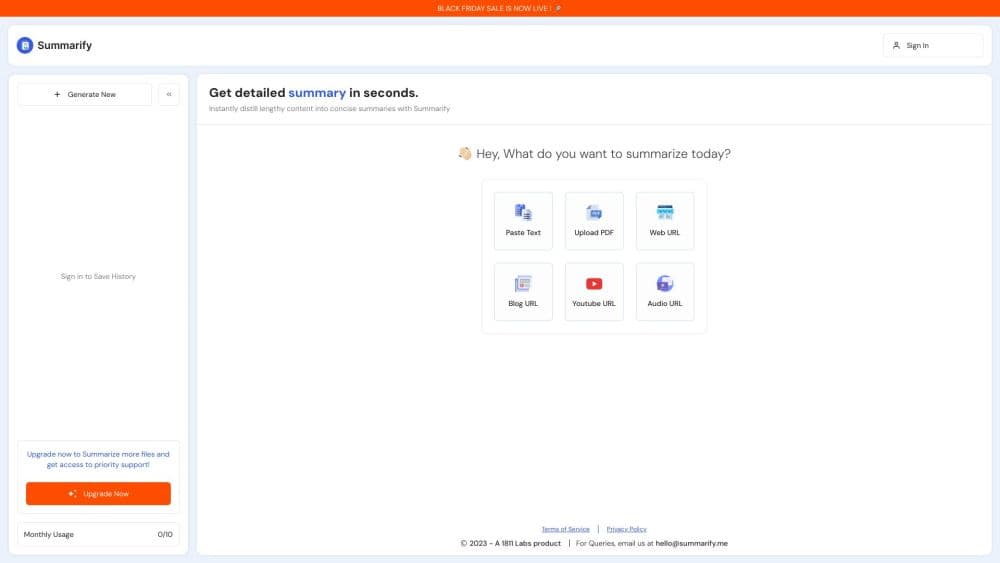
The home screen asks one question and offers six answers: paste text, web URL, blog URL, YouTube URL, upload PDF, upload audio. Type a chunk of text if you only need to summarize long text you already have. That single entry point is the main reason to pick this AI summarizer over a specialized one. You stop juggling tabs and tools when the source format changes mid-task.
Article and Blog Summaries From a Link
Paste a URL and Summarify fetches the page and returns the short version. As an article summarizer it handles both news pieces and long blog posts, which covers most of what people actually read online. You skip the scrolling and the newsletter pop-ups, and you get the argument in a few lines.
YouTube Video Summaries
A YouTube video summarizer is the feature most people come for. Drop in a video link and it condenses the transcript into readable points, which is faster than scrubbing a two-hour interview for one answer. The 10-minute cap on the free tier is the constraint to watch, since most podcasts run far longer.
PDF and Audio Uploads
Upload a PDF or an audio file and the same box handles it. The PDF summarizer reads documents up to the page cap of your plan, and the audio path covers recordings up to the minute cap. This is where the tool earns its place for students and meeting-heavy jobs. Long reports and full call recordings push you toward the higher plans.
Public YouTube Summary Library
Summarify publishes pre-made summaries of popular channels and episodes, from Huberman Lab and Lex Fridman to TED talks and commencement speeches. You can browse them at no cost, which makes the site useful as a reading surface even before you sign up. It also shows what the output looks like before you spend a credit.
Saved History Behind a Login
Signing in stores your past summaries so you can return to them later. Without an account, a summary exists only for that session, which is fine for a one-off check and annoying if you meant to keep it. History is the main practical reason to create a free account.
Pros and cons
Pros
- Six input types, including YouTube links and audio uploads, so one tool covers articles, documents, and recordings.
- The free tier needs no card and gives you five summaries a month to test the output quality.
- A public library of YouTube summaries lets you read popular podcast and talk recaps for free.
- Limits scale with price in a way that makes sense: 100 summaries and 30-minute videos on Basic, 1000 summaries and 120-minute videos on Pro.
- Annual billing takes 10% off every paid plan.
Cons
- Five free summaries a month with a 5-page PDF cap and a 10-minute video cap runs out fast for regular use.
- The entry paid plan costs $69 a month, which is hard to justify for occasional pasting.
- Nothing on the site describes an API or integrations, so you cannot automate summaries from your own tools.
- It runs in a browser only, with no mobile app, and long documents or recordings require an upgrade.
Frequently asked questions
Summarify takes long content and returns a short summary. You can feed it pasted text, a web or blog URL, a YouTube link, a PDF, or an audio file, and it produces a condensed version in seconds.
Related content
Explore related tools, skills, and articles for Summarify.
Summarify Alternatives

Google EmbeddingGemma 2
Google DeepMind · Writing · Image · CodingGoogle EmbeddingGemma 2 is a 740M-parameter open model that turns text, code, images, audio, and video frames into vectors in one 768-dimension space, running on phones and laptops.

MePersona
MePersona, Inc. · Writing · Productivity · MarketingMePersona is an AI unified inbox for creators. It learns your voice, drafts replies to fan messages from 12 platforms, and sends only what you approve.

Fluence
Yay Software (Yannick Huchard) · Writing · Voice & Language · ProductivityFluence is an Android app that reads PDFs, EPUBs, Word files and web articles aloud, follows each sentence as it speaks, and answers questions about the text on the phone itself.