

Suno AI Download
Suno, Inc. · Voice & Language
Suno AI is an AI music generator that turns a text prompt into a full song with vocals, lyrics, and production, and it runs in the browser and on iOS and Android.
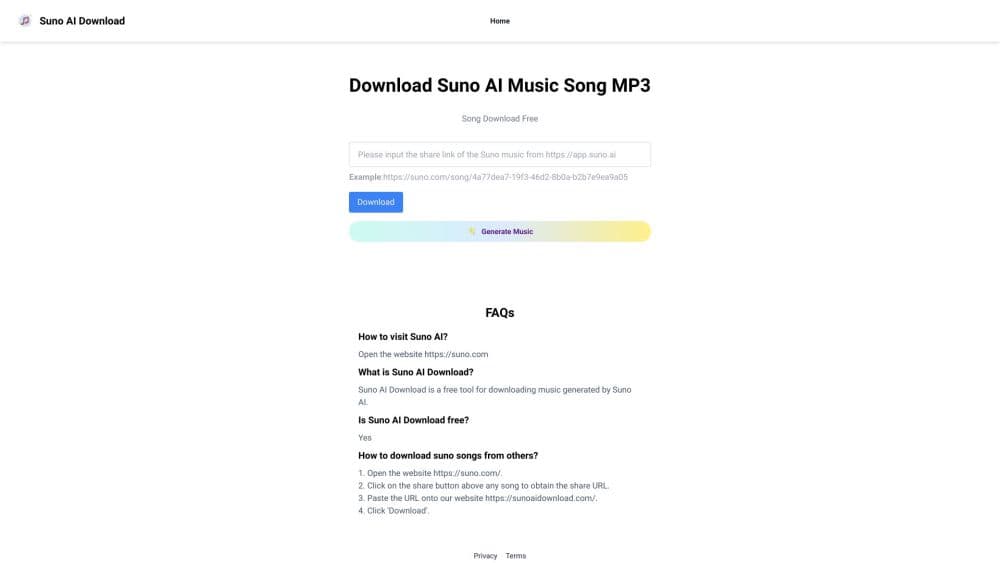
About Suno AI Download
What Is Suno AI
Suno AI is a text-to-music tool from Suno, Inc. that builds complete songs from a written description. You type a genre, a mood, or a few lyrics, and it returns a track with sung vocals, instrumentation, and a finished mix. The product sits on the web at suno.com and on iOS and Android, so the same account works across devices.
What separates Suno from a simple loop generator is the range on top of the core song tool. Suno Studio is a browser-based audio workstation where you arrange, edit, and mix parts of a track. Voices lets you record a few seconds of your own voice and hear it sing what you write. Stem separation pulls a song apart into vocal and instrument tracks for use in another DAW, and Custom Models train on your own recordings so each new song starts from your sound.
The catch is the plan structure. The free tier caps you at 50 credits a day, which is roughly 10 songs, and it gives no commercial rights and no downloads of full songs. Commercial use and the better models sit behind the paid Pro and Premier plans. Suno also carries the copyright baggage of AI music: the models once trained on large collections of licensed catalog material, and the company has been working through lawsuits from major labels. That legal background matters if you plan to release what you make.
Getting Started
- Sign up at suno.com with an email or a linked account, then open the Create screen.
- Describe the song you want in plain language, or switch on Custom Mode to write your own lyrics and set the style.
- Pick a model and, if you like, an instrumental-only or vocal setting, then hit Create.
- Listen to the two versions Suno returns, then regenerate, extend, or edit until the track fits.
- Download the finished song on a paid plan, or share it straight from the app.
Product Information
A quick look at Suno AI Download's pricing, supported platforms, and performance.
Best for
The users, tasks, and scenarios where this tool fits best.
Users
- First-time songwriters
- Content creators
- Working musicians and producers
Tasks
- Turning a lyric or idea into a demo
- Making background music for a project
- Recreating a voice or sound
- Shaping a song in a DAW
Scenarios
- A weekend hobby project
- Producing a client track
- Scoring a short video
Key features
Text to Music Generation
The core tool turns a written prompt into a complete song with vocals, lyrics, and production, usually in under a minute. You can describe a genre, a mood, a theme, or hand it your own lyrics. Suno returns two versions at once, so you compare takes instead of staring at one result.
Suno Studio
Suno Studio is a browser-based audio workstation for arranging, editing, and mixing inside the same app you generate in. On the Premier plan it adds MIDI, effects, automation, and design-your-own plugins. For producers, this closes the gap between a rough AI take and a track you can finish without exporting first.
Voices and Custom Models
Voices records a few seconds of your own voice, then sings anything you write in that tone. Custom Models train on your own recordings so each new song starts from your sound rather than a default. Both push output toward something that sounds like you instead of a generic AI voice.
Stem Separation
Stem separation splits a song into clean parts, like vocals and instruments, so you can remix or complete a track in another DAW. The Pro plan includes two separation types, and Premier adds a more detailed advanced split. It is the feature that turns a finished AI song into editable material.
Editing and Remix Tools
Remix lets you extend a song, change its style, rewrite lyrics, or rebuild it around a recording you bring in. Advanced editing replaces or adds a section, and you can adjust speed and crop or fade. These controls matter when a generated take is close but not quite right.
Model Versions and Creation Controls
Suno ships several models, from the free v6-mini up to v6 and v6-wild on paid plans, each trading speed and credit cost against quality. You steer the result with style prompts, exclusions, vocal gender, and weirdness and style sliders. Higher tiers also unlock audio uploads of up to 30 minutes for building on your own material.
Pros and cons
Pros
- It produces a full song with vocals and lyrics from one prompt, which is far beyond what loop-based music tools deliver.
- The free plan covers around 10 songs a day, so you can test the quality before paying.
- Suno Studio, stem separation, and Voices turn it into a real production tool, not just a toy.
- Paid plans grant commercial rights and downloads, which makes the output usable in client and content work.
Cons
- The free plan gives no commercial rights and no full song downloads, so anything you plan to publish needs a paid plan.
- There is no official public API, which blocks developers who want to build Suno generation into their own apps.
- The AI music copyright picture is still unsettled, so releasing tracks commercially carries legal risk you should weigh.
- The best models and the deepest editing tools sit on the pricier plans, so the full feature set isn't cheap.
Frequently asked questions
Suno AI is an AI music generator that turns a text prompt into a complete song with vocals, lyrics, and production. A Suno AI download runs on the web and on iOS and Android, and people use it to sketch song ideas, generate songs with AI for videos and podcasts, and produce full tracks without instruments or a studio.
Related content
Explore related tools, skills, and articles for Suno AI Download.
Suno AI Download Alternatives

Foley
Hanamori Labs, LLC · Voice & Language · Productivity · AI AssistantFoley is a voice to-do list that turns a spoken sentence into a filed task, complete with project, date and time, then helps you plan the day around what is already there.

HireKey
HireKey · Voice & Language · Productivity · LeaningHireKey is an AI job search copilot built by a former tech recruiter. It checks role fit, tailors resumes, runs interview practice and tracks every application.

Fluence
Yay Software (Yannick Huchard) · Writing · Voice & Language · ProductivityFluence is an Android app that reads PDFs, EPUBs, Word files and web articles aloud, follows each sentence as it speaks, and answers questions about the text on the phone itself.