

Suno AI Music
Suno, Inc. · Voice & Language
Suno AI Music turns a text prompt into a complete song with vocals, lyrics and production, then lets you split stems and edit in a browser DAW. Free daily credits cover about 10 tracks.
About Suno AI Music
What Is Suno AI Music
Suno AI Music is an AI music generator and text to song studio for the web and mobile. You type a description, add lyrics if you have them, and the model returns two full takes with vocals, drums, bass and arrangement already mixed. The company's v6 model, introduced in September 2026, is the one it currently ships as its most capable.
The product covers the whole loop: write, generate, extend a section, swap a vocal, pull stems into another DAW, and publish to a public library where other users listen and remix. It's aimed at people who hear a melody in their head but don't play an instrument, and at working creators who need a track for a video before lunch.
The limits matter as much as the features. Credits reset each month and don't roll over, downloads on the free plan are switched off, and commercial rights only come with a paid subscription. Anyone planning to use tracks in monetized content should price the subscription as a production cost, not a novelty.
Getting Started
- Sign up at suno.com with Google, Microsoft, Apple or an email address. The free plan starts with 50 credits a day, enough for roughly 10 songs.
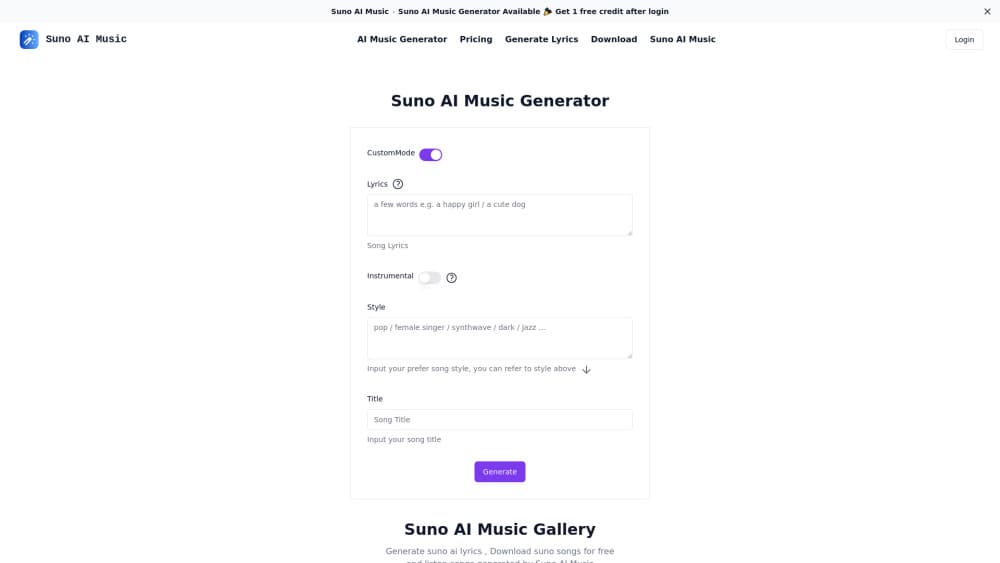
- Pick Simple mode for a one-line idea, or Custom mode to paste lyrics and set style, vocal gender and title yourself.
- Press Create and wait a minute or two. Two variations come back, and you keep the one that works.
- Use Extend to add an intro or a third verse, then download the audio or send the stems to your own DAW.
Product Information
A quick look at Suno AI Music's pricing, supported platforms, and performance.
Best for
The users, tasks, and scenarios where this tool fits best.
Users
- Songwriters without an instrument
- Video and podcast editors
- Hobbyists and gift makers
Tasks
- Drafting a full demo
- Building background music
- Remixing an existing idea
- Writing to a brief
Scenarios
- A weekly upload schedule
- Late-stage edits before delivery
- Learning arrangement by ear
Key features
Prompt to Full Song
Describe a scene, a feeling or a genre and the model writes lyrics, melody and arrangement in one pass. Custom mode gives you separate fields for lyrics, style and title, so you can keep your own words and let Suno handle everything else. Each run returns two takes, which is useful because the first one often misses.
Suno Studio
Suno Studio is a browser-based DAW built around generated audio. It handles arranging, MIDI, effects, automation and design-your-own plugins, so a track can be finished without exporting to Ableton or Logic. Studio access sits on the Premier plan, and it's the main reason heavy users pick that tier over Pro.
Voices
Record a few seconds of your own voice and the model sings anything you write in that timbre. A verification step asks you to read a random phrase so a cloned voice can't be created from someone else's clip. This is the feature that moves output from "a generated song" to "my song" for singers who don't like their own takes.
Custom AI Models
Paid users can train a custom AI model on their own recordings, so new tracks start from their sound rather than a generic average. It suits producers with a catalog who want consistent texture across a project. The tradeoff is time spent training and a narrower range when you want to go somewhere unfamiliar.
Stem Separation and Remix
Stem separation pulls a finished track into time-aligned parts: vocals, drums, bass and more, depending on your plan. Those stems drop into any DAW for a real mix. Remix goes the other way, letting you change the style of an existing song, rewrite its lyrics or rebuild it around a new recording.
Granular Style Controls
Style and weirdness sliders, exclusions, vocal gender and inspo references give you steering beyond a single sentence. Small moves change a lot, so the practical approach is to lock the lyrics and nudge one control at a time. It's the difference between a random result and a repeatable one.
Pros and cons
Pros
- Full songs with vocals in a couple of minutes, which is fast enough to iterate on an idea during a single sitting.
- Commercial rights on Pro and Premier, so tracks can go into monetized videos without a separate license.
- Stem separation and Studio cover mixing and editing, cutting the need for a second tool.
- Voices and custom models make output sound like a specific artist's work rather than generic AI.
- Mobile apps mirror the web flow, so a draft can start on a phone and finish on a laptop.
Cons
- Credits reset monthly and don't roll over, so a busy month can leave you buying top-ups.
- The free plan no longer allows downloads, which means you can't keep a track without a subscription.
- A usable song often takes five to ten attempts, and each attempt spends credits.
- Studio, extra stem types and longer uploads are locked to Premier, so the $30 plan is the real working tier.
Frequently asked questions
Yes, with strings attached. The free plan gives 50 credits a day, about ten songs, and access to the v6-mini model. Downloads and commercial rights require a paid plan, so free output is for listening and sharing inside Suno, not for publishing elsewhere.
Related content
Explore related tools, skills, and articles for Suno AI Music.
Suno AI Music Alternatives

Off the Record
Weird Machines · Voice & Language · ProductivityOff the Record is a macOS app from Weird Machines that reshapes your voice in real time to block AI transcription, so people hear you normally and notetakers get nothing usable.
Cekura Bench
Cekura · Voice & Language · BusinessCekura Bench is a public benchmark that runs speech-to-speech models and deployed voice agents through 82 simulated phone calls, three times each, then publishes pass rates, latency and cost.
Griffin by Tavus
Tavus · Voice & Language · Video · ChatbotGriffin by Tavus is the first Human Interaction Model: a full-duplex, video-to-video system that watches, listens, and answers during a live video call in real time.