
SunoCC
SunoCC · Voice & Language
SunoCC is a browser-based Suno AI music generator that turns a text prompt or custom lyrics into a sung MP3 track. A free trial plus two monthly plans run $9.9 to $29.9.
About SunoCC
What Is SunoCC
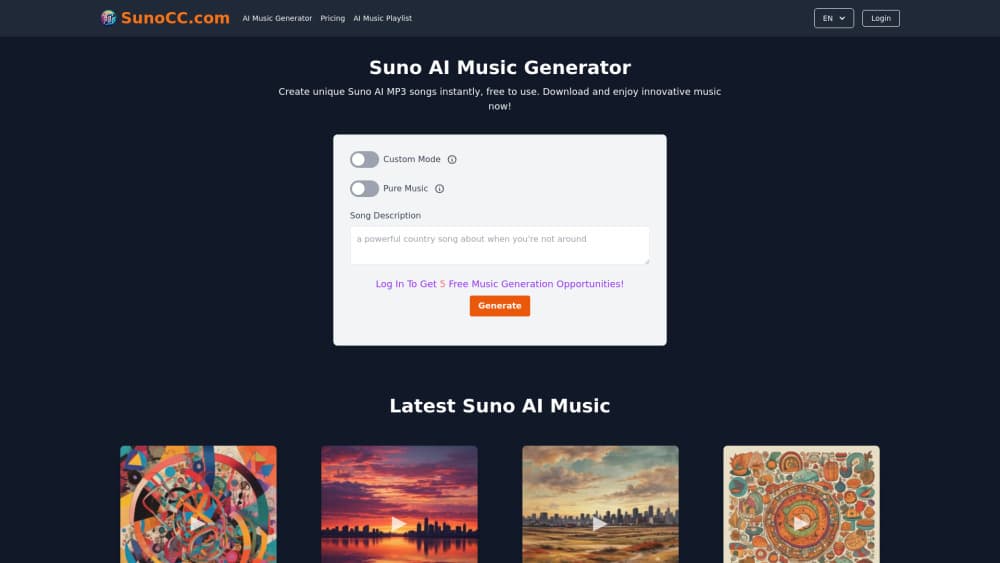
SunoCC is a web app that generates songs from a description. You type a title, a style, a mood, and optionally your own lyrics, then pick a Suno model and press Generate. A few minutes later you get an MP3 you can play, download, or share through the site's public music list. The site covers the whole text to song loop without asking you to install anything.
The service is a third-party front end, and it says so in its own footer: SunoCC is not the official Suno AI website. It runs Suno's v4, v4.5, and v5 models behind its own credit system, so the music comes from the same family of models while the account, billing, and interface belong to SunoCC. That difference matters if you need official support or exact Suno plan features. Here you buy generation counts, not download tiers.
The practical limits follow from that. v4.5 and v5 stay locked behind paid plans, so the free trial only reaches v4. Songs you make with AI voice generation come back as finished mixes with no stem separation and no editing timeline. If you need to fix one drum fill, this isn't the place.
Getting Started
- Open sunocc.com and sign in with a Google account. That unlocks the trial credits listed on the homepage.
- Type a song title, then fill in the Style of Music fields: genre, mood, voice, and tempo. Use Show More if you want tighter control.
- Add lyrics in the Lyrics box, or switch on Pure Music for an instrumental track with no vocals.
- Choose a model: v4 on the free trial, v4.5 or v5 on a paid plan.
- Press Generate and wait a few minutes. Download the MP3, or leave it in your library for the site's playlist.
Product Information
A quick look at SunoCC's pricing, supported platforms, and performance.
Best for
The users, tasks, and scenarios where this tool fits best.
Users
- People who want songs without a Suno subscription
- Hobbyists testing AI music for the first time
- Video and podcast creators who need custom tracks
Tasks
- Turning written lyrics into a sung track
- Making short background music
- Generating song ideas fast
- Building a small music library for a channel
Scenarios
- A creator needs a themed jingle by tomorrow
- A student wants a gift song for a friend
- Someone is curious whether AI voice generation sounds usable
Key features
Prompt to MP3 in One Pass
The generator takes a plain description and returns a finished MP3 with vocals, backing instruments, and a mixed level, all from one pass of the AI voice generator. You don't build a loop or a sample pack. You get a track you can play straight from the results page, which makes the tool fast for sketches and throwaway ideas.
Custom Mode
Custom Mode opens the controls that the quick prompt hides. You set the song title, the style of music, the genre tags, the mood, the voice type, and the tempo from dropdown lists. Lyrics go in their own box, with a 3,000 character limit on v4 and 5,000 on v4.5 and v5.
Pure Music Mode
Switch on Pure Music and the generator skips vocals entirely, returning an instrumental track. This is the setting to use for background music under a voiceover, a game stream, or a podcast intro, where a singing voice would compete with the main audio.
Three Model Options
SunoCC exposes three Suno models and treats them differently. v4 comes with every plan and allows up to 4 minutes per song. v4.5 and v5 sit behind paid plans and stretch to 8 minutes, with the site describing v5 as its closest to studio-level sound quality. The style box also grows from 200 characters to 1,000 on the paid models, which matters when you want a detailed prompt.
Credit Based Pricing
The Basic plan includes 320 songs and 160 generations a month for $9.9, the popular plan doubles that to 1,600 songs and 800 generations for $29.9, and the free trial starts with 4 songs and 2 generations. Generation counts are shared across models, so a v5 run costs the same as a v4 run.
Public Music Playlist
Every account feeds into a public music list that anyone can browse without signing in. New tracks and popular tracks sit in separate feeds with the creator's name attached. It works as a gallery, and it's also the quickest way to hear what other users get out of the AI song generator before you commit credits.
Pros and cons
Pros
- You can start with a Google login and no card, and the trial includes 2 generations.
- Three Suno models in one place means you can compare v4, v4.5, and v5 output without separate accounts.
- Paid plans sell generation counts rather than downloads, so the basic SunoCC pricing fits one-off projects.
- Pure Music mode produces instrumentals for video and podcast beds without extra steps.
- The public playlist gives you real output samples from other users before you spend anything.
Cons
- Stem separation and section-level editing are missing, so fixing one part means regenerating the whole song.
- The free trial caps at v4 and 4 songs, which shows the weakest model and hides what v4.5 and v5 can do.
- No public API or developer docs, so you can't wire the generator into your own app or a batch pipeline.
- It's an unofficial site, so account support and policies come from SunoCC rather than from Suno, and refunds need a request within 10 days.
- The 4-minute ceiling on v4 rules out long-form tracks unless you pay.
Frequently asked questions
SunoCC is an unofficial web app that runs Suno's music models for people who don't want a Suno subscription. You describe a song, choose a model, and download the resulting MP3. The site states in its footer that it isn't the official Suno AI website.
Related content
Explore related tools, skills, and articles for SunoCC.
SunoCC Alternatives

Foley
Hanamori Labs, LLC · Voice & Language · Productivity · AI AssistantFoley is a voice to-do list that turns a spoken sentence into a filed task, complete with project, date and time, then helps you plan the day around what is already there.

HireKey
HireKey · Voice & Language · Productivity · LeaningHireKey is an AI job search copilot built by a former tech recruiter. It checks role fit, tailors resumes, runs interview practice and tracks every application.

Fluence
Yay Software (Yannick Huchard) · Writing · Voice & Language · ProductivityFluence is an Android app that reads PDFs, EPUBs, Word files and web articles aloud, follows each sentence as it speaks, and answers questions about the text on the phone itself.