
Suno Download
Suno, Inc. · Voice & Language
Suno Download covers getting your songs off the platform: this AI song generator writes a full track from a text prompt, and paid plans unlock watermark free MP3 and WAV files plus stem exports.
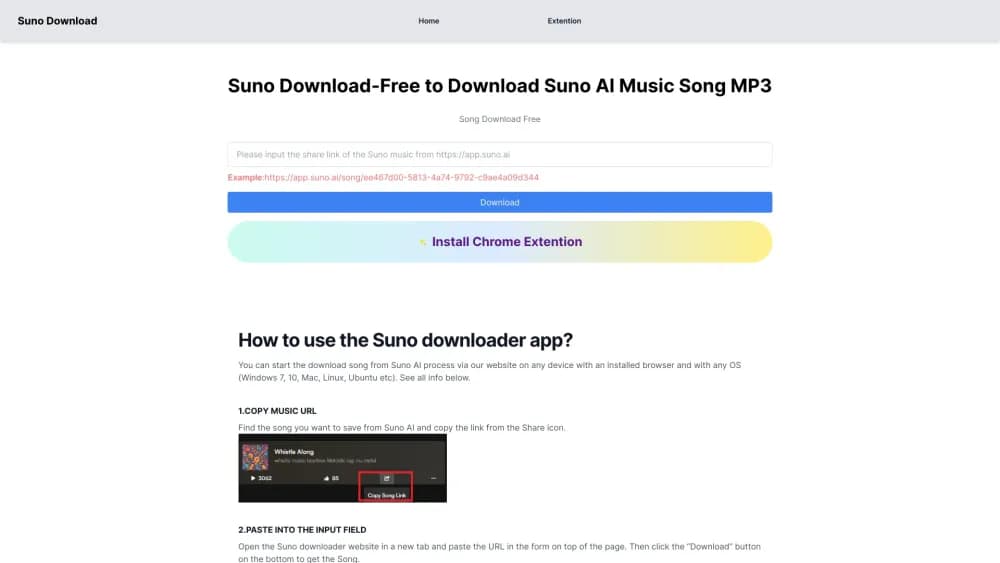
About Suno Download
What Is Suno
Suno is an AI song generator from Suno, Inc., a Boston company founded in 2022 by musicians and machine learning engineers. You type a description or paste lyrics, and the service returns a finished song: vocals, instruments, arrangement, mix. The first version arrived in late 2022, and the model has been rebuilt several times since, with v6 as the current generation at the time of writing.
The product matters most to people who have an idea and no studio. A student who wants a track for a video project, a songwriter testing a hook before recording it properly, a small business that needs background music it can legally publish. None of them need a DAW, a session player or a mixing engineer to hear the result.
Every account creates songs, but download rights are what separate the plans. Free accounts can stream what they make and share a link, yet they can't save the audio file and can't use it commercially. Pro and Premier add downloads, commercial rights and the editing tools that make a generated demo usable in real work.
Getting Started
- Open suno.com in a browser, or install the Suno app on iPhone or Android, and sign up with an email address, a Google account or Discord. The Suno free plan needs no card.
- Type what you want in the creation box: a genre, a mood, a topic, or your own lyrics. Switch on Instrumental if the track should have no singing.
- Press Create and wait. A song usually lands in under a minute, and the free queue takes longer than the paid one.
- Play both variations and keep the one you like. Extend it, remix it, or swap out a section you don't want.
- Subscribe when you need the file itself. Suno Pro and Suno Premier unlock the download button, and the file then appears in your library.
Product Information
A quick look at Suno Download's pricing, supported platforms, and performance.
Best for
The users, tasks, and scenarios where this tool fits best.
Users
- Content creators making music for videos, podcasts and ads
- Songwriters who want a rough demo before a studio session
- Hobbyists curious about making music with no training
- Small teams that can't afford a production budget
Tasks
- Turning a written brief into a downloadable track
- Building a reusable voice or sound
- Pulling a mix into your own DAW
- Releasing music commercially
- Rescoring or rewriting an existing track
Scenarios
- A weekly upload schedule that needs fresh background music
- A student film or a game jam with a fixed deadline
- A brand video that needs a licensed track
- Experimenting with a genre you've never written in
Key features
Text to Full Song Generation
Type a genre, a mood or a story, and Suno returns a complete track with singing, lyrics and production rather than a short loop. A single prompt can carry a whole song, and the result arrives in well under a minute on a paid queue. Both variations are generated at once, so you hear two directions from one prompt and keep the better one.
Download and File Formats
Paid subscribers can save songs as MP3 or WAV, and stems come out as separate files for each part of the mix. Free accounts stream and share but have no download button and no commercial rights, which is the single biggest difference between the plans. Pro includes 20 song downloads a month, Premier includes 60, and extra downloads can be bought on both paid plans.
Suno Studio
Premier unlocks Suno Studio, a browser based workstation for arranging, editing and mixing a song after it's generated. It ships with MIDI, effects, automation and a plugin designer, so parts can be moved, cut and processed the way you would in a desktop DAW. Studio exports aren't counted against the monthly download allowance, which makes it the practical choice for anyone finishing tracks here rather than elsewhere.
Voices and Custom Models
Record a few seconds of your own voice and Suno can make it sing lyrics you write, in whatever style you choose. Paid plans also accept audio uploads of up to 30 minutes, and that material can train a custom model so new songs start from your own sound instead of a generic preset.
Stem Separation
Suno splits a generated song into clean, time aligned stems across three types on Premier: automatic, split from mix, and advanced split. Those files drop straight into Ableton, Logic or Reaper for a real mix. Pro gets two of the three types, which is enough for most vocal and backing track work.
Remix, Extend and Section Editing
Remix takes a finished song somewhere new by changing its style, rewriting the lyrics or rebuilding it around your own recording. You can also extend a track past its first version, replace a weak section, or add new vocals and instrumentals to an existing song on Premier. Co-write mode lets you shape lyrics with the model instead of writing them alone.
Pros and cons
Pros
- Full songs, not loops. This Suno AI music generator brings vocals, lyrics and arrangement together from one prompt, which saves the hours a demo normally takes.
- The free plan is genuinely usable, with 50 credits daily, roughly ten songs, and no card required to try the workflow.
- Commercial rights come with Suno Pro at $8 a month, cheaper than most stock music subscriptions for the volume you get.
- Stem separation and MIDI export mean finished tracks can move into a real DAW instead of staying trapped in the browser.
- A public library and inspiration tools make it easy to hear what a genre sounds like before spending credits.
Cons
- Free accounts can't download at all. You can listen and share, but the audio file stays on Suno's servers until you pay.
- Good results take iteration. A usable song often means generating several versions and discarding most of them, which burns credits faster than the plan suggests.
- Voice cloning and custom models raise consent and rights questions. Artists and labels have pushed back hard, and the legal position on training data is still settling.
- Credits reset monthly and don't roll over. Unused allowance is lost, so a burst of work late in the month costs extra.
Frequently asked questions
No. Free accounts can stream a song and share a link, but the download button belongs to paid plans. Pro includes 20 song downloads a month, Premier includes 60, and both can buy extra downloads when the allowance runs out.
Related content
Explore related tools, skills, and articles for Suno Download.
Suno Download Alternatives

Off the Record
Weird Machines · Voice & Language · ProductivityOff the Record is a macOS app from Weird Machines that reshapes your voice in real time to block AI transcription, so people hear you normally and notetakers get nothing usable.
Cekura Bench
Cekura · Voice & Language · BusinessCekura Bench is a public benchmark that runs speech-to-speech models and deployed voice agents through 82 simulated phone calls, three times each, then publishes pass rates, latency and cost.
Griffin by Tavus
Tavus · Voice & Language · Video · ChatbotGriffin by Tavus is the first Human Interaction Model: a full-duplex, video-to-video system that watches, listens, and answers during a live video call in real time.